19
MR6DE User Manual
Getting Started
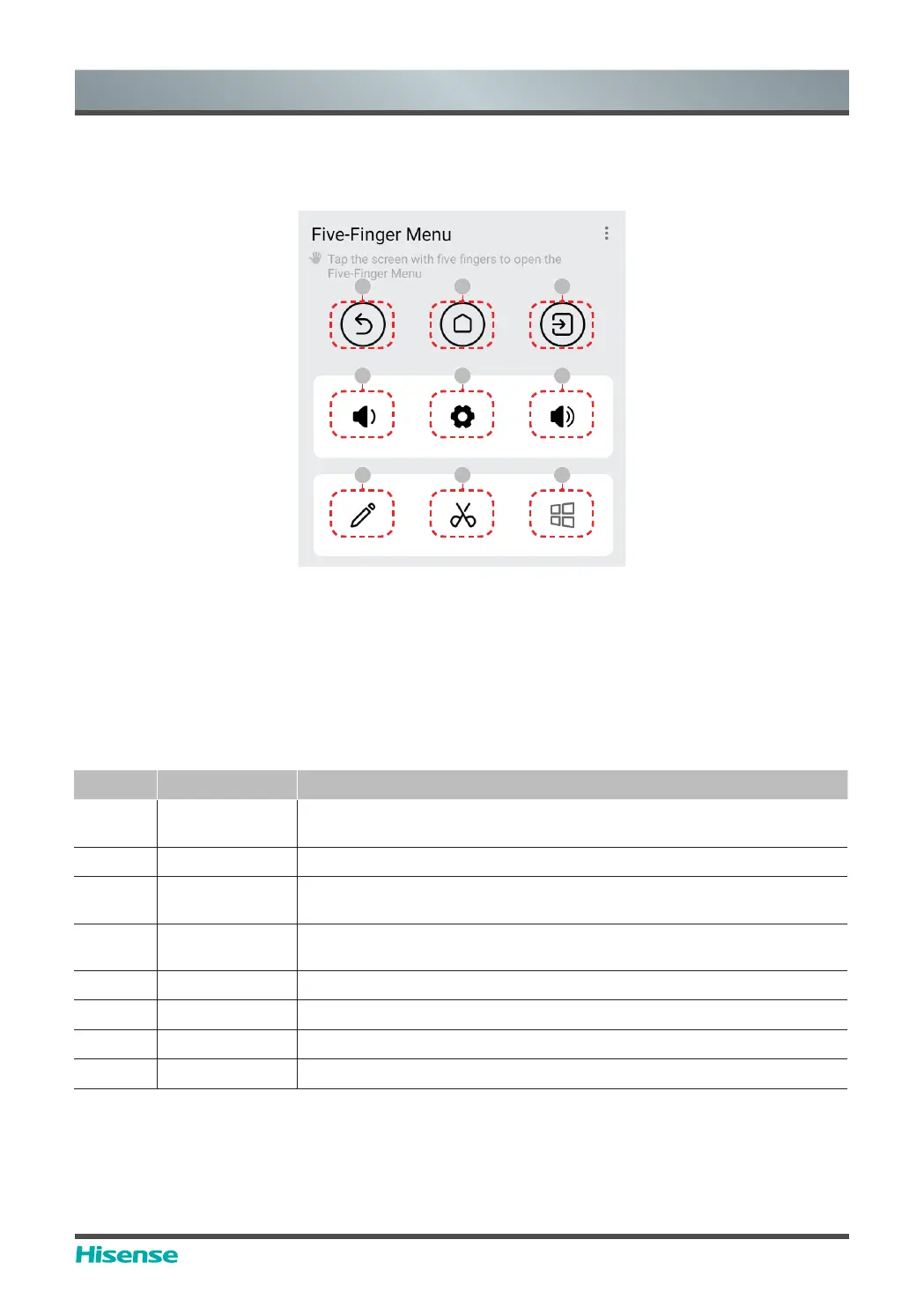
5.2 Five-finger menu
Invoking method
Put five fingers on the screen, touch the screen and then raise all fingers (five-point touch control)
to invoke the touch control menu.
Menu introduction
Number Function Description
1 Back
Click it to return the last interface (Apps not tested by us may not
respond to this button)
2 Homepage Click it to return to the homepage
3 Signal source
Click it to invoke signal source switch menu and switch the signal
source according to the prompt
4
Volume +,
Volume -
Click it to increase or decrease the volume of the machine and
invoke the volume bar
5 Setting Click it to enter the setting interface of the complete machine
6 Notes Click it to initiate the all-channel notation function
7 Screenshot Click it to initiate the all-channel screenshot function
8 Computer Click it to switch to the Windows system when OPS is accessed
1 2 3
4 5 4
6 7 8



 To Next Page