5
MR6DE User Manual
Introduction
2.2 Products View
2.2.1 Front Panel | Control Panel
Number Item Description
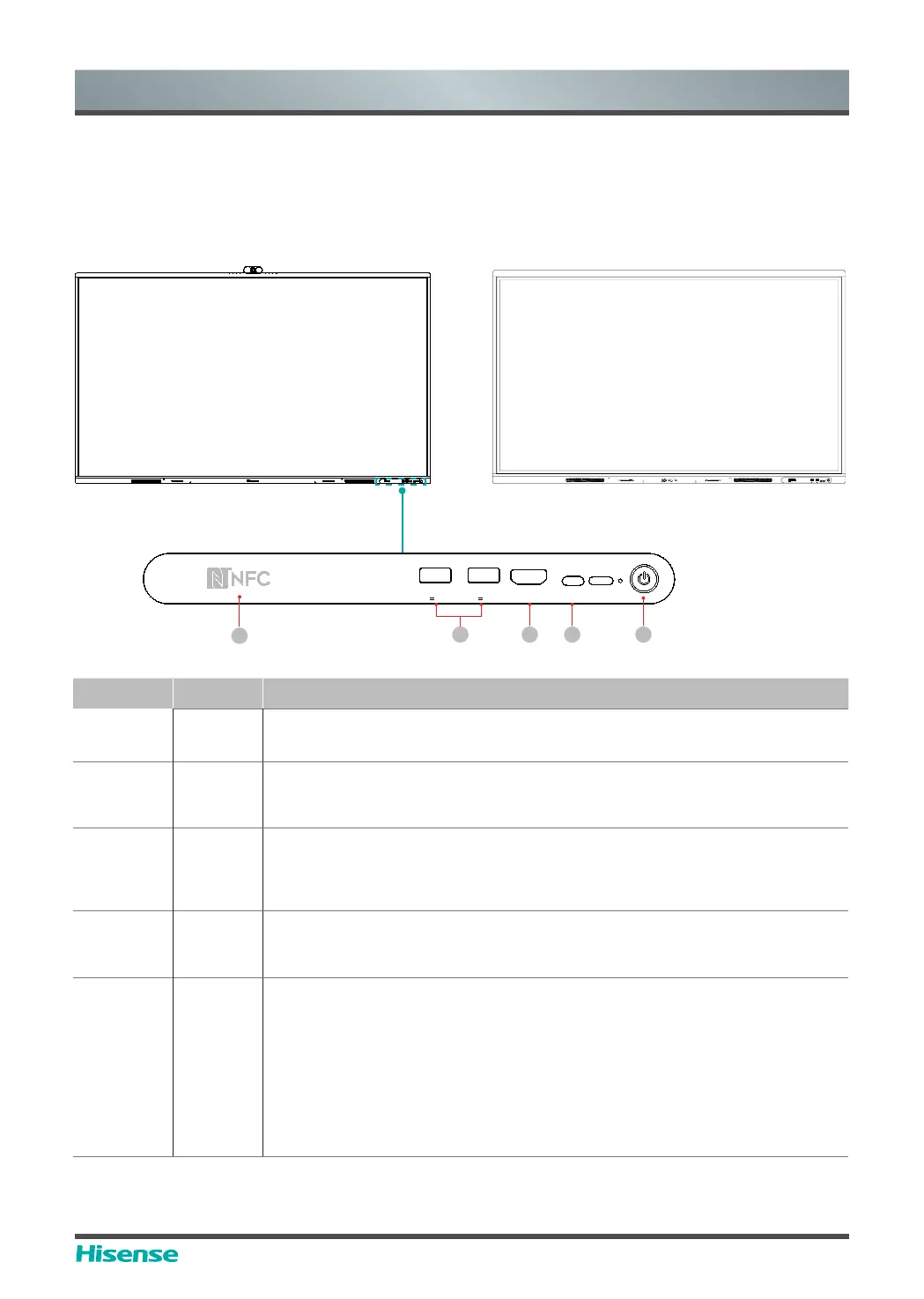
1 NFC
When the mobile phone touches the device, it can achieve screen sharing
through mobile phone NFC function.
2 USB
It is a USB interface, which can be used as the media playback interface
of the device and the
USB
interface of
embedded OPS module. It is also
the USB used to syncronize the USB-A dongle.
3
HDMI
IN
The front HDMI interface allows digital audio and video signals to be
transmitted using a single cable without compression. HDMI supports multi-
channel digital audio, and can be connected to external devices with HDMI
port, such as computer host, set-top box, Blu-ray player, A/V device, etc.
4 Type-C
,WLVDIXOOIHDWXUHG7\SH&LQWHUIDFHZKLFKVXSSRUWVDXGLRYLGHRDQG¿OH
transmission. Support 65W PD quick charge and support the following
VSHFL¿FDWLRQV9$9$9$9$9$
5
Standby
button
:KHQWKHGHYLFHLVRQVKRUWSUHVVWKHEXWWRQWRWXUQRႇWKHVFUHHQORQJ
press the button to go into standby mode.
:KHQWKHVFUHHQLVRႇSUHVVWKHEXWWRQWRRSHQWKHVFUHHQDQGZKHQ
the device is on standby, press the button to start.
The indicator light displays the state of power on or standby:
:KHQWKHGHYLFHLVRQWKHOLJKWLVEOXH
.
:KHQVWDQGE\WKHOLJKWLVUHG
:KHQWKHGHYLFHZLWK236PRGXOHLVWXUQHGRQWKHOLJKWLVJUHHQ
:KHQ05'(GRHVQRWFRQQHFW236:3'TXLFNFKDUJHLVVXSSRUWHGZKHQ05'(FRQQHFWV236
65W PD quick charge is not supported. When 75MR6DE and 86MR6DE connect OPS, 65W PD quick charge is
supported.
Type-C
DC5V 1A(MAX)
USB
USB
Type-C
HDMI IN
DC5V 1A(MAX)
1
2 3 4 5
MR6DE: MR6DE-E:
USBUSB
Type-C Type-C
DC5V 1A(MAX)DC5V1A(MAX)



 To Next Page