6
MR6DE User Manual
Introduction
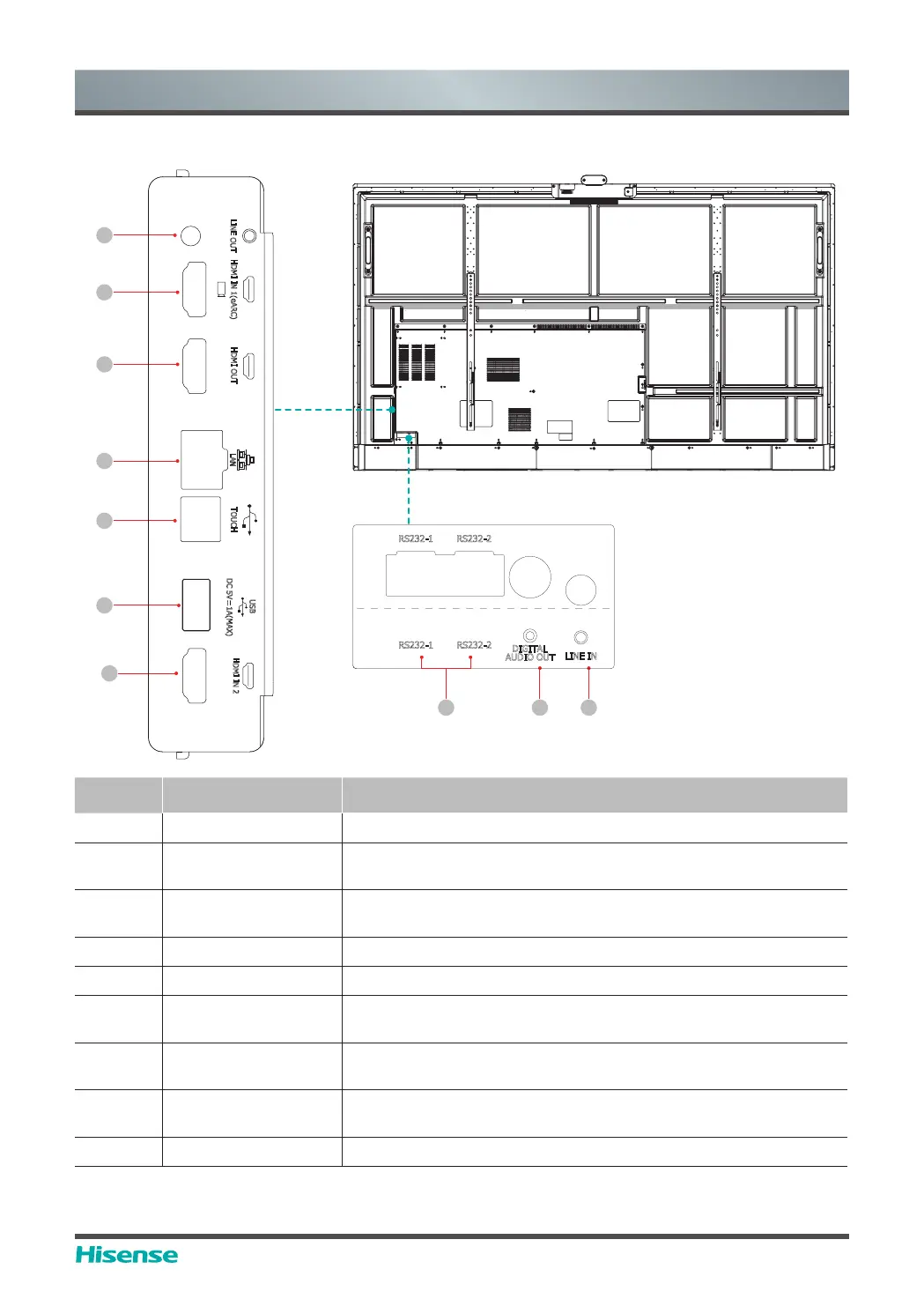
2.2.2 Rear Panel | I/O Panel
1
2
4
5
6
2
3
LA
N
TOUCH
USB
DC 5V 1A(MAX)
HDMI OUT
LINE OUT
HDMI IN 2
HDMI IN 1(eARC)
Number Port Description
1 LINE OUT Audio out to Headphones
2 HDMI IN
HDMI signal input, connect to PC with HDMI output port, set-
top box, or other video device
3 HDMI OUT
HDMI signal output, connect to an external device with HDMI
input port
4 LAN Standard RJ45 Internet connection interface
5 TOUCH Touch signal output to external PC
6 USB 3.0
Connect USB devices such as hard disks, keyboard, mouse,
etc
7 RS232-1/RS232-2
Serial interface, used for mutual transfer of data between
devices
8
DIGITAL AUDIO
OUT
Connect to power amplifier via coaxial port, then connect
SRZHUDPSOL¿HUWRVSHDNHU
9 LINE IN Input of audio signal
8 9
DIGITAL
AUDIO OUT
LINE IN
RS232-1
RS232-2
RS232-1 RS232-2
7



 To Next Page