22
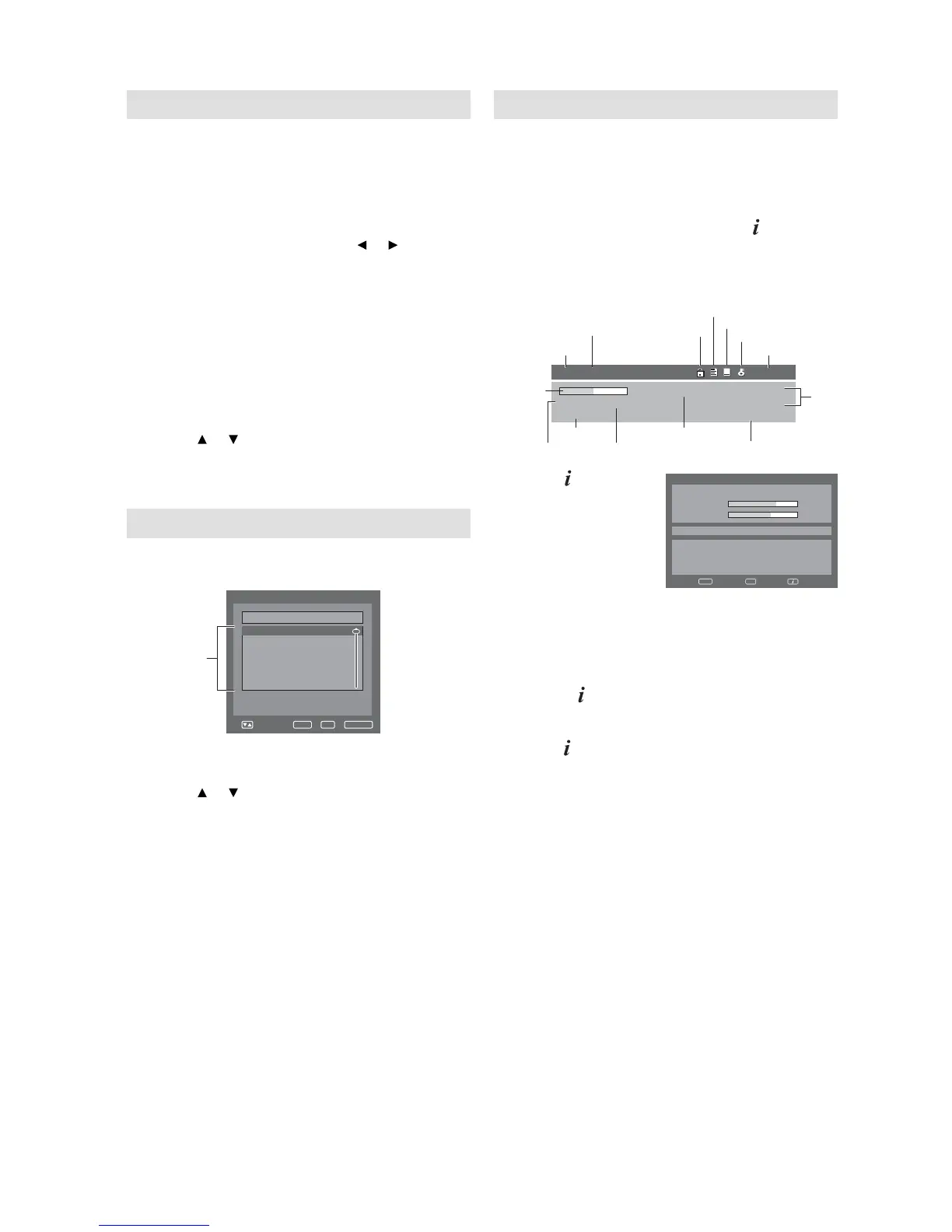
Channel banner
When you change from one channel to another,
the Channel banner will be displayed for the
selected service. In the channel banner menu,
information such as current date & time, channel
name, etc. will be displayed.
1
While watching the service, press to display
the Channel banner at any time. It will
disappear after the Banner timeout value (this
can be adjusted to your preferred value, see
page 21).
oeretSENOCBB100
251_ABC_Monosco_0... 17:17:37
9002/80/0283:7180:71
01:egA
Service No.
Service name
Lock status
DVB Teletext available
DVB Subtitle available
Pay TV
Audio mode
Time and
date
Parental rating
Programme name
Starting time/Ending time
of current programme
Duration
graph
Genre
Unclassified
2
Press again to
display the Basic
Service Information.
You can verify the
signal strength
and quality of the
selected service
here.
Basic Service Information DVB-T 64QAM
Service Name
Signal Quality
65%
Sig
n
al S
t
ren
g
th
671 MNO 10S
t
ep
082
0 0005 003
0 A
u
d
io2 AB...
671 MNO 10S
t
ep 0820 0005 0030 A
u
dio2 A
B
C
DE
F
GH
IJKLM
N
OP
QRSTUV
W
X
YZ
ab
cdefg
hijklmn
opqrstuvwxyz
671 M
NO
63%
Enter Exit
If necessary, adjust the direction of the
antenna to obtain the maximum signal
strength.
When the Country setting has been set to
FINLAND,
press
once more to display the advanced
detailed information.
•
3
To remove the Channel banner immediately,
press
again.
Note:
Subtitles are displayed on the channel banner. Some
broadcasts may not provide this service.
•
Common Interface
You can access the Common Interface module
information from this menu option.
Preparations
Insert CAM into the DVB Common Interface slot
on the backside of the TV (see page 10).
1
Press DIGITAL MENU. Press or to select
‘Common Interface’ option, then press
ENTER.
2
The CAM module name will be displayed.
You have to press ENTER to view further
information.
3
In the CI Menu, CAM specifi c information
such as Module information, Smart card
information, Language and Software
Download are shown.
Press or to select information, then press
ENTER to see detail.
4
Press EXIT to return to the normal screen.
Channel list
1
Press CH LIST to display the Channel list
menu.
VTtsillennahC
Navigate
Enter TV/RadioExit
S.No Services
671 MNO
672 PQR
673 STU
674 TCM
679 VWXYZ
800 SAT.1
List of the
services
2
Select the Services:
List of the services will be displayed in the left
side of the menu.
Press or to toggle within the service list,
then press ENTER.
Toggle between the list of TV and Radio
services:
The TV/RADIO key is used to toggle between
the TV and Radio mode. If you press CH LIST
when you are in Radio mode then the channel
list menu will display the list of Radio services.
If you wish to view the list of TV services
without exiting the current menu, TV/RADIO
key should be pressed once.
Note:
The displays of Channel / Service name will be
abbreviated depend on its size of the letter.
•


 To Next Page