8
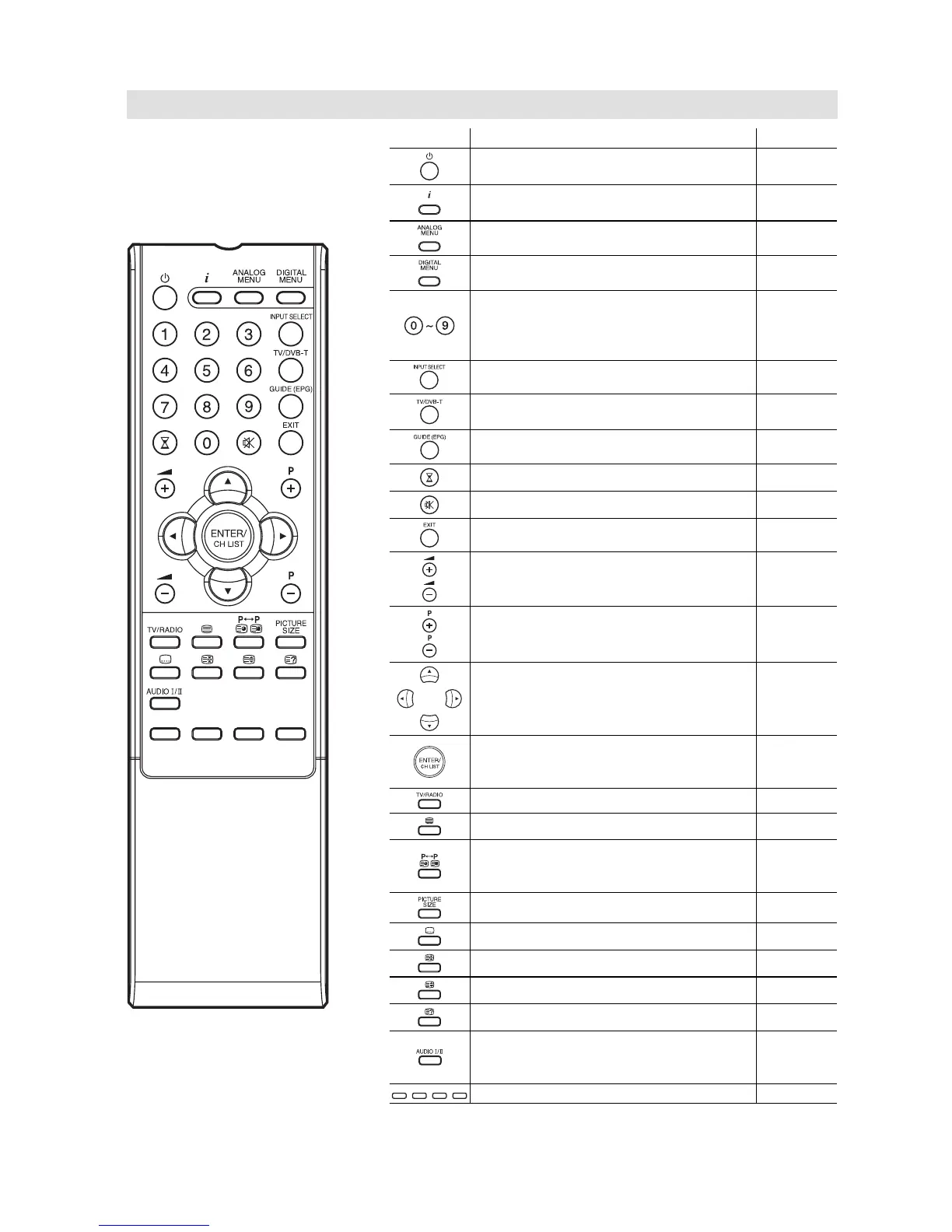
Remote Control
Function Page
Enter standby mode or turn on the
power
11
Display program position number
Teletext time display
13, 22
Activate the analogue menu 11
Activate the digital menu 18
Select channel
Select Teletext page
Enter password
Activate the channel organizer function
13
13
Select an input source 11
Switches between the analogue TV and
the digital TV
18
Display the EPG (Electronic Progr. Guide) 23
Sleep Timer 13
Turn the sound on/off 13
Exit the menu screen
Volume 13
Change the TV channel or Teletext page
up or down
In Standby: Turn on the power
13
11
Cursor buttons
Memorize
Teletext page 100
CH LIST
14
13
Toggle between the TV and radio mode 22
Teletext ON / TV+Text / OFF 13
Switches between the present channel
and the last selected channel
Sub Page selection
13
14
Select picture format 16
Display the subtitle (DVB Only) 23
Hold the text page 14
Teletext enlargement 14
Reveal quiz page answers 14
Select between the available broadcast
audio
Display the multi audio menu
14
23
Fastext/TOPtext buttons 13



 To Next Page