7
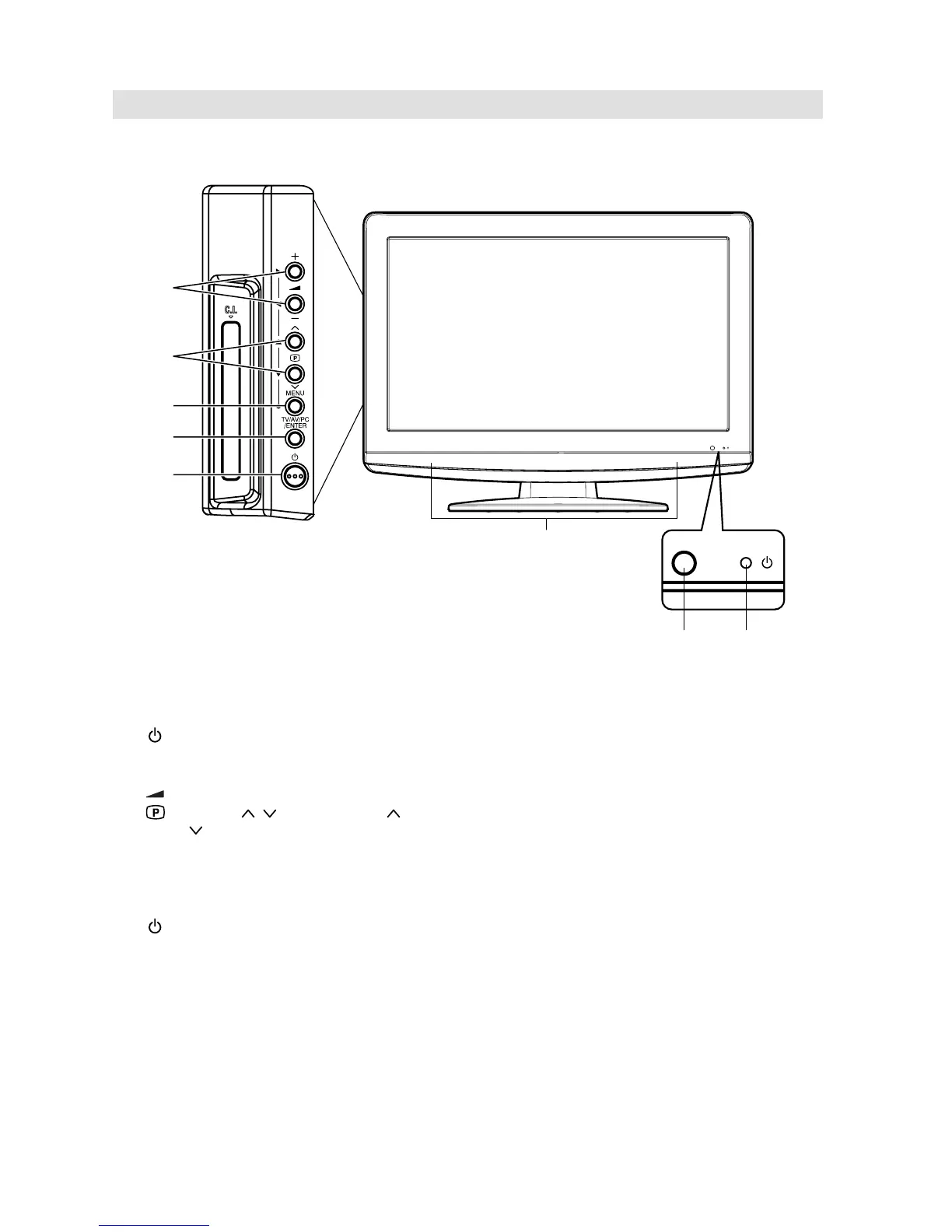
Location of controls
Description of Indicators and Controls
1. Remote sensor
2.
(Standby/Timer/On) indicator: The LED indicator lights up red in standby mode, orange in
standby mode when the timer is activated, and green in the power ON mode.
3. Loudspeakers
4.
(Volume) +/– buttons / In Menu: Setting.
5.
(Channel) / buttons: Press to change to a higher numbered channel set into memory.
Press
to change to a lower numbered channel set into memory. In Menu: Setting. In Standby:
Turning on the unit.
6. MENU button: To display the menu screen.
7. TV/AV/PC/ENTER button: Select input mode for TV/AV/COMPONENT/HDMI/PC. In Menu : Using
as ENTER button.
8.
(Power)-key: Preparation: Connect power-cable to AC220~240V/50Hz.
a) If standby-LED is red, you may power-off. To power-off, press power-key 1x and release.
For confi rmation, standby-LED will change to dark.
b) If standby-LED is off, you may power-on. To power-on, press power-key 1x and release.
For confi rmation, standby-LED will change to red and about 1 second later to green.
c) If the TV is currently working, press power-key 1x and release to power-off.
For confi rmation, standby-LED will change to dark.
In power-off-condition, the TV’s power-consumption is approx. 1 Watt.
If total disconnection from the mains is required, pls unplug.
4
3
1
2
5
6
7
8
19LD5550U



 To Next Page