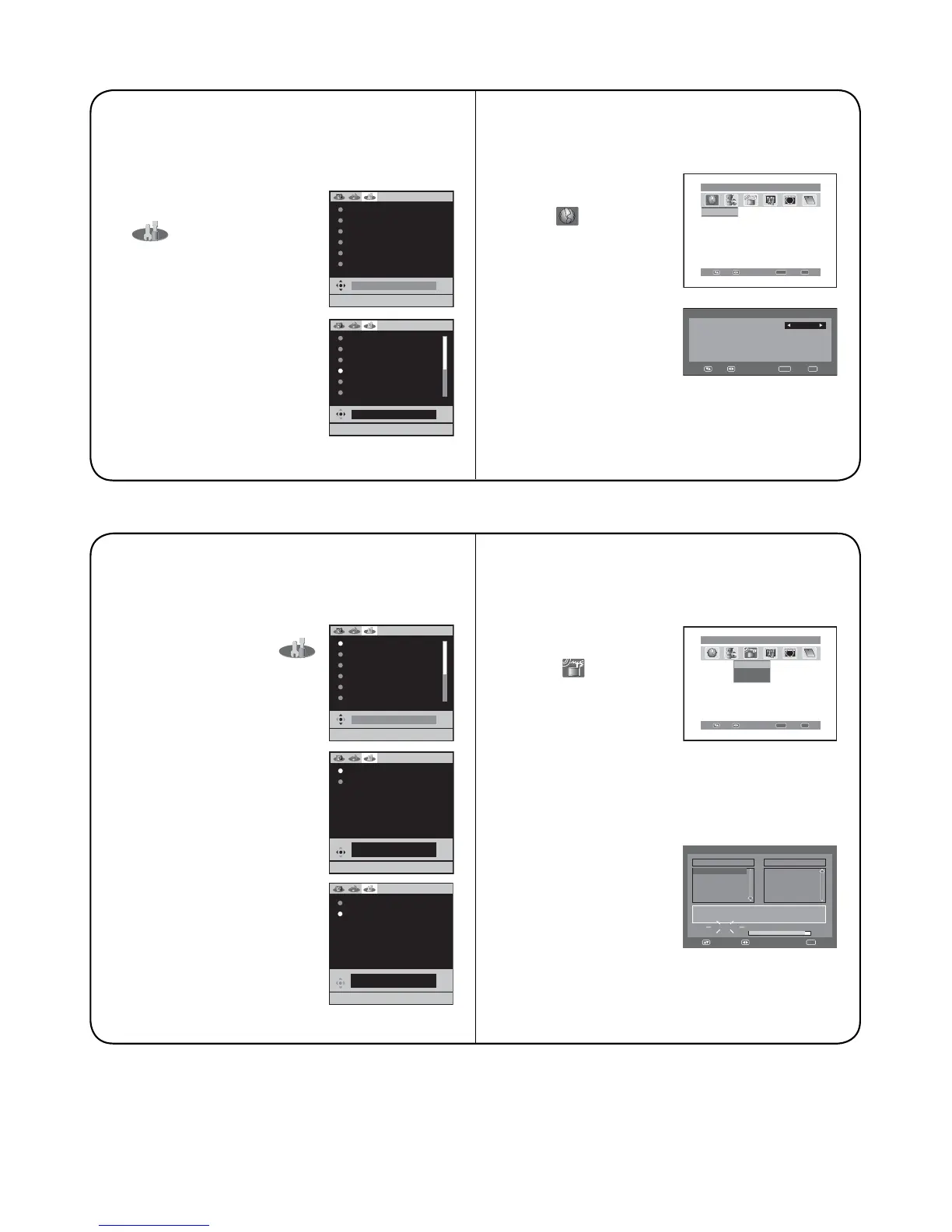
4. ON-SCREEN LANGUAGE SELECTION
[ANALOGUE MODE]
1. Press TV/DVB-T to select the analogue TV
mode.
2. Press ANALOG MENU,
then press ϵ or ϶ to select
(SETUP) menu.
3. Press ϳ or ϴ to select LAN-
GUAGE, then press ENTER.
Press ϵ or ϶ to select
desired language.
4. Press EXIT to return to the normal screen.
[DIGITAL MODE]
1. Press TV/DVB-T to select the digital TV mode.
2. Press DIGITAL MENU,
then press ϵ or ϶ to
select
ABC
ABC
(Language
Setup) option.
Press ENTER.
3. Press ϳ or ϴ to select
the item you want to
change.
Press ϵ or ϶ to select
desired language.
4. When all changes are decided, press EXIT to
return to the normal screen.
5. AUTO TUNING
[ANALOGUE MODE]
1.
Press TV/DVB-T to select the analogue TV mode.
2. Press ANALOG MENU, then
press ϵ or ϶ to select
(SETUP) menu.
3. Press ϳ or ϴ to select
AUTO TUNING, then press
ENTER. Press ϳ or ϴ to
select COUNTRY, then
press ENTER. Press ϵ or ϶
to select your country, then
press ENTER.
4. Press ϳ or ϴ to select
START, then press ENTER.
The automatic tuning
will search for available
broadcasts and should store
the channels in the correct
order. During the search the
sound is muted.
5. When all programs have
been stored, the normal TV
screen will appear.
[DIGITAL MODE]
1. Press TV/DVB-T to select the digital TV mode.
2. Press DIGITAL MENU,
then press ϵ or ϶to
select
(Installation)
option.
3. Press ϳ or ϴ to select
‘Auto Scan’, then press
ENTER.
4. Press ϵ or ϶ to select ‘Yes’ or ‘No’ in the
confirmation screen, then press ENTER (the
selected option is shown in blue).
5. The Auto Scan process
will now begin.
The scanning process
will be displayed in the
progress bar.
When the search has
been completed ‘Scan
completed’ message will be displayed.
And the Auto Scan menu will exit automatically.
EXIT : END MENU: RETURN
AUTO TUNING
MANUAL TUNING
CH ALLOCATION
LANGUAGE ENGLISH
VERTICAL POSITION 0
AUTO 4:3 DEFAULT
16:9
Enter Exit
Main menu Language Setup
Navigate
Language Setup
ABC
CH1
CH2
CH3
Texd
CI
i
ABC
i
Language Setup
Menu Language
English
Pref. Audio Language
English
Pref. Subtitle Language
English
Pref. Digital Service Language
English
Navigate
Enter Exit
Manual Scan
Auto Scan
Carrier Setup
Enter Exit
Navigate
Main menu Installation
ABC
CH1
CH2
CH3
Texd
CI
i
ABC
i
Auto Scan
TV
Progress
Searching...
Carrier :1
Frequency (kHz) :562000
:003
DVB-T 16QAM
Radio
070 BBC Radio 1
:001
001 BBC ONE
002 BBC TWO
007 BBC THREE
Navigate
Exit
EXIT : END MENU: RETURN
ENGLISH
AUTO TUNING
MANUAL TUNING
CH ALLOCATION
LANGUAGE ENGLISH
VERTICAL POSITION 0
AUTO 4:3 DEFAULT
16:9
EXIT : END MENU: RETURN
COUNTRY UK
START
AUTO TUNING
17%
UK
EXIT : END MENU: RETURN
COUNTRY UK
START
EXIT : END MENU: RETURN
AUTO TUNING
MANUAL TUNING
CH ALLOCATION
LANGUAGE ENGLISH
VERTICAL POSITION 0
AUTO 4:3 DEFAULT
16:9



 To Next Page