K6602705
Rev.3
08.20.01
- 61 -
6.3.2.8.10 SMART Enable/Disable Automatic Off-line [B0h, Sub DBh]
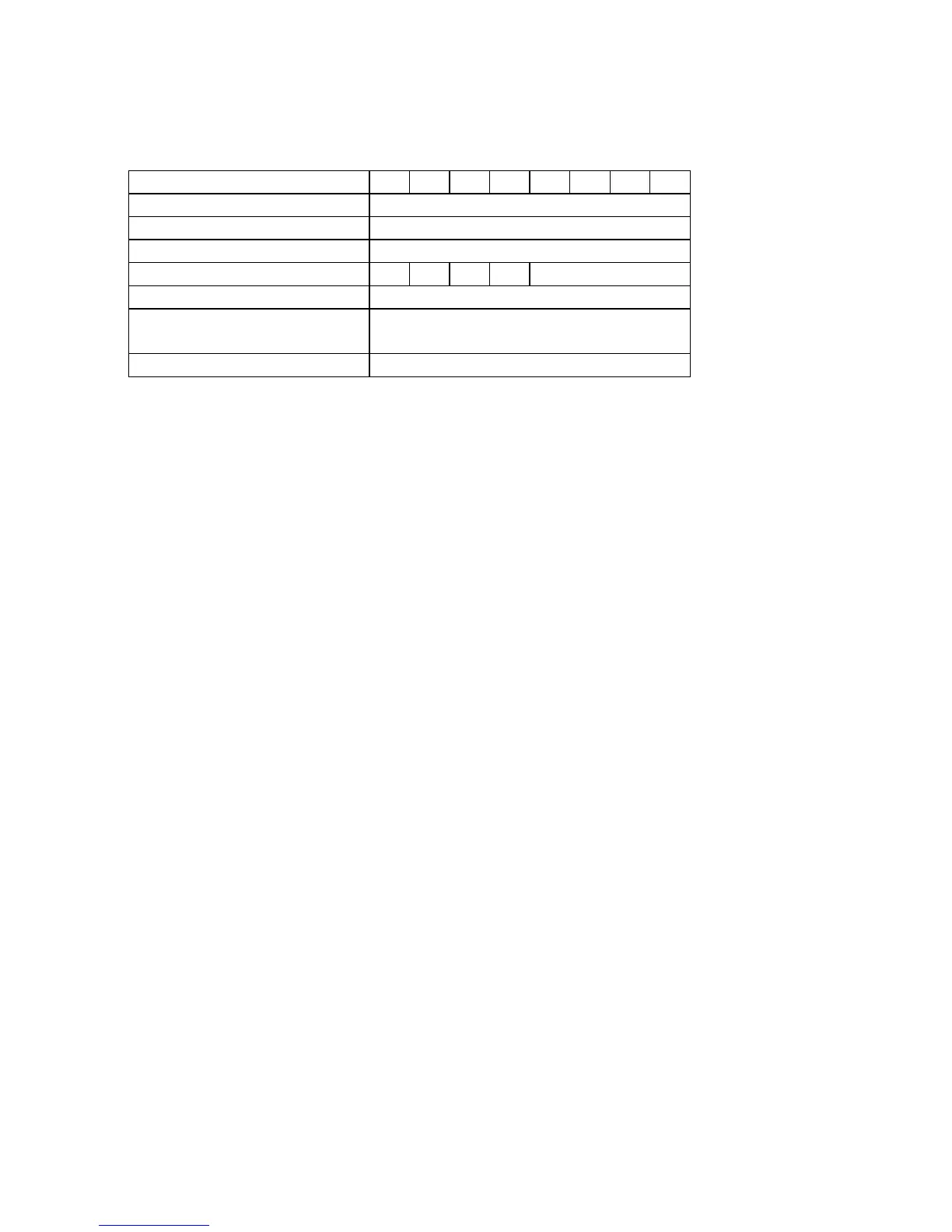
Task File Registers 76543210
Command B0h
Cylinder High C2h
Cylinder Low 4Fh
Device/Head - X - DRV XX
Sector Number XX
Sector Count 00h:Disable
F8h:Enable
Features DBh
DRV : Device selection bit 0 : DRV0 1:DRV1
SMART Enable/Disable Automatic Off-line command enables and disables the Automatic Off-line feature.
If Automatic Off-line is enabled, the device automatically correct attribute data in an off-line mode
periodically and save the attribute data on the disk.
- The Sector Count Register is set to 00h to disable Automatic collection of Off-line data
-
The Sector Count Register is set to F8h to enable Automatic collection of Off-line data
The following tests are performed for the Automatic off-line feature:
a) Raw Read Error Rate Measurement
Partial read scanning and Raw Read Error Rate measurement is performed.
This event is occurred every 24 POH’s and 2 minutes of host inactivity.
b) Automatic sector reallocation in off-line read scanning for entire LBA.
This event occurs every 168 POH’s and 2 minutes of host inactivity.
Enable state is preserved until receiving a disable automatic off-line command. Upon receipt of the SMART
Enable/Disable automatic Off-line command, the device sets BSY to one, enables or disables
the automatic off-line data correction feature, clear BSY to zero and asserts INTRQ. During execution of its
off-line data collection activities and saving the data on the disk, DRDY and BSY are set to zero.
A command is issued during execution of its off-line data collection activities and saving the data on the disk,
the device will respond to the host within two seconds.



 To Next Page