Basic Instruction Manual
22
Battery
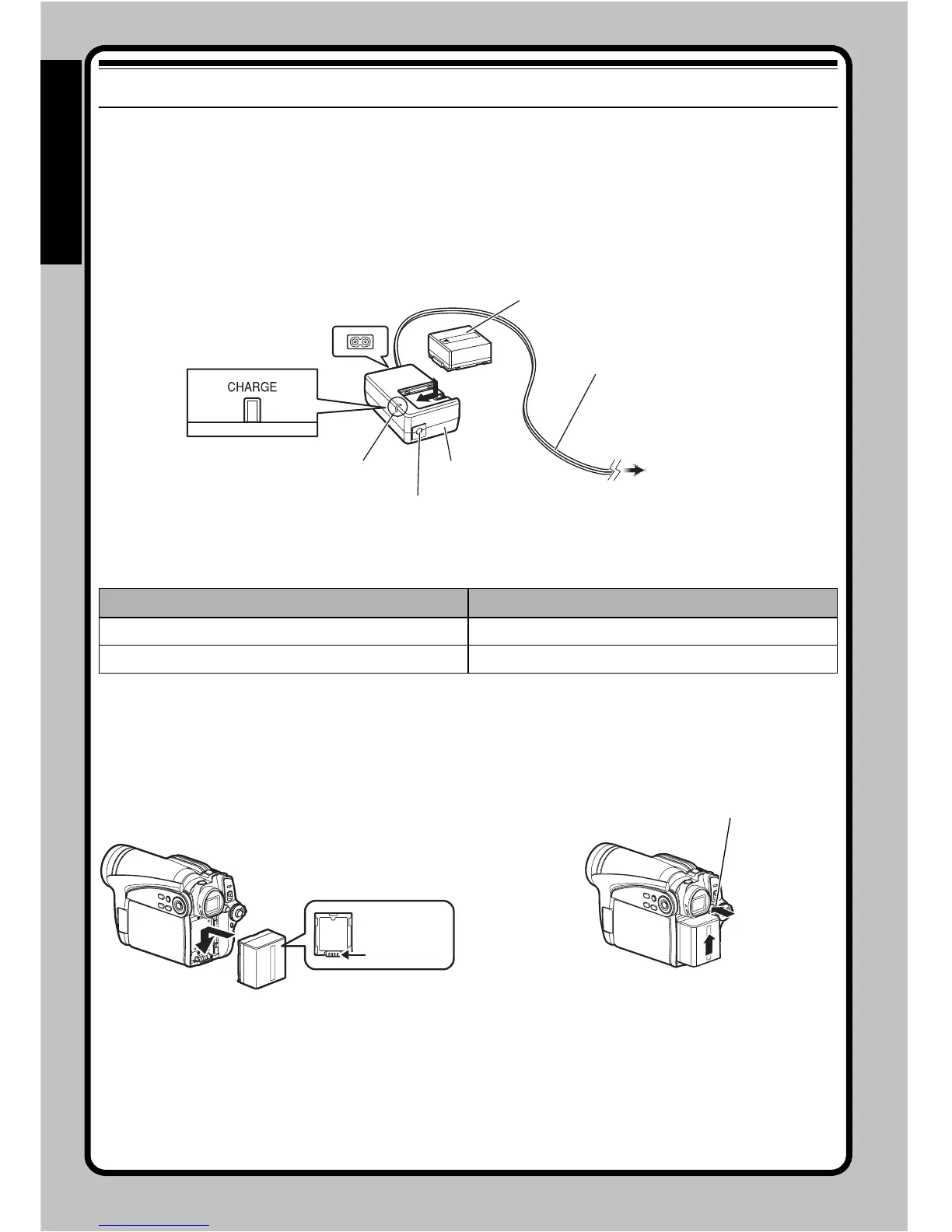
CHARGING BATTERY
1 Connect the mains lead to AC adapter/
charger.
2 Plug the mains lead into AC outlet.
3 Attach the battery to AC adapter/charger.
Note:
When charging a battery, unplug the DC power cord
from the DC output jack on AC adapter/charger.
●Battery charged status
ATTACHING BATTERY
1 Fit the battery to the battery attachment
platform on this DVD video camera/recorder
and slide it downward until a click is heard.
Note:
• Make sure that the battery is in the correct orientation.
• Make sure that the battery is securely attached:
Incomplete attachment could cause the battery to fall,
resulting in damage.
REMOVING BATTERY
1 While holding down the BATTERY EJECT
button, slide the battery upward to remove it.
Note:
• For safety, be sure to turn the DVD video camera/
recorder off before attaching or removing the battery.
• Be careful not to drop the removed battery.
Charge status CHARGE indicator
During charge Lit
Charge complete Goes out
1
2
3
Mains lead
AC adapter/charger
Battery
CHARGE indicator
DC output jack
To AC outlet
* The shape of plug
varies depending
on the model.
Ter minal
side must be
down.
BATTERY EJECT button







 To Next Page