Programme Type
This describes the “Style” or “genre” of music
that is being broadcast e.g. “Rock”, “ Classical” or
“Information”.
Time/Date
The broadcaster (Radio station) provides clock
and date information automatically so there’s
no need to manually set this information. In the
unlikely event that the broadcaster does not
transmit any clock information; the display will
show <Time/Date>.
Radio Text
As with DAB, the broadcaster can include a
scrolling text that displays information about
the current program. If Radio text information
is not available, then the display will show
<Radio Text>.
Frequency
This shows the frequency of the current station.
Programme Type
Time/Date
Radio Text
Frequency
Display Modes
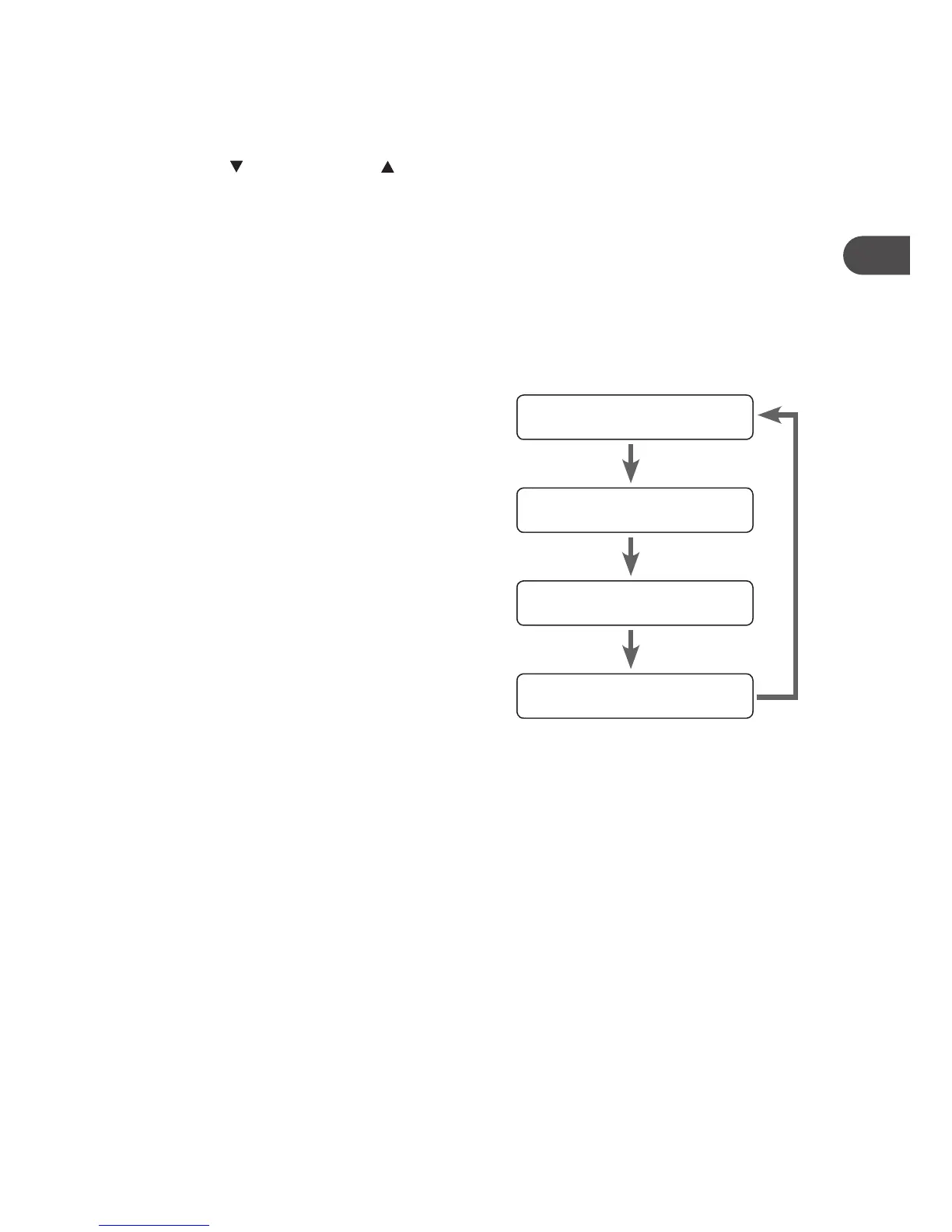
Every time you press the INFO button, the display will cycle through the following display
modes: Programme Type, Time/Date, Radio Text, Frequency.
Recalling a Stored Station
1. Once you have saved a station to one of the preset buttons, you can recall it by
pressing the PRESETS button.
2. Turn the
VOLUME/SELECT control to select your desired preset station number.
3. Press the TUNE/SELECT button to conrm the selection.
4. If you choose a preset that hasn’t been allocated a station, “Empty preset #“ will be
displayed.
15


 To Next Page