“B” Group: Fine Tuning Functions
Configuring
Drive Parameters
3–40
NOTE: To disable parameter editing when using B031 lock modes 00 and 01, assign the
[SFT] function to one of the intelligent input terminals.
See “Software Lock” on page 4–22.
“B” Function Run
Mode
Edit
Lo Hi
Defaults
Func.
Code
Name /
SRW Display
Description
–FE(F)
(EU)
–FU
(USA)
Units
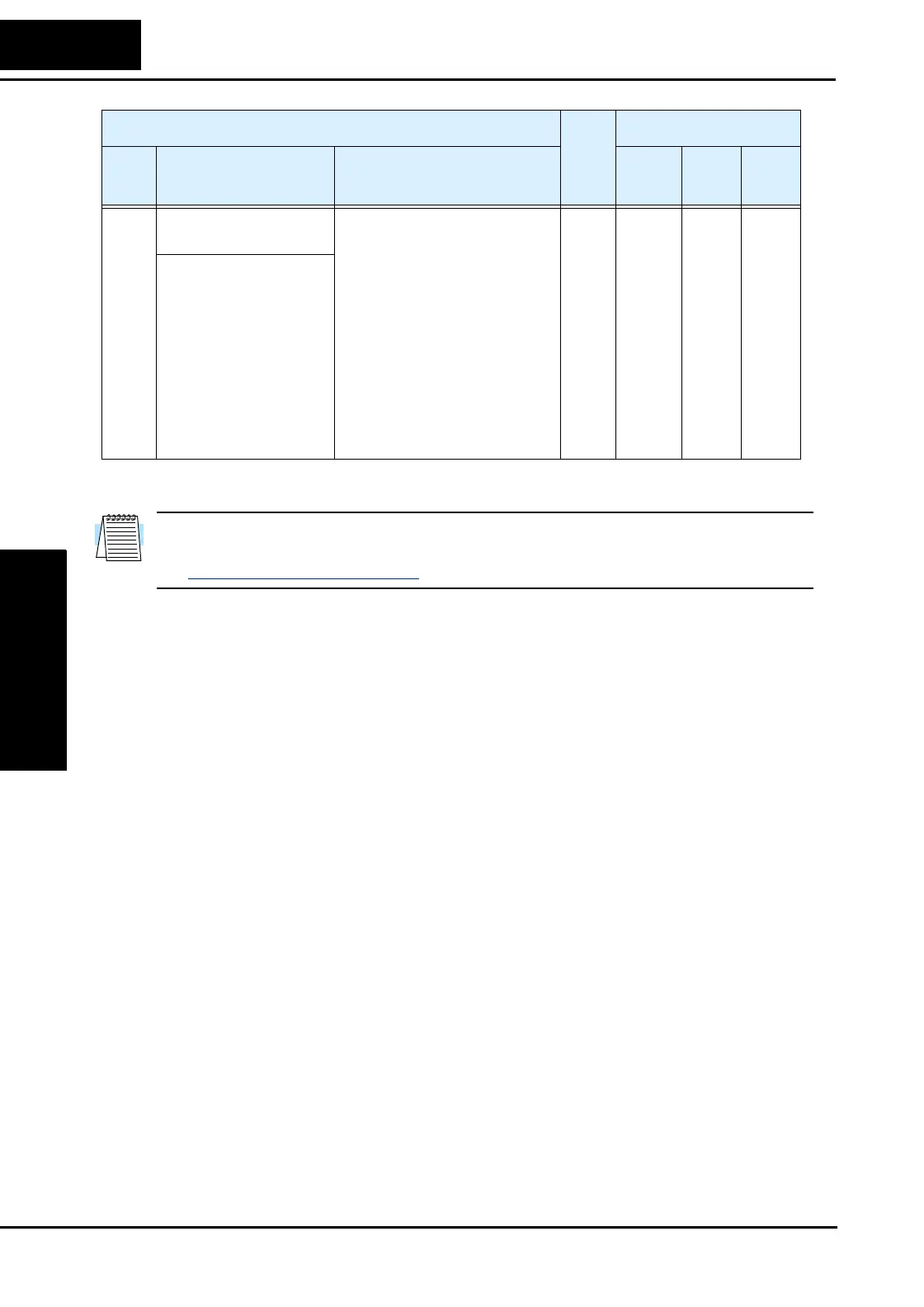
B031 Software lock mode
selection
Prevents parameter changes, in
five options, option codes:
00... Low-level access, [SFT]
input blocks all edits
01... Low-level access, [SFT]
input blocks edits (except F001
and Multi-speed parameters)
02... No access to edits
03... No access to edits except
F001 and Multi-speed parame-
ters
10... High-level access, includ-
ing B031
✘ ✔ 01 01 —
S-Lock MD1




 To Next Page