15
ENGLISH
3. Connecting to External Equipment
Terminals on Rear
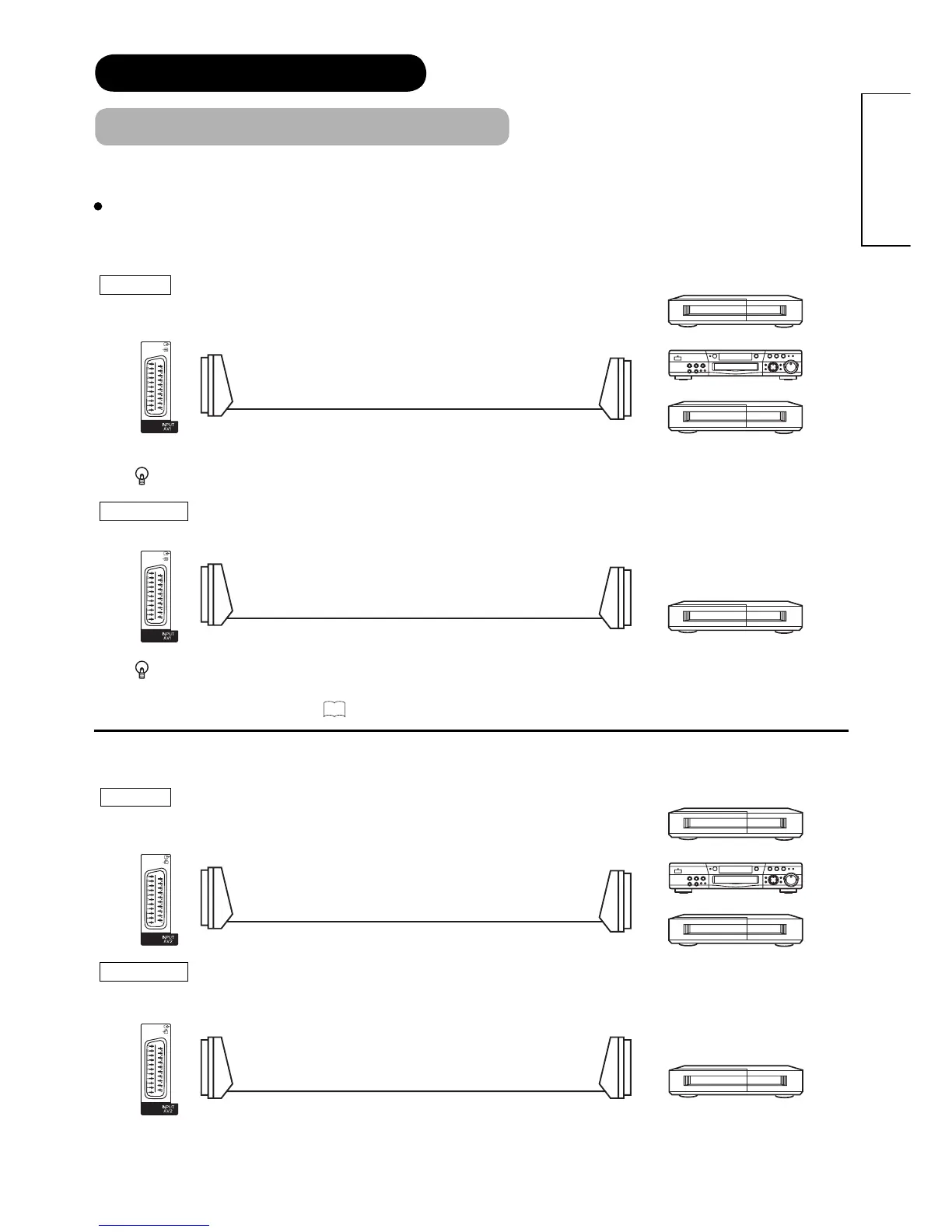
AV1 can be connected to the equipment with Composite/S-Video/Audio input, and Composite/Audio output.
The output signal
can support not only Analogue but also Digital Terrestrial TV signals.
INPUT Composite/S-Video/Audio
If STB is connected to AV1 in France, it descrambles some of the Pay TV images by resending the signal again (In/Out).
OUTPUT Composite/Audio
When you are watching either TV or DTT broadcasting from AV1, you can switch to the other by setting
"Scart Output" in Initial Setup menu. For example, whilst you are watching TV, it is possible to record the
DTT programme. Refer to
27
about "Scart Output" in Initial Setup menu.
AV2 and 3 can be connected to the equipment with Composite/RGB/Audio input, and Composite/Audio output.
INPUT Composite/RGB/Audio
OUTPUT Composite/Audio
CONNECTION (continued)
Connecting Procedure (continued)
OUT
IN
OUT
IN
[Example]
VCR
(Recording Device)
IN OUT
[Example]
VCR
Set-Top Box
DVD player/recorder
IN OUT
[Example]
VCR
Set-Top Box
DVD player/recorder
[Example]
VCR
(Recording Device)









 To Next Page