32
MAIN MENU OPERATION (continued)
Picture Menu
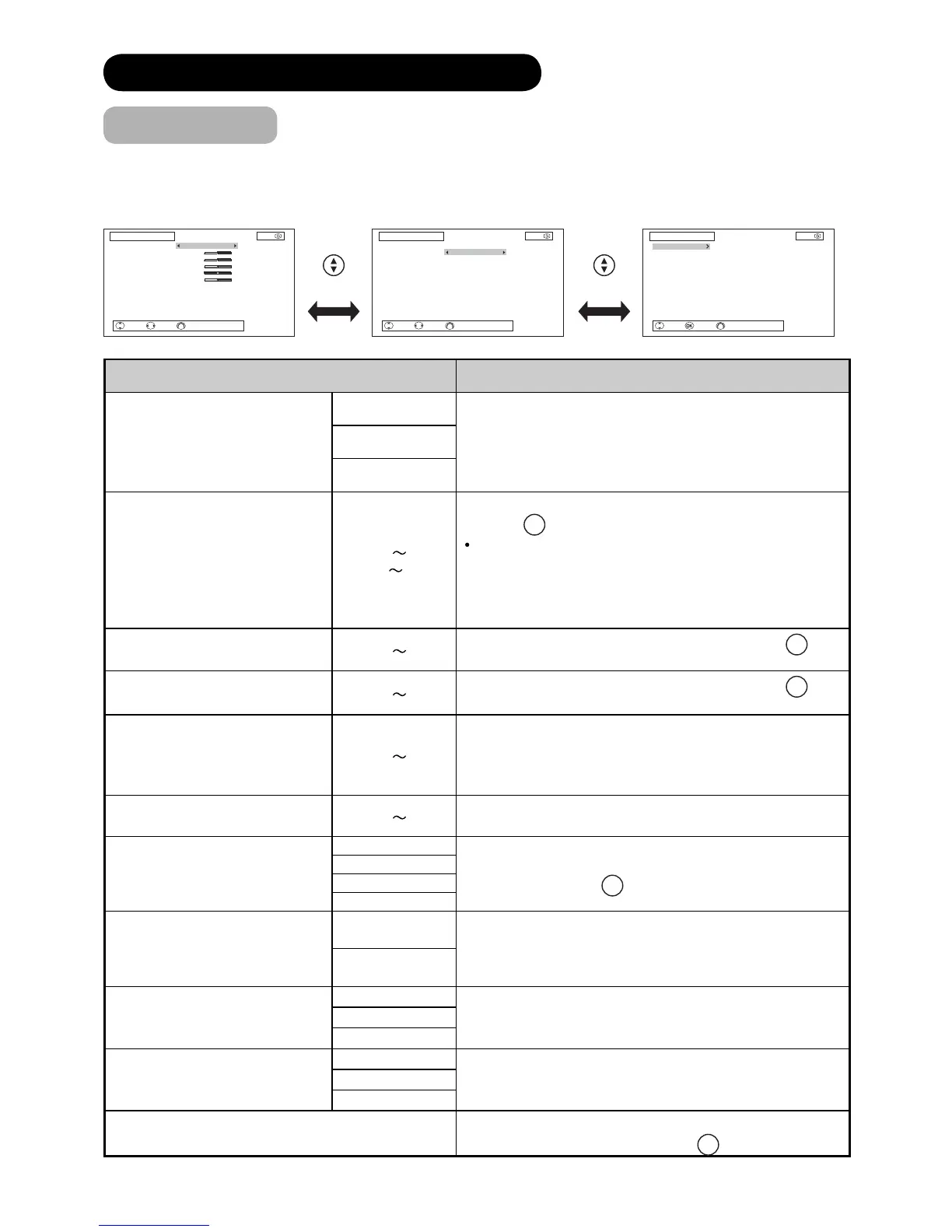
In this menu, you can make specifi c adjustments for the picture based on your preference.
By pressing ź button at the bottom of each menu page, the next Picture menu page will appear on the screen.
The menu items indicated by * can be automatically stored.
Selected Items Setup hint
Picture Mode*
Dynamic
You can make the best selection from 3 modes depending
on the lighting condition and intended use.
Dynamic: Suitable for the brighter conditions.
Natural : Suitable for the normal lighting condition.
Cinema : Suitable for watching movie.
Natural
Cinema
Contrast*
0 100%
(101 110%)
This adjusts the contrast to meet the lighting environment
by using
◄►
button.
The maximum value can be extended to [110%] by
pressing and holding Ź button at [100%].
This is the special feature prepared for the dark scenes.
At the normal condition, it is recommended to set the
value less than [100%].
Brightness*
0 100%
Adjust according to personal preference by using
◄►
button.
Colour*
0 100%
Adjust according to personal preference by using
◄►
button.
Hue*
0
100%
Pressing Ż button enhances red and weakens green,
whilst pressing Ź button weakens red and enhances
green. The setup hint is adjusting for the realistic skin
colour.
Sharpness*
0 100%
Preferred sharpness can be adjusted by pressing Ż
button for softer image or Ź button for sharper image.
Colour Temperature*
Cool
You can select from 4 settings (default) depending on the
colour condition with
◄►
button.
Normal
Warm
Black/White
Contrast Mode*
Dynamic
It allows you to choose from 2 modes.
Dynamic: Sharpen the gradation to improve the contrast
feeling.
Normal: Reproduce as faithful gradation as possible.
Normal
YNR*
Off
This is a noise reduction system for picture signal.Low
High
CNR*
Off
This is a noise reduction system for colour signal.Low
High
Reset
Each item on this menu screen can be restored to the
original factory settings by pressing
OK
button.
Select Enter Return
Picture 3/3
Colour Management
Colour Temp. Adjust
1010
Select Adjust Return
Picture 1/3
Picture Mode
Contrast
Brightness
Colour
Hue
Sharpness
Colour Temperature
Contrast Mode
YNR
CNR
Natural
50%
50%
50%
100%
50%
Cool
Normal
Off
Off
Reset
1010
Select Adjust Return
Picture 2/3
Picture Mode
Film Mode
3D Comb Filter
LTI
CTI
Auto Colour
Black Enhancement
MPEG NR
Natural
On
Off
Low
High
On
Low
Off
Reset
1010









 To Next Page