49
ENGLISH
This teletext is for ***T01U and TP01U model in DTT mode.
MHEG Digital Teletext can provide various information with text
on the screen.
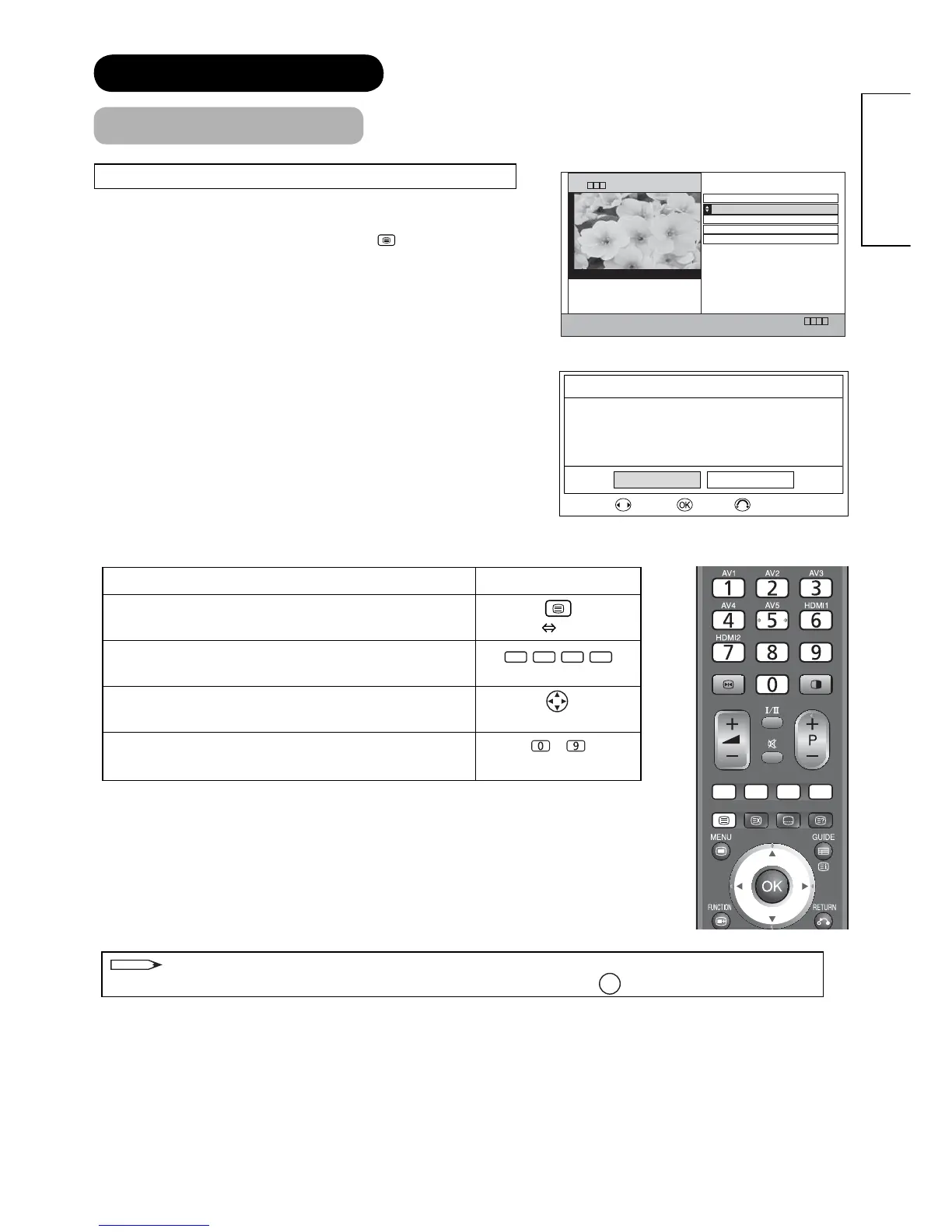
• To access/exit from Teletext screen, press
button or Colour
button depending on the programme being broadcast. Please
follow the navigation on the screen when using Colour button.
• MHEG Digital teletext and subtitles (DVB) cannot be activated
at the same time.
Subtitle (DVB) should be turned off to activate teletext.
• If you try to activate teletext during subtitles (DVB) ON, the
dialogue box appears to ask you to turn subtitles off as shown.
03:01 15 Sep
UK Outlook
Regional 24 Hour Forecast
Regional 5 Day Forecast
World Cities
Press TEXT to exit
Press 0 for full screen TV
HOME SHORTCUTS BACK BBCi MENU B B C 1
Weather
B B C Weather
BBC ONE
Operation Press
This switches the receiver between the TV mode and
TELETEXT mode.
[TV TEXT]
Each of these buttons selects a link page displayed at
the lower part of the screen.
[Colour]
This selects items on the screen.
[Item Select]
This jumps to the indicated page if any navigation on the
screen.
~
[Page Select]
NOTE
When you are asked to press SELECT in the menu of digital teletext, press
OK
button on the remote control.
FEATURES (continued)
MHEG Digital Teletext [DTT mode only]
)NTERACTIVESERVICESCANNOTBEUSED
WHILESUBTITLESAREON7OULDYOULIKE
TOTURNSUBTITLESOFFNOW
#ONFIRM
9ES .O
3ELECT
%NTER #ANCEL









 To Next Page