36
FUNCTION MENU OPERATION (continued)
Basic Mode (continued)
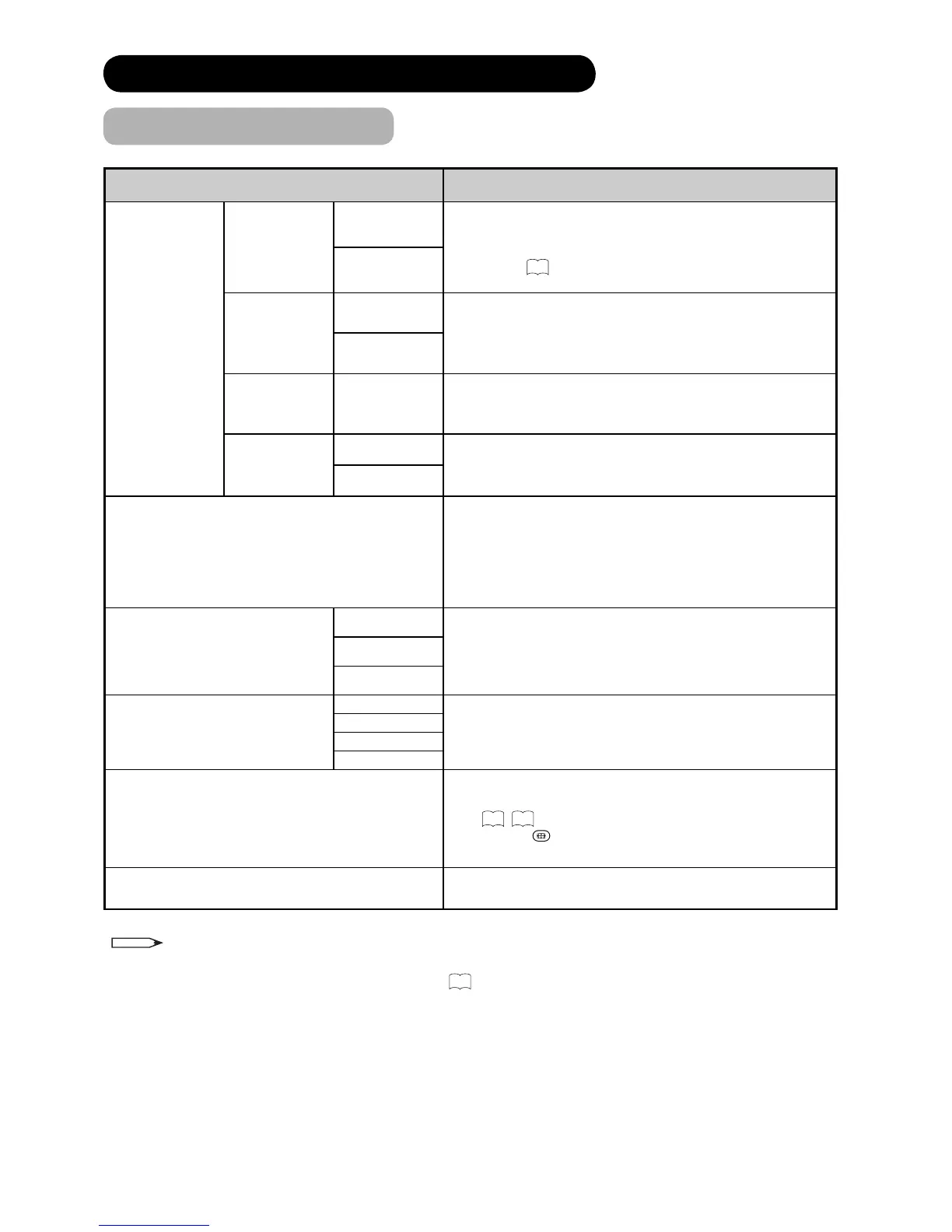
Selected Items Setup hint
Lock &
Rating
Channel Lock
Off
If set On, the selected channels can be locked so that it
cannot be selected without 4 digit codes. To select the
channel to lock, go to “Channel Manager” from main
menu. See
29
for the details. (This is available only in
DTT mode.)
On
Rating Lock
Off
If set On, this avoids watching a programme by the age
selected in “Rating Age”.
(This is available only for *** T01E and TP01E model in
DTT mode.)
On
Rating Age 4~18
You can select age to lock a programme.
(This is available only for *** T01E and TP01E model in
DTT mode.)
Menu Lock
Off
This avoids entering “Channel Manager,” “Confi guration,”
and “Initial Setup” of main menu without lock key. (This is
available only in DTT mode.)
On
Common Interface
This enables you to plug in a module which for example
receives Pay TV service. You can confi rm the module
information which depends on the module inserted. Please
ask the service provider if the module type is suitable for TV.
The TV supports module meeting DVB standard. (This is
available only in DTT mode.)
Dynamic
You can make the best selection from 3 modes depending
on the lighting condition and intended use.
Dynamic: Suitable for the brighter conditions.
Natural : Suitable for the normal lighting condition.
Cinema : Suitable for watching movie.
Picture Mode Natural
Cinema
Movie
You can select the most suitable sound condition from 4
alternatives according to the contents.
If you want to adjust each item value based on your
preference, select “Favourite”.
Audio Mode
Music
Speech
Favourite
You can select the most suitable display size.
The selectable size varies depending on the input mode.
See
50
,
51
for the details.
By pressing
button on the remote control, you can also
change the zoom mode.
Zoom
Stop Timer Event
You can stop the running timer event. This menu item is
available only whilst running timer event.
NOTE
• Each time the setting is changed in “Lock & Rating”, Lock key is required to input in order to enable the new
setting. Enter the current Lock Key or “7777”. (See
27
about “Lock Key”.)









 To Next Page