55
ENGLISH
FEATURES (continued)
Photo Input Function (continued)
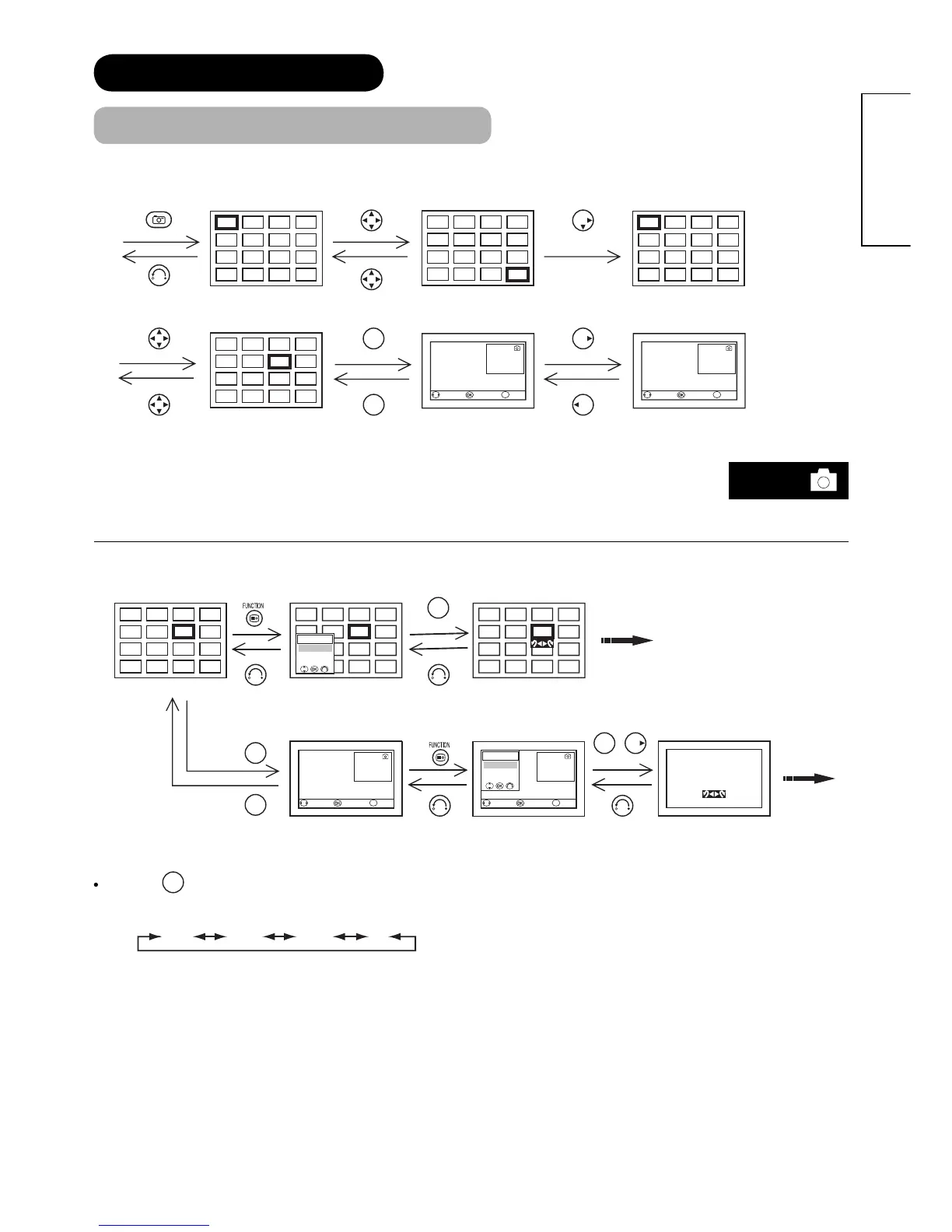
Thumbnail-Size Image (Index) to Full-Size Image
4
8
12
16
3
7
11
15
2
6
10
14
1
5
9
13
20
24
28
32
19
23
27
31
18
22
26
30
17
21
25
29
20
24
28
32
19
23
27
31
18
22
26
30
17
21
25
29
OK
OK
4
8
12
16
3
7
11
15
2
6
10
14
1
5
9
13
Prev./Next Thumbnail
Jump
0-9
24/60
15 Feb. 2007
1600 x 1200
ABCDEF
Prev./Next Thumbnail
Jump
0-9
23/60
15 Feb. 2007
1600 x 1200
ABCDEF
* You can also select the preferred fi le in both Thumbnail-size and Full-size image by inputting the
fi le number directly with numeric buttons of remote control. If the entered number is wrong, the
closest fi le will be selected automatically.
Rotation Function
AA
OK
OK
A
A
AA
Prev./Next Thumbnail
Jump
0-9
Function Menu
Rotate
Slideshow
Select Device
23/60
15 Feb. 2007
1600 x 1200
ABCDEF
23/60
15 Feb. 2007
1600 x 1200
ABCDEF
Prev./Next Thumbnail
Jump
0-9
Function Menu
Rotate
Slideshow
Select Device
OK
OK
By using
◄►
button, the picture is rotated in the sequence of the following. This returns to the default setting when
changing the device of images.
90° 180° 270° 0°
Full size
File#23 is displayed.
Photo Index (1
st
Page). Photo Index (1
st
Page).
Move to the fi le.
Photo Index (2
nd
Page)
Move to next page.
Photo Index (2
nd
Page)
Select to the fi le.
Full size
File#24 is displayed.
Display Function Menu.
Select “Rotate”.
Photo Index (2
nd
Page). Display Function Menu.
Select “Rotate”.
Rotating a thumbnail
image to 90°.
Full size
File#23 is displayed.
Rotating a full size
image to 90°.










 To Next Page