EasyManua.ls Logo

Hitachi RX - Page 149

Hitachi RX
188 pages
Print Icon
To Next Page IconTo Next Page
To Previous Page IconTo Previous Page
Loading...
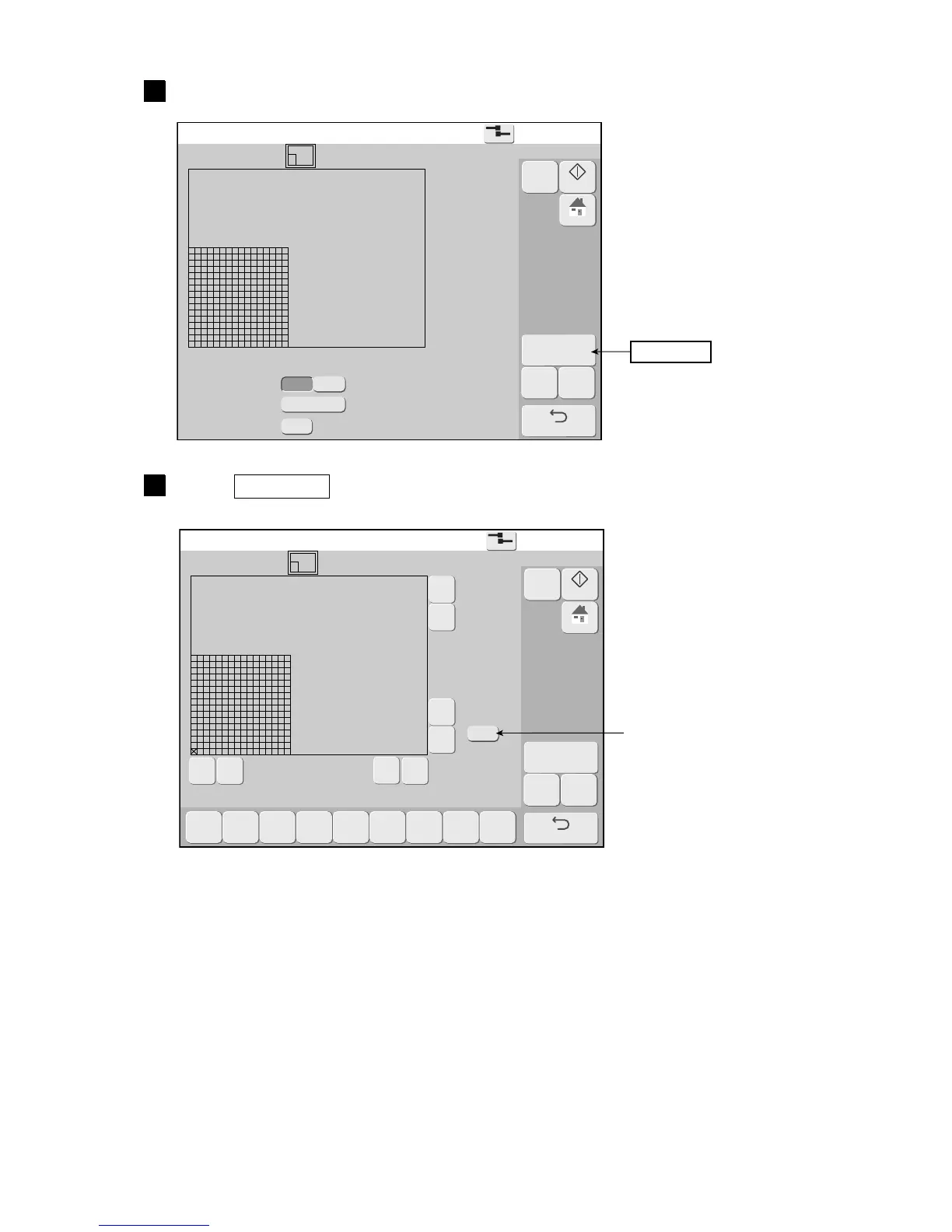
7-16 Creating a user pattern
2
Create user pattern
2015.07.0712:45
Com=0
[Stop      ]
Pattern  [  ]
Horizontal dot
Dot matrix
Inter-char. space
Fixed
Free
12x16
4
Create/Edit
Back
Select Save
M
Manual
Startup
HOME
Create user pattern
2015.07.0712:45
Com=0
[Stop      ]
Pattern  [  ]
Pattern size
Hor. 16
Vert. 16
Cursor
position
Hor. 1
Vert. 1]
Zoom
×1
Clear
Back
Select Save
Dupli-
cate
Paste Move
Clear
area
Invert
Rec-
tangle
Rec-
tangle
fill
〈
《 》
〉
▲
△
▼
▽
M
Manual
Startup
HOME
Set the dot matrix and inter-character space.
3
Press Create/Edit .
The Create/Edit screen is displayed.
Create/Edit
Changes the display
magnification
(X1, X2, X4).

Table of Contents

Other manuals for Hitachi RX

Related product manuals