EasyManua.ls Logo

Hitachi VM-3100A - Page 7

Hitachi VM-3100A
36 pages
To Next Page IconTo Next Page
To Previous Page IconTo Previous Page
Loading...
CHECKING
THE
BATTERY
PACK
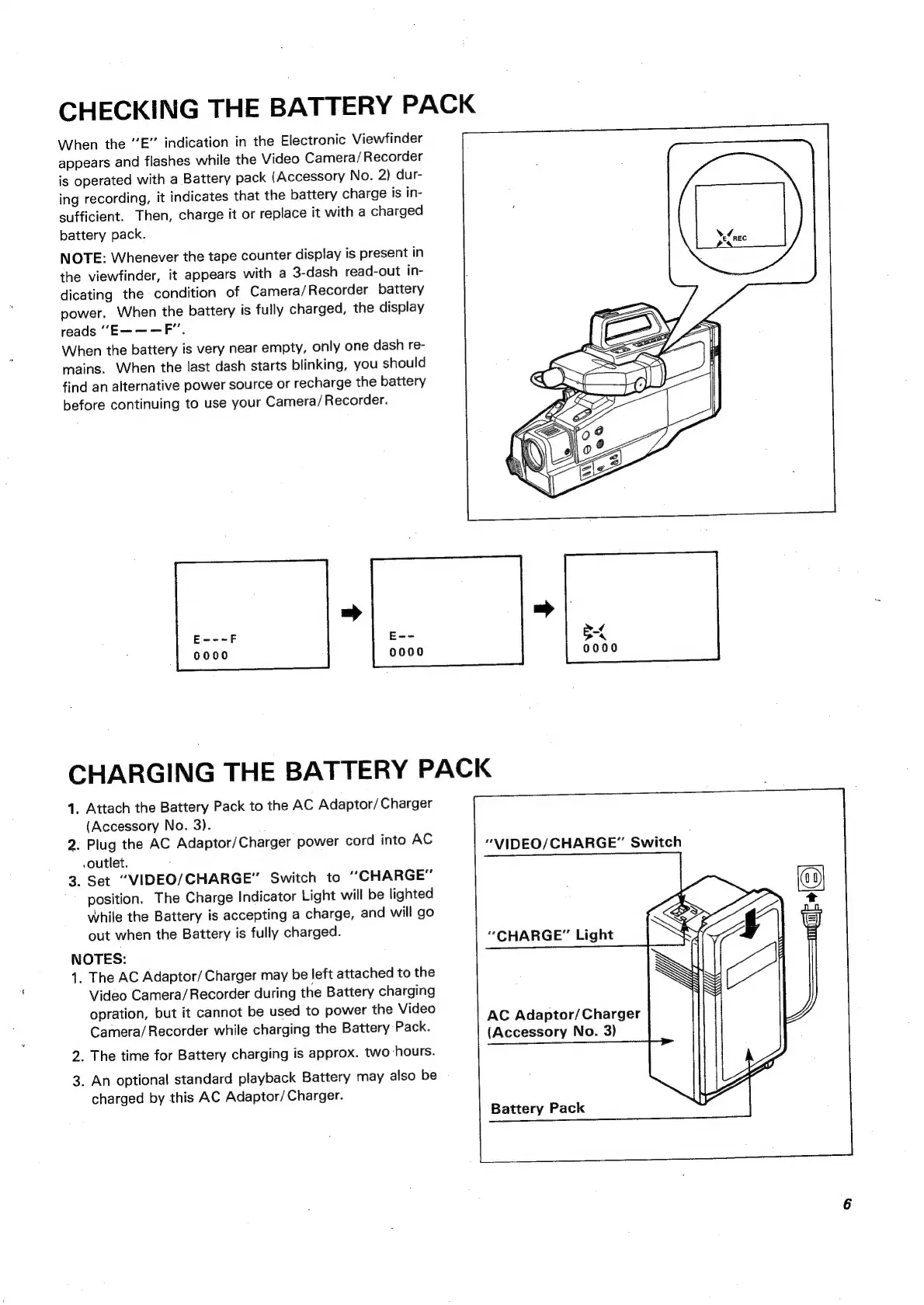
When
the
E”
indication
in
the
Electronic
Viewfinder
appears
and
flashes
while
the
Video
Camera/Recorder
is
operated
with
a
Battery
pack
(Accessory
No.
2)
dur-
ing
recording,
it
indicates
that
the
battery
charge
is
in-
sufficient.
Then,
charge
it
or
replace
it
with
a
charged
battery
pack.
NOTE:
Whenever
the
tape
counter
display
is
present
in
the
viewfinder,
it
appears
with
a
3-dash
read-out
in-
dicating
the
condition
of
Camera/Recorder
battery
power.
When
the
battery
is
fully
charged,
the
display
reads
“E———F”.
When
the
battery
is
very
near
empty,
only
one
dash
re-
mains.
When
the
last
dash
starts
blinking,
you
should
find
an
alternative
power
source
or
recharge
the
battery
before
continuing
to
use
your
Camera/
Recorder.
Es=
0000
0000
CHARGING
THE
BATTERY
PACK
1.
Attach
the
Battery
Pack
to
the
AC
Adaptor/
Charger
(Accessory
No.
3).
2.
Plug
the
AC
Adaptor/Charger
power
cord
into
AC
outlet.
:
3.
Set
“VIDEO/CHARGE”
Switch
to
“CHARGE”
position.
The
Charge
Indicator
Light
will
be
lighted
While
the
Battery
is
accepting
a
charge,
and
will
go
out
when
the
Battery
is
fully
charged.
NOTES:
1.
The
AC
Adaptor/
Charger
may
be
left
attached
to
the
Video
Camera/
Recorder
during
the
Battery
charging
opration,
but
it
cannot
be
used
to
power
the
Video
Camera/
Recorder
while
charging
the
Battery
Pack.
2.
The
time
for
Battery
charging
is
approx.
two
hours.
3.
An
optional
standard
playback
Battery
may
also
be
charged
by
this
AC
Adaptor/
Charger.
“VIDEO/CHARGE”
Switch
“CHARGE”
Light
AC
Adaptor/
Charger
(Accessory
No.
3)
Battery
Pack

Related product manuals