Version 1.0, 05/2013. Copyright 2012 Hitron Technologies
31
Version 1.0, 05/2013. Copyright 2013 Hitron Technologies
31
Hitron CDA-RES User’s Guide
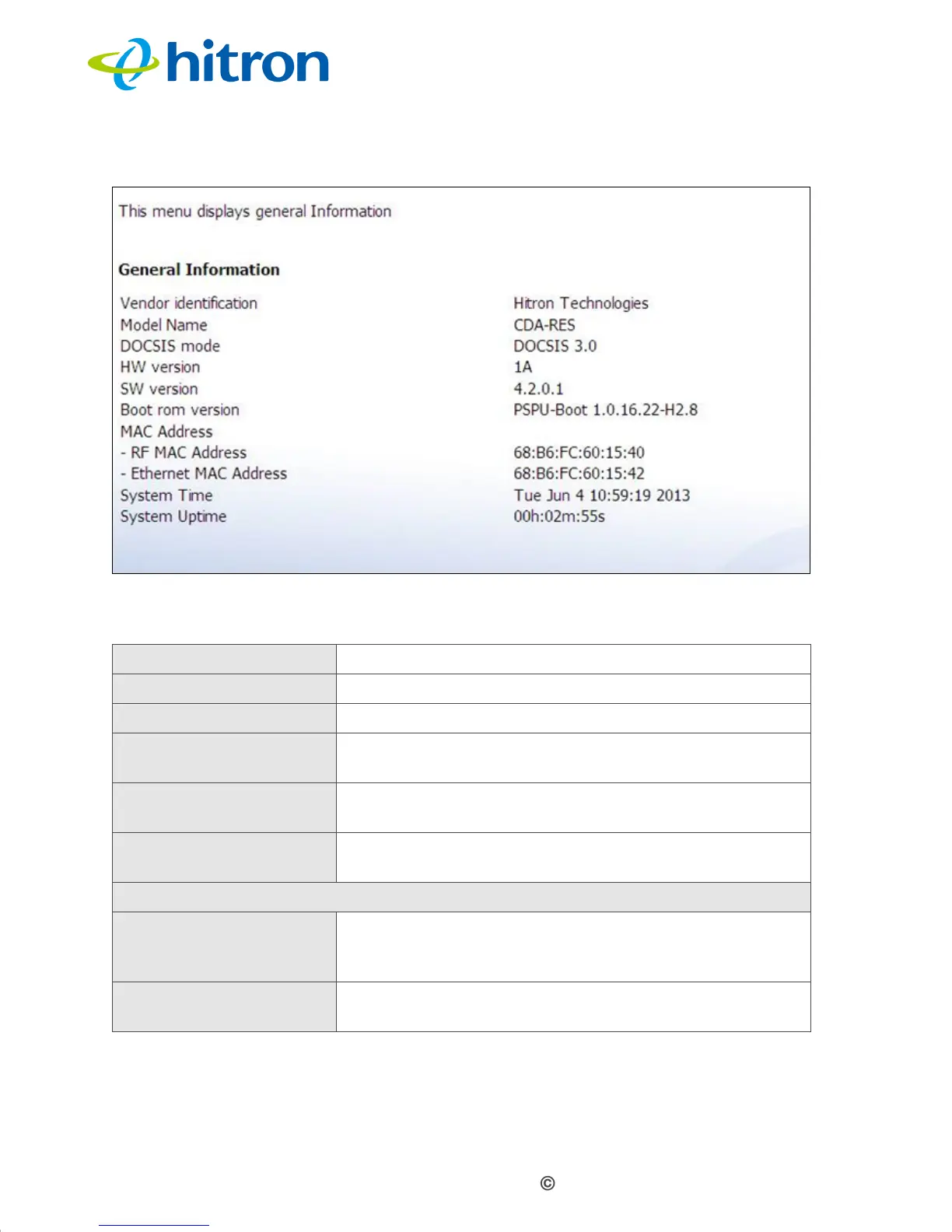
Figure 7: The Cable: System Info Screen
The following table describes the labels in this screen.
Table 8: The Cable: System Info Screen
Vendor Identification This displays the vendor name of the CDA-RES.
Model Name This displays the device’s model name.
DOCSIS Mode This displays the DOCSIS mode of the CDA-RES.
HW Version This displays the version number of the CDA-RES’s
physical hardware.
SW Version This displays the version number of the software that
controls the CDA-RES.
Boot rom version This displays the version number of the CDA-RES’s
boot rom.
MAC Address
RF MAC Address This displays the Media Access Control (MAC) address
of the CDA-RES’s RF module. This is the module that
connects to the Internet through the Cable connection.
Ethernet MAC
Address
This displays the Media Access Control (MAC) address
of the CDA-RES’s Ethernet.


 To Next Page