5G WIRELESS SETTINGS
Version 1.0, 04/2015. Copyright 2012 Hitron Technologies
35
Version 1.0, 04/2015. Copyright 2015 Hitron Technologies
35
Hitron HT-EMN2 User’s Guide
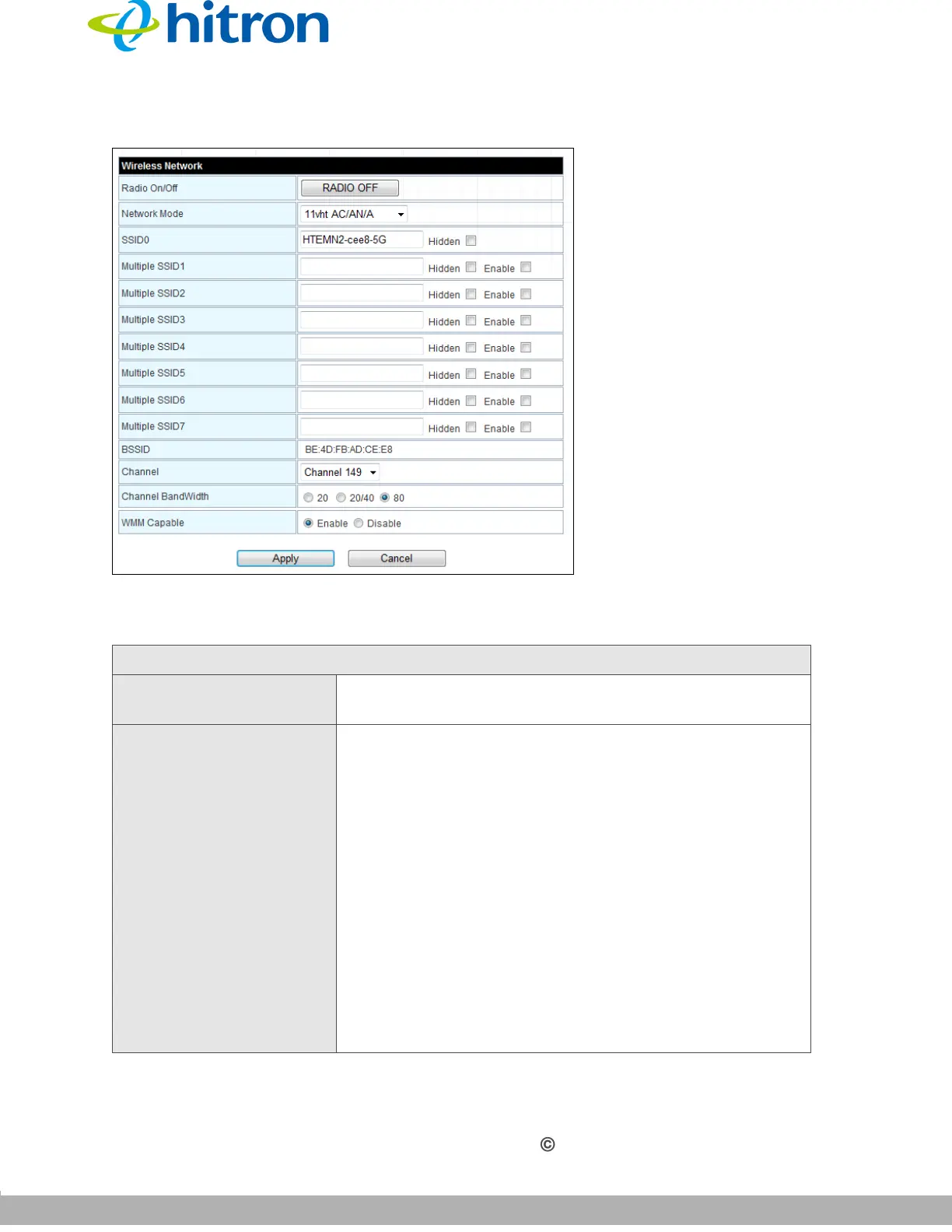
Figure 10: The 5G Wireless Settings: Basic Screen
The following table describes the labels in this screen.
Table 9: The 5G Wireless Settings: Basic Screen
Wireless Network
Radio On/Off Use this field to turn the 5GHz wireless network on or
off.
Network Mode Select the type of wireless network that you want to use:
802.11 11a Only: use IEEE 802.11a
802.11 a/n Mixed: use IEEE 802.11a and 802.11n
802.11 11n Only: use IEEE 802.11n
802.11 vht ac/an/a: use IEEE 802.11ac, 802.11an/
and 802.11a
802.11 vht ac/an: use IEEE 802.11ac and
802.11an
Only wireless clients that support the network protocol
you select can connect to the wireless network. If in
doubt, use 11vht ac/an/n (default).


 To Next Page