5G WIRELESS SETTINGS
Version 1.0, 04/2015. Copyright 2012 Hitron Technologies
37
Version 1.0, 04/2015. Copyright 2015 Hitron Technologies
37
Hitron HT-EMN2 User’s Guide
4.2 The Security Screen
Use this screen to configure your HT-EMN2’s 5G wireless network authentication and
encryption.
NOTE: It is strongly recommended that you set up security on your network;
otherwise, anyone in the radio coverage area can access your network.
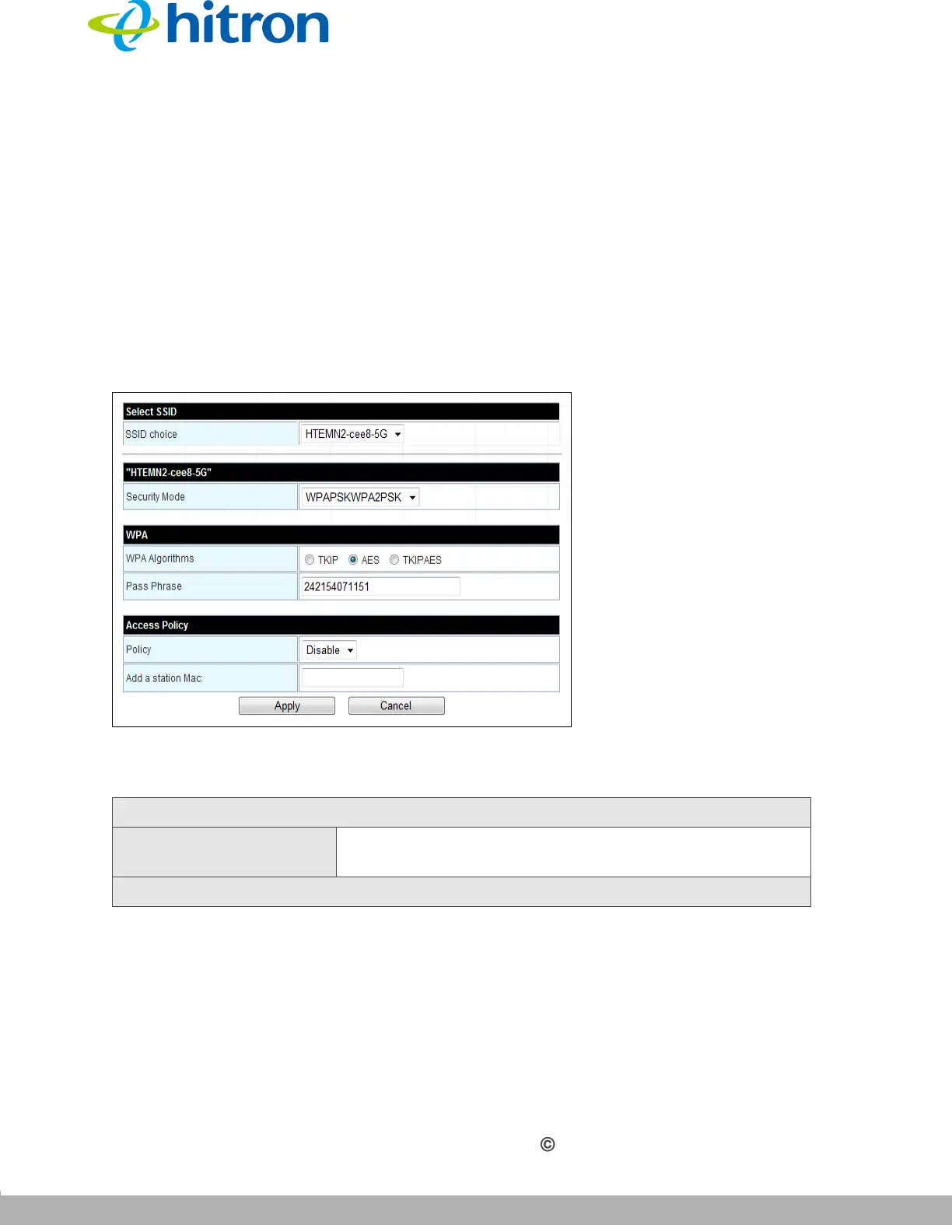
Click 5G Wireless Settings > Security. The following screen displays.
Figure 12: The 5G Wireless Settings: Security Screen
The following table describes the labels in this screen.
Table 10: The 5G Wireless Settings: Security Settings Screen
Select SSID
SSID choice Your HT-EMN2 has multiple SSIDs. Click the SSID you
wish to configure to see its security fields.
SSID


 To Next Page