MOCA
Version 1.0, 04/2015. Copyright 2012 Hitron Technologies
45
Version 1.0, 04/2015. Copyright 2015 Hitron Technologies
45
Hitron HT-EMN2 User’s Guide
5.3 The MoCA Setup Screen
Use this screen to view and make changes to the HT-EMN2’s cable network settings.
NOTE: Do not change any of the settings in this screen unless you have a good
reason to do so!
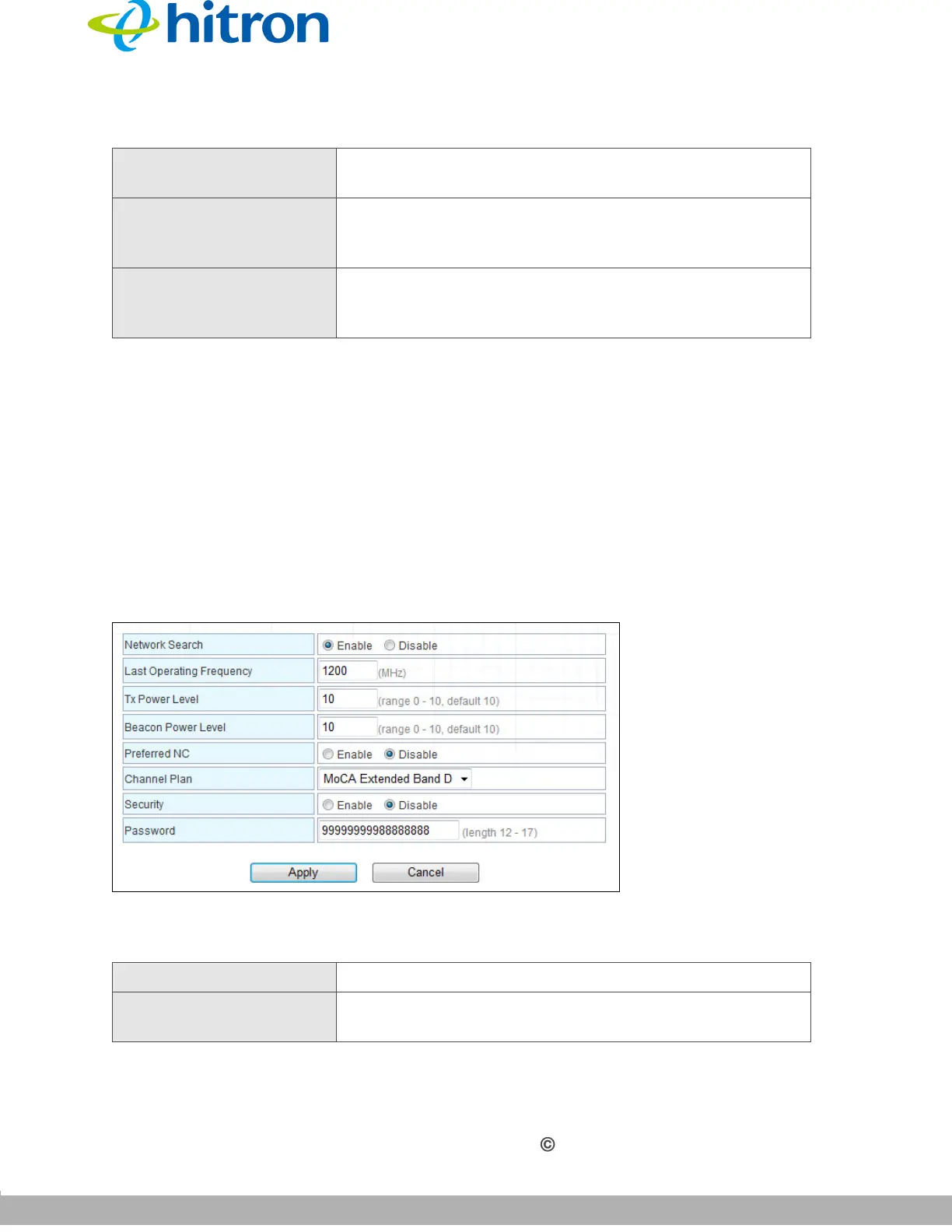
Click MoCA > MoCA Setup. The following screen displays.
Figure 18: The MoCA: MoCA Setup Screen
The following table describes the labels in this screen.
Link Status This displays whether or not the HT-EMN2 is connected
over the cable network.
Coax TX This displays the transmission (TX) power of the HT-
EMN2 on the cable network, from 0 (extremely weak) to
10 (extremely strong).
Coax RX This displays the strength of the signal that the HT-
EMN2 is receiving (RX) on the cable network, from 0
(extremely weak) to 10 (extremely strong).
Table 13: The MoCA: Coax Settings Screen
Network Search Use this to Enable or Disable MoCA function.
Last Operating
Frequency
Use this to set operation frequency of MoCA.
Table 12: The MoCA: MoCA Information Screen (continued)


 To Next Page