MEASURED DATA
Service +49(0)391 2514666 02/2017 Instruction Manual HMP LFGpro – en
Display / Print the Stored Measured Data
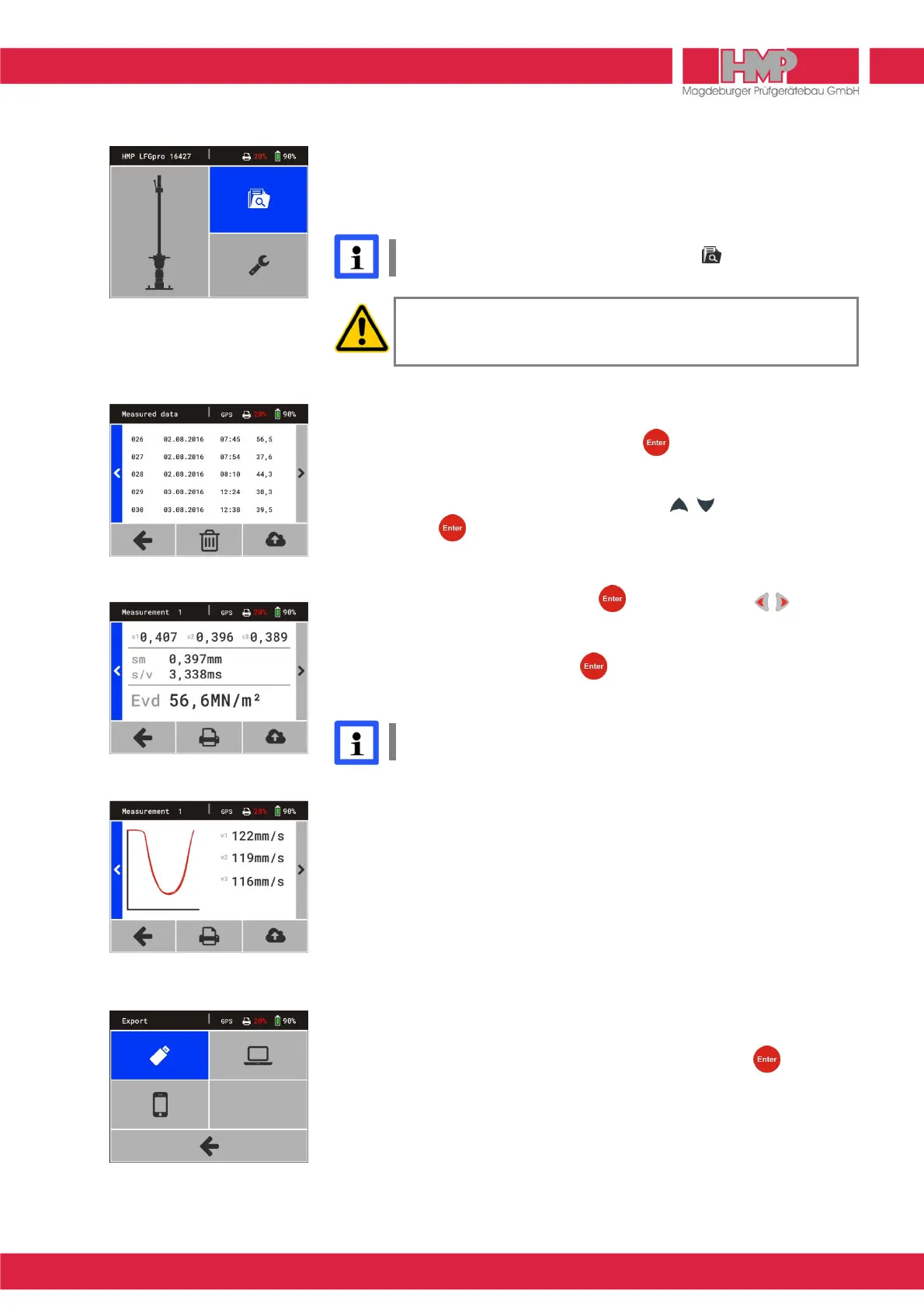
The in the database stored test series and -results can be displayed via
button
U
(Figure 21) on the screen and printed out if required (only devices
with printer).
When no data are safed in memory, the button is without function.
Before using the thermal printerAP1300 please read the instruction
manual ( page 19) and follow the given instructions regarding
putting into operation and handling.
■
Select and confirm the button
U
in the main menu.
The stored test series appear on the screen (Figure 22).
By confirming the buttons M or N with more test series can be
displayed.
■
Select the desired test series by means of the keys and confirm by
pressing the key.
The values of the selected test series are displayed on the screen
(Figure 23).
By confirming the buttons M or N with or by pressing the keys GPS
position and settlement curves with deformation rates (Figure 24) can be
displayed.
■
Select button
B
and confirm with key.
Data of selected test series are printed.
GPS data will only be printed, in case GPS is enabled J in menu
Settings/Device.
Export the Stored Measured Data
The test series and –results stored in the database can be transferred via USB
interface to the supplied USB stick or to PC or via HMPtransfer APP to web-
based evaluation software HMPreport.
Data Transfer Measuring Instrument → USB Stick
■
Connect the USB stick to the measuring instrument.
■
Select within measuring instrument under menu measured data
U
/
export
Q
the transfer mode P (Figure 25) and confirm with key.
The data are being copied to the USB stick.
After completion of data transfer the measuring instrument switches off
automatically.
To transfer the data from the USB stick to the PC see instruction manual
»Protocol software for the Light Weight Deflectometer«.



 To Next Page