THE LIGHT WEIGHT DEFLECTOMETER
Service +49(0)391 2514666 02/2017 Instruction Manual HMP LFGpro – en
Display
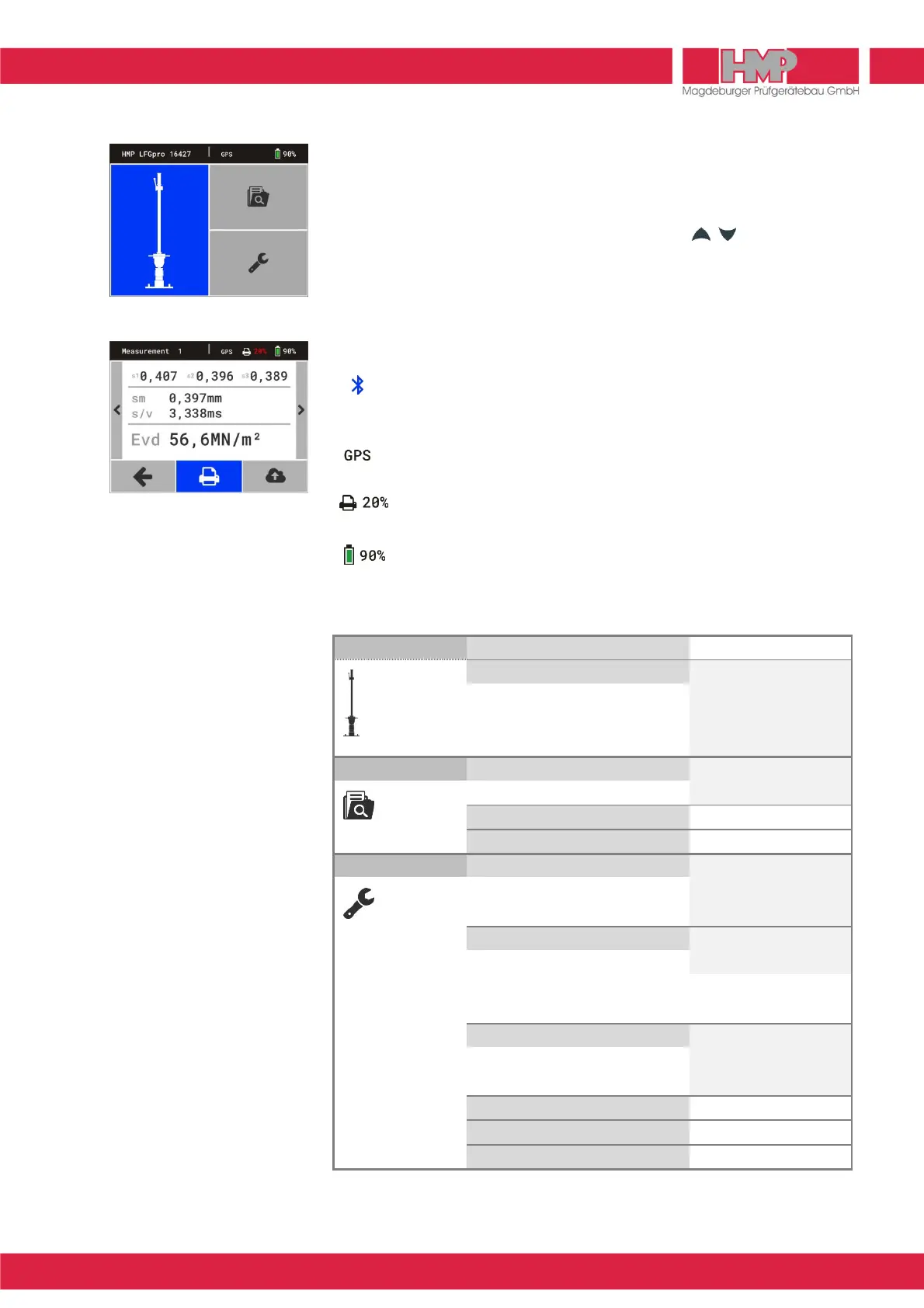
In the main menu the display is subdivided into status line and button area
(Figure 4).
In the submenus the display is subdivided into status line, button area/
indicating area and footer (Figure 5). With the keys can be switched
between button area/indicating area and footer.
The information on the left of status line will be changed according to several
menus. In the main menu (Figure 4) type and number of device are displayed
for example.
The information on the right side of status line is the same in all menus:
Status Bluetooth
displaying in status line, in case Bluetooth is active
(during data transfer only)
Status GPS
displaying in status line, in case GPS is active and available
State of charge of the printer
displaying in status line, in case printer is connected
State of charge of the measuring instrument
Overview Menu Functions
Measuring Precompaction
Measuring
Store E
Delete D
Print B
Export Q
Measured data Show single measurements
Print B
Export Q
Export Q
Delete (all measurements) D
Settings
Display K
Date
Time
Language
Device X
Drop weight
GPS
Unit
Calibration
Printer B
Head datea
Date/time
Graphics
Service L
Calibration menu M
Maintenance R
By confirming the button G you always come back to the previous menu.



 To Next Page