7. Electrical Installations108
Thetemperaturedisplaycanbechangedbyamaximumof+/-
12°C.
Exitthismenubyusingthe“Back”function;otherwise,after
oneminute,itwillautomaticallyswitchbacktothemainmenu
onthecontrolpanel.
01.09.15
8:59
0 °C
12:00
0 °C
08:59 19,5 °C
01.09.15
17,5 °C
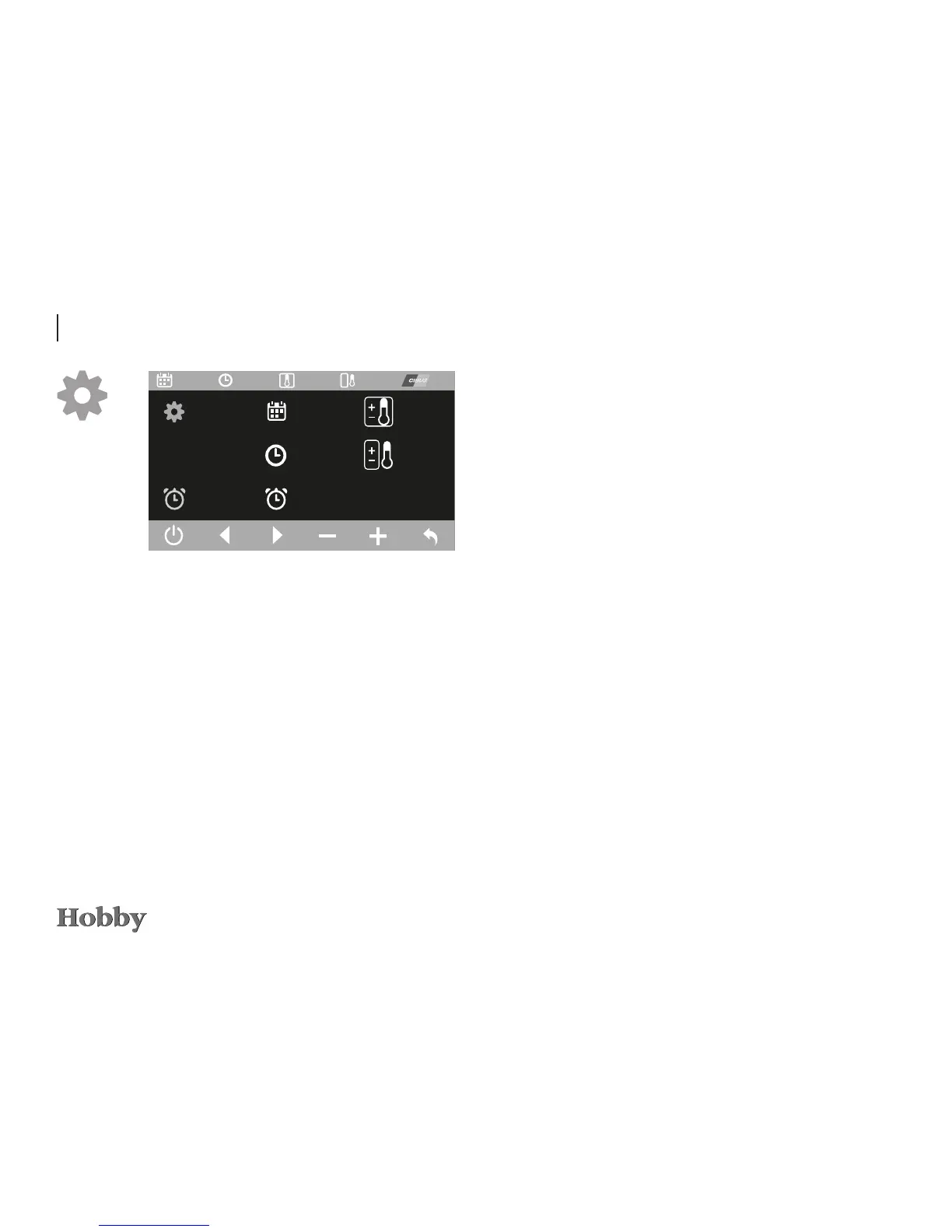
Settings menu (for data in the xed header A)
Thedateandtime can be setintheSettings menu. Use the
controlknobortheleftandrightarrowsto reachthedesired
value.Pressthecontrolknob;itisthenpossibletochangethe
valuesbyturningtheknob(right=increasevalue;left=decre-
asevalue)orbyusingthe“+/-”function.Pressthecontrolknob
toconrmthechangedvalue.Onlythenwillitbesaved.
Thewake-uptimeissetandconrmedinthesameway.Usethe
“On/O”functiontoactivatethealarmclock.Theactivatedalarm
clockisshowningreen.
Itisalsopossibletocalibratetheindoorandoutdoortempera-
turesshown,astemperatureeectsonthesensorsmayleadto
adeviationbetweenthetemperaturedisplayedandtheactual
temperature.





 To Next Page