10. Built-in devices 163
Reading out the warning code
- Use the adjusting knob / pushbut-
ton to select the icon.
- Press the adjusting knob / push-
button. The current warning code
will be displayed. Use the error
list to determine the cause of the
warning and eliminate it.
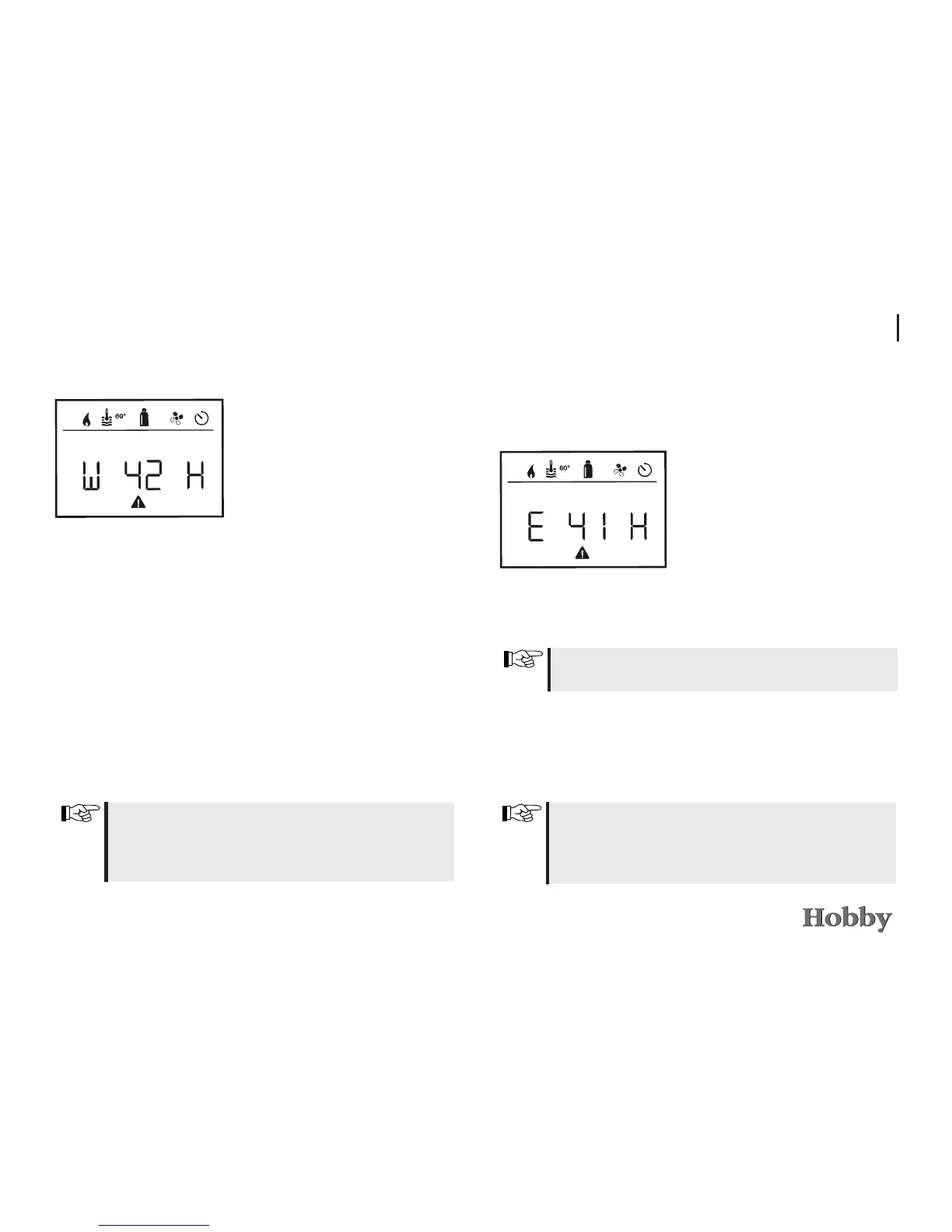
W = Warning
42 = Error code
H = Heating
Cause eliminated / Return to
setting mode
- Press the adjusting knob / push-
button.
Cause not eliminated / Return to
setting mode
- Press the reset button.
In this case, the warning will not be acknowledged on the control
panel and the warning icon will continue to be displayed. The
control panel will remain in a warning state. Other connected
devices can be operated.
Malfunction
If there is a malfunction, the control panel will immediately go to
“Malfunction” mode and display the Malfunction error code.
E = Malfunction
41 = Error code
H = Heating
Cause eliminated / Return to
setting mode
- Press the adjusting knob / push-
button.
- The corresponding device will be
restarted.
In this case, the malfunction will not be acknowledged on the
control panel and the warning icon will continue to be displayed.
The device will remain in a state of malfunction. Other connected
devices can be operated.
Cause not eliminated / Return to
setting mode
- Press the reset button.
Due to an internal lag feed in the connected devices, this may
take a few minutes.
If the cause has not been eliminated, the malfunction will occur again
and the control panel will once again go to “Malfunction” mode.



 To Next Page