7. Electrical Installations98
12:30 23,5 °C
09.01.15
18,0 °C
12:30 23,5 °C
09.01.15
18,0 °C
18:00 to 20:30 on
0:00 to 0:00 off
Lichtsystem
09.01.2015
17:00 to 22:00
14:00 -------
01.07.15
-------
14:00 -------
01.07.15
-------
On/O Timer
Activated timer
(blue dot)
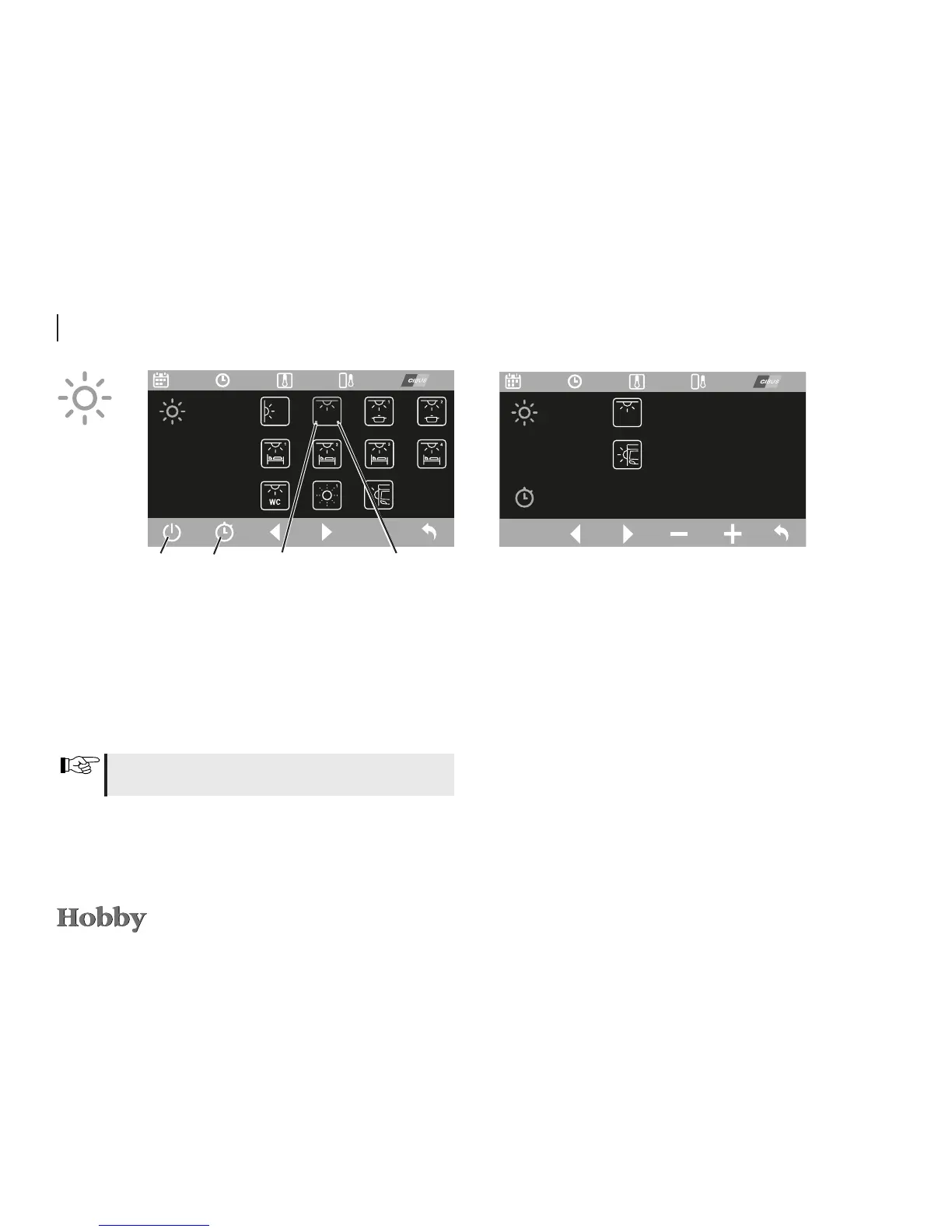
Lighting system
Select the desired light in the menu for the lighting system
bymeansofthecontrolknoborthearrowfunctions(display:
yellow).Pressonthecontrolknobortheleftsoftkeytoswitch
thecorrespondinglightonoro(activatedlightsaredisplayed
ingreen).
Accessthesubmenuforprogrammingthetimerbymeansof
thetimerfunction.Onlytheceilinglight(toprow)andtheouter
tentlight(bottomrow)canberegulatedusingthetimer.Acti-
vateordeactivatethe“O”functionasappropriate.
Thelightsforbed3andbed4areonlyassignedinthealcove
bed and alcove models.
Lichtsystem
12:30 23,5 °C
09.01.15
18,0 °C
12:30 23,5 °C
09.01.15
18,0 °C
18:00 to 20:30 on
0:00 to 0:00 off
Programming the timer
Triggerthedesiredvaluebymeansofthearrowkeysorthe
controlknobandpress the “On/O” function or the control
knobtoselectit.Turnthecontrolknoborusethe“+/-”func-
tionstosetthetime.Pressthecontrolknobagainorusethe
“On/O”functiontoconrmthesettime.
Activating/deactivating the timer
The timer will only be activated if the function to the right is
changedfrom“O”to“On”(thewaytodothisisidenticalto
programmingthetimer).
Deactivatethetimer bysettingthefunctionfrom“On”back
to“O”.
Light is
switched on
(green dot)




 To Next Page