5
3.4 Reading an implanted microchip
3.4.1 Scanning and LOCATING AN IMPLANTED MICROCHIP
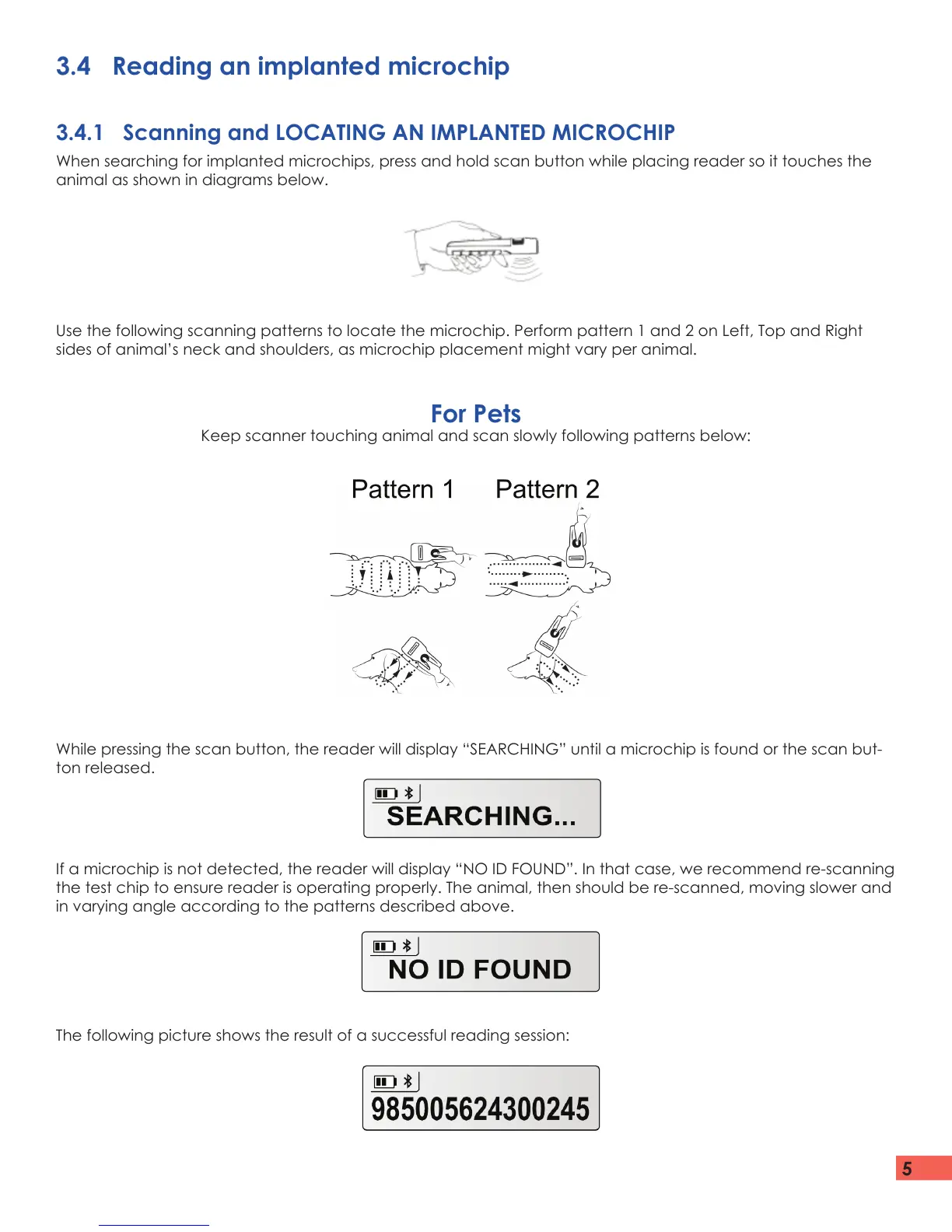
When searching for implanted microchips, press and hold scan button while placing reader so it touches the
animal as shown in diagrams below.
For Pets
Keep scanner touching animal and scan slowly following patterns below:
Use the following scanning patterns to locate the microchip. Perform pattern 1 and 2 on Left, Top and Right
sides of animal’s neck and shoulders, as microchip placement might vary per animal.
While pressing the scan button, the reader will display “SEARCHING” until a microchip is found or the scan but-
ton released.
If a microchip is not detected, the reader will display “NO ID FOUND”. In that case, we recommend re-scanning
the test chip to ensure reader is operating properly. The animal, then should be re-scanned, moving slower and
in varying angle according to the patterns described above.
The following picture shows the result of a successful reading session:


 To Next Page