9
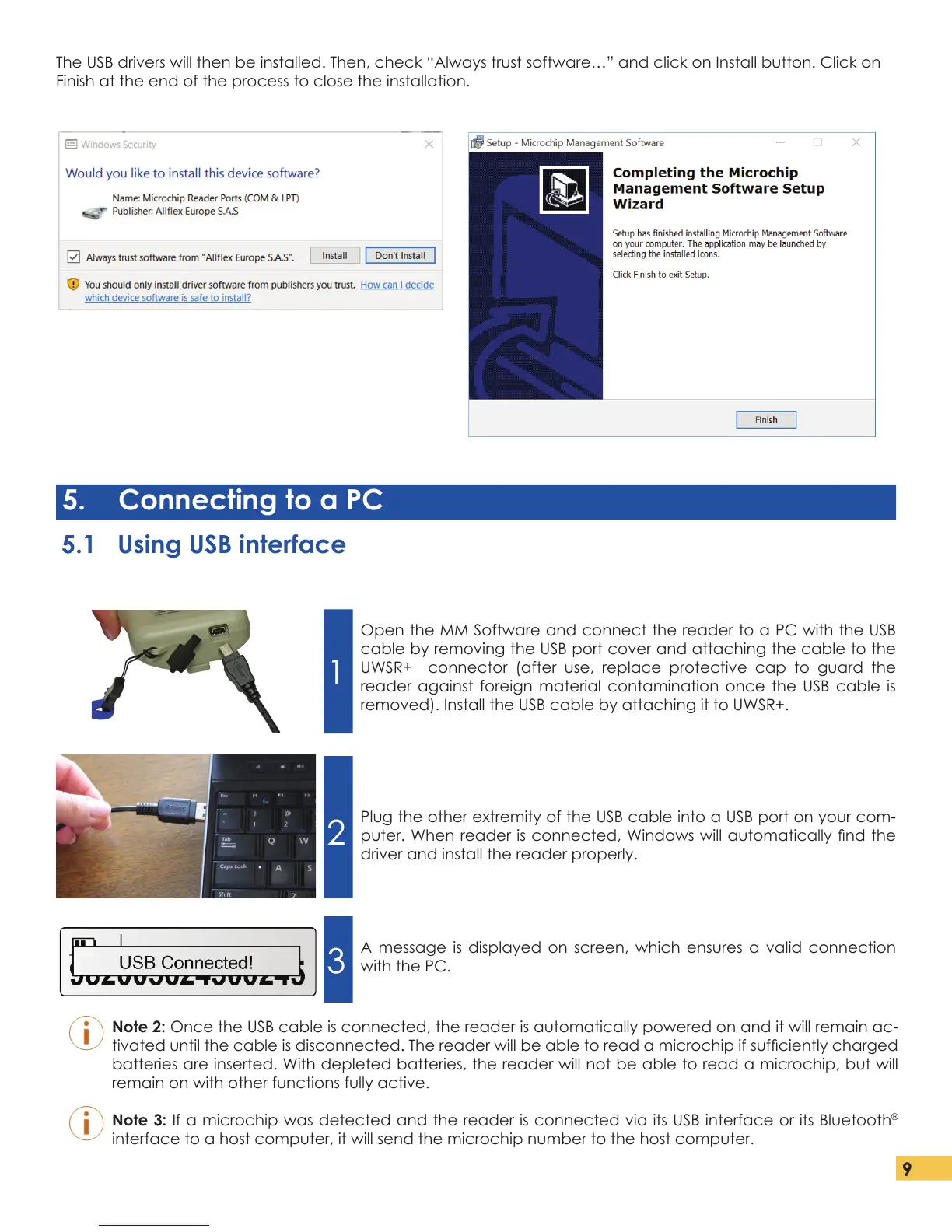
The USB drivers will then be installed. Then, check “Always trust software…” and click on Install button. Click on
Finish at the end of the process to close the installation.
5. Connecting to a PC
5.1 Using USB interface
Open the MM Software and connect the reader to a PC with the USB
cable by removing the USB port cover and attaching the cable to the
UWSR+ connector (after use, replace protective cap to guard the
reader against foreign material contamination once the USB cable is
removed). Install the USB cable by attaching it to UWSR+.
Plug the other extremity of the USB cable into a USB port on your com-
puter. When reader is connected, Windows will automatically nd the
driver and install the reader properly.
A message is displayed on screen, which ensures a valid connection
with the PC.
Note 2: Once the USB cable is connected, the reader is automatically powered on and it will remain ac-
tivated until the cable is disconnected. The reader will be able to read a microchip if sufciently charged
batteries are inserted. With depleted batteries, the reader will not be able to read a microchip, but will
remain on with other functions fully active.
Note 3: If a microchip was detected and the reader is connected via its USB interface or its Bluetooth
®
interface to a host computer, it will send the microchip number to the host computer.
1
2
3


 To Next Page