© 2013 American Honda Motor Co., Inc. – All Rights Reserved. AII 50024-50373 (1308) 21 of 25
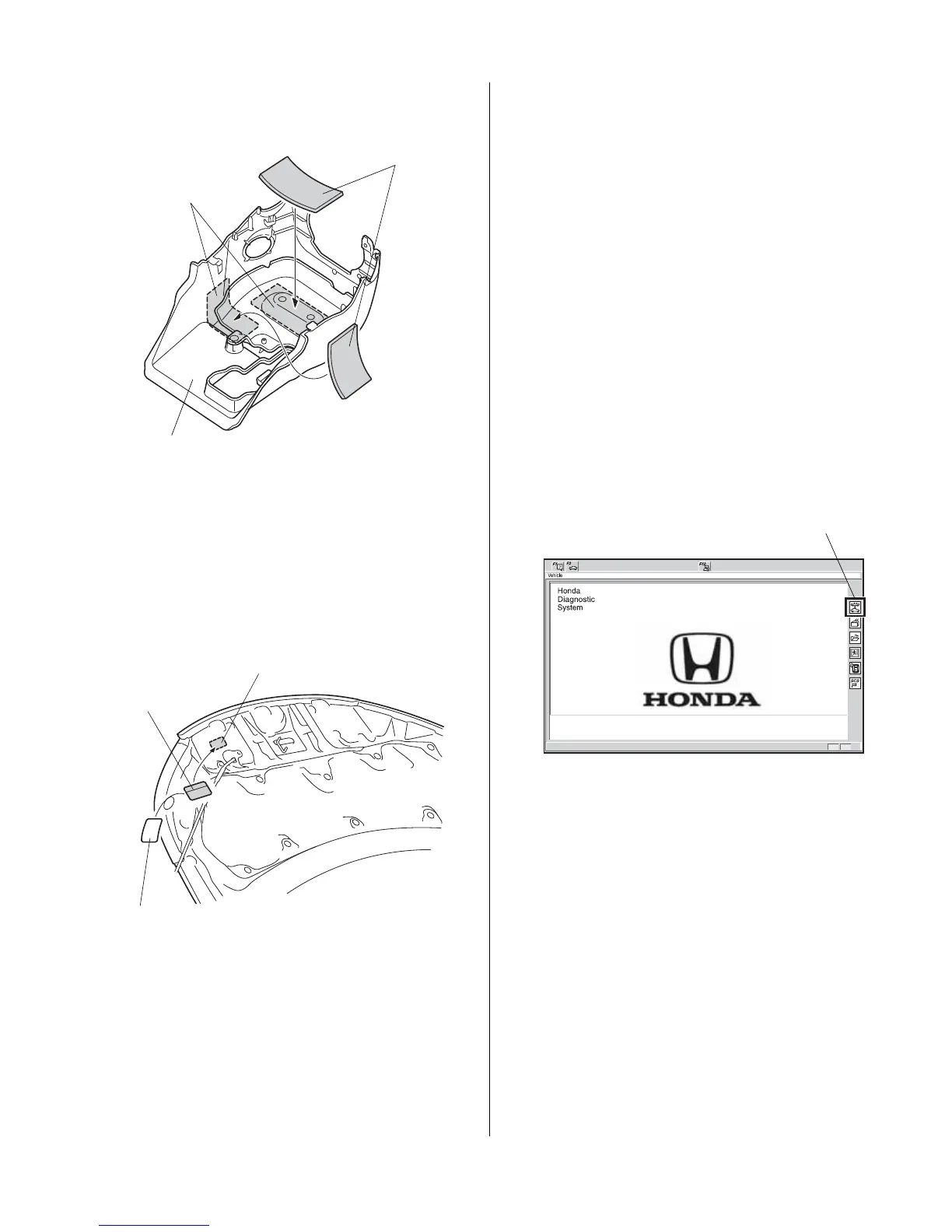
80. Using isopropyl alcohol on a shop towel, clean the
areas where the urethane tape will attach.
Clean with
isopropyl alcohol.
2 URETHANE
TAPES
LOWER COLUMN
COVER
(inside)
81. Attach two pieces of urethane tape to the inside of
the lower column cover.
82. Open the hood. Using isopropyl alcohol on a shop
tow
el, clean the hood where the caution label will be
attached.
ADHESIVE
BACKING
(Remove.)
CAUTION
LABEL
HOOD
(Clean with
isopropyl alcohol.)
83. Remove the adhesive backing from the caution
label, and attach the caution label to the hood.
84. Make sure that all harness and cables are routed
properly and that all connectors are plugged in.
85. Reinstall all removed parts.
86. Reconnect the negative cable to the battery.
87. Check the operation of the headlights and wipers.
88. Press and hold the radio power button for two
se
conds to restore the radio and navigation (if
equipped) system functions.
89. Reset the clock on vehicles without navigation.
90. Proceed to REMOTE ENGINE STARTER
REGISTRATION and Check the operation of the
Remote Control Engine Starter.
REMOTE ENGINE STARTER REGISTRATION
NOTE: Make sure the HDS has been upgraded to the
latest v
ersion.
1. Retrieve the PCM code from the Interact
ive Network
(iN).
QC31909AC
2. Connect the HDS/MVCI tester to the OBD II data link
connector, then turn the ignition switch to ON (II)
position.
3. Start the HDS, and click the car icon.


 To Next Page