Continued
153
uuGauges and Driver Information InterfaceuDriver Information Interface
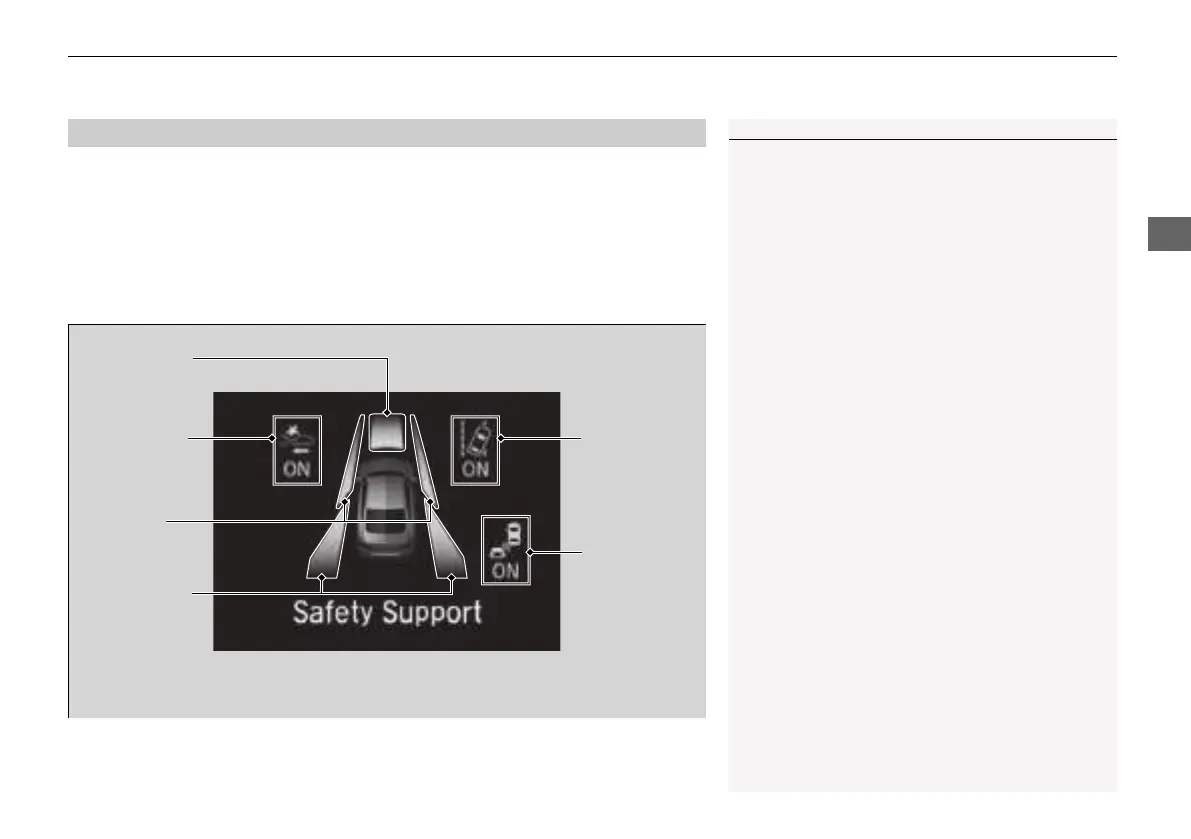
Indicates the state of RDM, CMBS
TM
and blind spot information system
*
, such as On,
Off, or Failure, by color and letters.
The following colors indicate the state of any of the above mentioned systems:
• Green: The system is on.
• Gray: The system is off.
• Amber: There is a problem with the system.
■
Safety Support
1Safety Support
If a system is indicated by the color amber, have your
vehicle checked by a dealer immediately.
To turn on or off each system, first rotate the left
selector wheel to switch displays. From the next
display you can select which system to turn on or off.
2 RDM On and Off P. 527
2 CMBS
TM
On and Off P. 493
2 Blind spot information System On and Off
P. 485
You can also confirm the state of the each function
by the color of the safety support indicator.
2 Safety Support Indicator (Amber) P. 103
2 Safety Support Indicator (Green/Gray)
P. 106
Area Info for
CMBS
TM
CMBS
TM
Icon
and State Info
RDM Icon and
State Info
Area Info
for RDM
Area Info for
Blind spot
information
system
*
Blind spot
information
system Icon
and State
Info
*
* Not available on all models
21 INSIGHT-31TXM6200.book 153 ページ 2020年2月5日 水曜日 午前10時0分














 To Next Page