571
uuMaintenance Minder
TM
uTo Use Maintenance Minder
TM
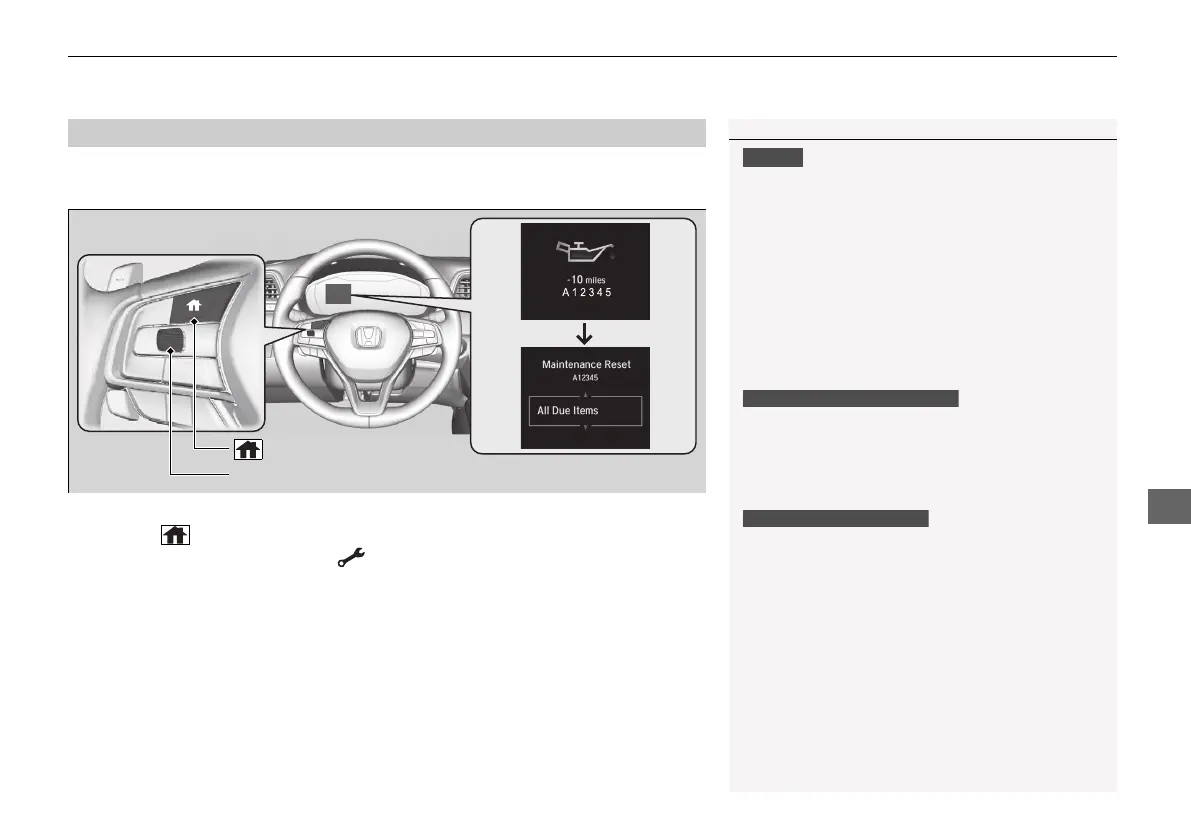
Reset the maintenance minder information display if you have performed the
maintenance service.
1. Set the power mode to ON.
2. Press the (home) button.
3. Roll the left selector wheel until is displayed.
4. Press the left selector wheel to go to the Maintenance screen.
5. Press the left selector wheel to enter the reset mode.
6. Roll the left selector wheel to select a maintenance item to reset, or to select All
Due Items (You can also select Cancel to end the process).
7. Press the left selector wheel to reset the selected item.
8. Repeat from step 5 for other items you wish to reset.
■
Resetting the Display
Failure to reset the Maintenance Minder
TM
display
after a maintenance service results in the system
showing incorrect maintenance intervals, which can
lead to serious mechanical problems.
The dealer will reset the Maintenance Minder
TM
display after completing the required maintenance
service. If someone other than a dealer performs
maintenance service, reset the Maintenance
Minder
TM
display yourself.
You can also reset the Maintenance Minder
TM
display
using the customized features on the driver
information interface.
2 Customized Features
*
P. 158
You can also reset the Maintenance Minder
TM
display
using the audio/information screen.
2 Customized Features P. 372
Models with color audio system
Models with Display Audio
Left Selector Wheel
(home) Button
* Not available on all models
21 INSIGHT-31TXM6200.book 571 ページ 2020年2月5日 水曜日 午前10時0分














 To Next Page