EasyManua.ls Logo

Honeywell 7800 SERIES - User Manual

Honeywell 7800 SERIES
56 pages
Print Icon
To Next Page IconTo Next Page
Loading...
1 65-0120—1
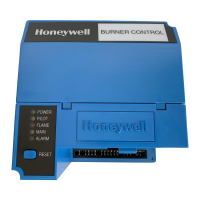
The Honeywell RM7838B is a microprocessor based
integrated burner control for industrial process semi-
automatically fired gas, oil, coal or combination of fuels
for single burner applications. The RM7838B consists
of a Relay Module, Subbase, Amplifier, Keyboard Dis-
play Module and Purge Card. Options include Personal
Computer Interface, DATA CONTROLBUS MOD-
ULE™, Remote Display Mounting, First-Out Expanded
Annunciator and software COMBUSTION SYSTEM
MANAGER
®
.
The RM7838B is programmed to provide a level of
safety, functional capability and features beyond the
capacity of conventional process control combustion
systems.
Functions provided by the RM7838B include auto-
matic modulated high fire and low fire proven purge,
burner pilot start up with pilot valve hold, a special
pilot valve hold from the Run condition, flame supervi-
sion, system status indication, system or self-diagnos-
tics and troubleshooting.
7800 SERIES
RM7838B Relay Module
L.Z. • Rev. 1-95 • ©Honeywell Inc. 1995
65-0120-1
Safety features:
Combustion Interlock check.
Closed loop logic test.
Dynamic input check.
Dynamic safety relay test.
Dynamic self-check logic.
Expanded safe-start check.
High Fire Purge Switch test.
Internal hardware status monitoring.
Low Fire Purge Switch test.
Tamper resistant timing and logic.
Access for external electrical voltage checks.
Application flexibility.
Communication interface capability via personal com-
puter utilizing MicroSoft
®
Windows™ software.
First out annunciation and system diagnostics provided by
2 row by 20 column Vacuum Fluorescent Display (VFD)
located within the local or remotely mounted Keyboard
Display Module.
First out expanded annunciation with 24 limit and inter-
lock Light Emitting Diodes (LEDs) (optional).
Five sequence information LEDs.
Five function Run/Test Switch.
Interchangeable plug-in flame amplifiers.
Local or remote annunciation of operation and fault
information.
Dependable, long-term operation provided by microcom-
puter technology.
Nonvolatile memory for retaining history files and se-
quencing status after loss of power.
Remote reset (optional).
Report generation (optional).
Burner controller data (optional):
Sequence status.
Sequence time.
Hold status.
Lockout/alarm status.
Flame signal strength.
Expanded annunciator status.
Total cycles of operation.
Total hours of operation.
Fault history of six most recent faults:
Cycles of operation at time of fault.
Expanded annunciator data at time of fault.
Fault message and code.
Hours of operation at time of fault.
Sequence status at time of fault.
Sequence time at time of fault.
Diagnostic information:
Device type.
Flame amplifier type.
Flame failure response time.
Manufacturing code.
On/Off status of all line voltage digital inputs.
Selected purge time.
Software revision and version of RM7838B and
Keyboard Display Module.
Status of configuration jumpers.
Status of Run/Test switch.
On/Off status of all line voltage digital outputs.

Table of Contents

Other manuals for Honeywell 7800 SERIES

Questions and Answers

  • G
    Gregory RodriguezSep 4, 2025
    What does Honeywell Control Unit Code 4-1 *Purge Card Problem* mean?
    • P
      pjosephSep 4, 2025
      If your Honeywell Control Unit displays Code 4-1, indicating a *Purge Card Problem*, it means there is no purge card or the purge card timing has changed from the original configuration. Here’s how to address it: 1. Make sure the purge card is seated properly. 2. Inspect the purge card and the connector on the Relay Module for any damage or contaminants. 3. Reset and sequence the Relay Module. 4. If the fault code reappears, replace the purge card. 5. Reset and sequence the Relay Module. 6. If the fault code persists, replace the Relay Module.
  • S
    Sara HughesAug 25, 2025
    How to reset Honeywell 7800 Relay Module?
    • A
      anne12Aug 25, 2025
      To reset the Honeywell Control Unit Relay Module, either press the reset button located on the Relay Module itself, or use a remote reset button wired through the Keyboard Display Module, DATA CONTROLBUS MODULE™, or Remote Reset Module.
  • S
    Shelley CoxSep 23, 2025
    What does RUN LOWFIRE TEST (Run/Test Switch) mean on Honeywell Control Unit?
    • P
      patrickmillerSep 23, 2025
      The KDM indicates the burner status and that the Run/Test Switch is in the TEST position.
  • C
    cadamsSep 10, 2025
    What to do if Honeywell 7800 shows configuration jumper problem?
    • W
      William HaleSep 10, 2025
      If the Honeywell Control Unit displays a 'Configuration Jumper Problem', indicating that the configuration jumpers differ from the sample taken at startup, inspect the jumper connections, ensuring that any clipped jumpers were completely removed. Reset and sequence the relay module. If the fault persists, replace the relay module.
  • C
    Christopher HopkinsSep 15, 2025
    What does FAULT 29 Lockout ILK mean on Honeywell Control Unit, and how to fix it?
    • S
      Sandra DixonSep 15, 2025
      If your Honeywell Control Unit displays FAULT 29, indicating a Lockout Interlock fault, you should check the wiring and correct any errors.
  • N
    Nicholas RosalesSep 7, 2025
    Why is flame signal absent in Honeywell 7800 Control Unit?
    • A
      ashley69Sep 7, 2025
      If your Honeywell Control Unit is experiencing a 'Flame Signal Absent' issue, where no flame is detected when expected, follow these steps: * Measure the flame signal to ensure it meets the required specifications. * Confirm the flame amplifier and flame detector are compatible. * Inspect the main fuel valve(s) and their connections. * Verify sufficient fuel pressure to the combustion chamber and check the fuel pressure switches. * Inspect the Airflow Switch for proper function. Also, check the flame detector sighting position, reset and recycle, and measure the flame signal strength. If needed, replace the flame amplifier or detector. If the issue continues, replace the relay module.
  • K
    kparkSep 1, 2025
    What to do if Honeywell Control Unit displays Code 4-3 *Flame Amplifier Problem*?
    • M
      Melissa BallardSep 1, 2025
      If your Honeywell Control Unit displays Code 4-3, indicating a *Flame Amplifier Problem*, here’s how to troubleshoot: 1. Check the wiring and correct any errors. 2. Ensure that the flame amplifier and flame detector are compatible. 3. Remove the flame amplifier and inspect its connections. Reseat the amplifier. 4. Reset and sequence the Relay Module. 5. If the code reappears, replace the flame amplifier and/or the flame detector. 6. If the fault persists, replace the Relay Module.
  • M
    Mary HoltDec 1, 2025
    What does 'Airflow Sw. On' indicate on Honeywell Monitor?
    • A
      Angela HollowayDec 1, 2025
      The 'Airflow Sw. On' error on the Honeywell Monitor indicates a combustion airflow interlock fault during Standby. To troubleshoot: 1. Check wiring to ensure that the Airlock Switch is connected properly between terminals 6 and 7. Correct any errors. 2. Reset and sequence the 7800. 3. If the fault persists, measure the voltage between terminals 6 and G (ground), then terminal 7 and G (ground). If there is 120 Vac at terminal 6 when the controller is off, the controller switch may be bad or is jumpered. 4. If steps 1 through 3 are correct and there is 120 Vac at terminal 7 while the controller is closed and the fault persists, check for a welded or jumpered Running Interlock, Lockout Interlock or Airflow Switch. Correct any errors. 5. If steps 1 through 4 are correct and the fault per...
  • L
    Luis PinedaDec 1, 2025
    What to do if Honeywell 7800 Control Unit displays Code 2-2 *Flame Signal Absent*?
    • H
      hallhannahDec 1, 2025
      If your Honeywell Control Unit displays Code 2-2 indicating a *Flame Signal Absent*, here's what you can do: * First, measure the flame signal to ensure it meets specifications. * Next, verify the compatibility of the flame amplifier and flame detector. * Inspect the main fuel valve(s) and their connections. * Confirm that the fuel pressure is adequate for the combustion chamber, and inspect the connections to the fuel pressure switches, ensuring they function correctly. * Also, inspect the Airflow Switch to ensure proper operation. * Check the flame detector's sighting position, then reset and recycle, measuring the flame signal strength again. If it doesn't meet specifications, consult the installation instructions for flame detector and amplifier checkout procedures. * If...
  • A
    amber89Aug 27, 2025
    What causes Honeywell Monitor to show 'Pilot Flame Fail'?
    • S
      smithchadAug 27, 2025
      The Honeywell Monitor shows 'Pilot Flame Fail' due to pilot flame failure. To troubleshoot: * Check pilot valve wiring and operation, correcting any errors. * Check the fuel supply. * Check pilot pressure and repeat the pilot turn down test. * Check the ignition transformer electrode, flame detector, flame detector sighting, and flame amplifier. If the issue persists after these steps, replace the relay module.

Summary

Specifications

Principal Technical Features

Safety Shutdown Conditions

Details conditions triggering a safety shutdown or lockout.

Dynamic Flame Amplifier & Shutter Check

Details self-checking circuitry for the flame detection system.

Dynamic Self-Check Safety Circuit

Describes microcomputer and safety relay system self-testing.

First-Out Annunciation & Self-Diagnostics

Describes visual indication of sequence and self-diagnostic capabilities.

Installation

Installing the Flame Detector

Flame Detector Installation

Guidance on proper installation of flame detectors.

Operation

Sequence of Operation

Overview of the burner control sequence.

Normal Start-up Sequence

Covers steps from PURGE to IGNITION TRIALS.

Keyboard Display Module Functions

Explains the VFD display and LED indications.

Keyboard Functions

Run;Test Switch Functions

Run;Test Switch Operation

How the Run/Test switch alters burner sequence.

Static Checkout

Checkout

Preliminary Inspection

Initial checks to avoid common problems before testing.

Flame Signal Measurement

Procedure for measuring flame signal voltage.

Initial Lightoff Check for Proved Pilot

Steps to verify pilot operation and flame detection.

Initial Lightoff Check for Direct Spark Ignition

Steps for burners without a pilot, using direct spark ignition.

Pilot Turndown Test

Verifies main burner ignition with minimum pilot flame.

Ignition Interference Test

Checks for false flame signals from ignition spark.

Eliminating Ignition Interference

Methods to correct ignition interference issues.

Hot Refractory Saturation Test

Checks if hot refractory masks flame signal.

Hot Refractory Hold-in Test

Verifies hot refractory doesn't delay flameout response.

Safety Shutdown Tests

Verifies system response to various fault conditions.

Troubleshooting

RM7838 B System Diagnostics

Overview of the unit's self-diagnostic features.

Lockout Messages

Details the different lockout display states and reasons.

Hold and Fault Message Summary

Lists all annunciation messages and their system failure causes.

Honeywell 7800 SERIES Specifications

General IconGeneral
Model7800 SERIES
CategoryControl Unit
Frequency50/60 Hz
ApprovalsUL, CE
CommunicationCommunication Interface (Optional)

Related product manuals