FDAP configuration
Establish connection between WDM and FDAP
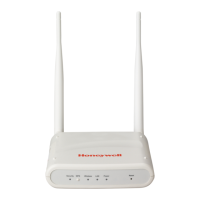
To establish connection between WDM and FDAP, power on the FDAP and connect FDAP
to the WDM through the FDN port of WDM. If you are using multiple FDAPs, you can use
an Ethernet switch to connect the FDAPs to the WDM. WDM enables you to commission,
configure, and monitor the FDAPs connected to it from a centralized location. All FDAP
configuration parameters are easily accessible from the WDM, which centralizes all key
functions required to manage the field device network and wireless field devices.
Log on to the OneWireless user interface and configure the WDM using the First Time
Configuration Wizard. The First Time Configuration wizard appears only for the first log on.
For more information about First Time Configuration and OneWireless user interface
details, see the Wireless Device Manager User’s Guide (OWDOC-X254-en).
Physical access to critical devices
A malicious operation of critical WDM and access points results in system
shutdown, starting the system unexpected system start up or restart, or
impact process control. The critical WDM components include, Expansion
Processor Module (EPM), Control Processor Module (CPM), network
switches for I/O network and host communication network, I/O Modules,
power supply modules, and simulator. Critical OneWireless modules
include, WDM, FDAP, Access Point, WirelessHART field devices,
Provisioning Handheld Device, and switches. For maximum security, the
WDM must be placed in a cabinet or locked closet to protect against
unauthorized access to the critical modules.
Provision a FDAP
The FDAP should be given a unique authentication key to associate it with the wireless
network in which it is installed and operated. The authentication keys are generated and
managed by the WDM. You can provision an FDAP using over-the-air provisioning or using
a Provisioning Handheld device. A Provisioning Handheld device is used to upload the
authentication keys from the WDM to the Provisioning Handheld device, and then
download the keys to FDAPs using IR media. The provisioning information (security,
wireless) can be sent from a Provisioning Handheld device to the FDAP using the IR
communication link. Once the unit is set up and the authentication is completed, the
FDAP joins the network and starts communicating.
Before provisioning an FDAP, ensure that you have configured the WDM
using the First Time Configuration Wizard and the authentication keys
are transferred to the Provisioning Handheld device from the WDM.



 To Next Page
 Loading...