www.honeywell.com/security
36 | Performance Series IP Camera User Guide
Configuring Streaming Settings
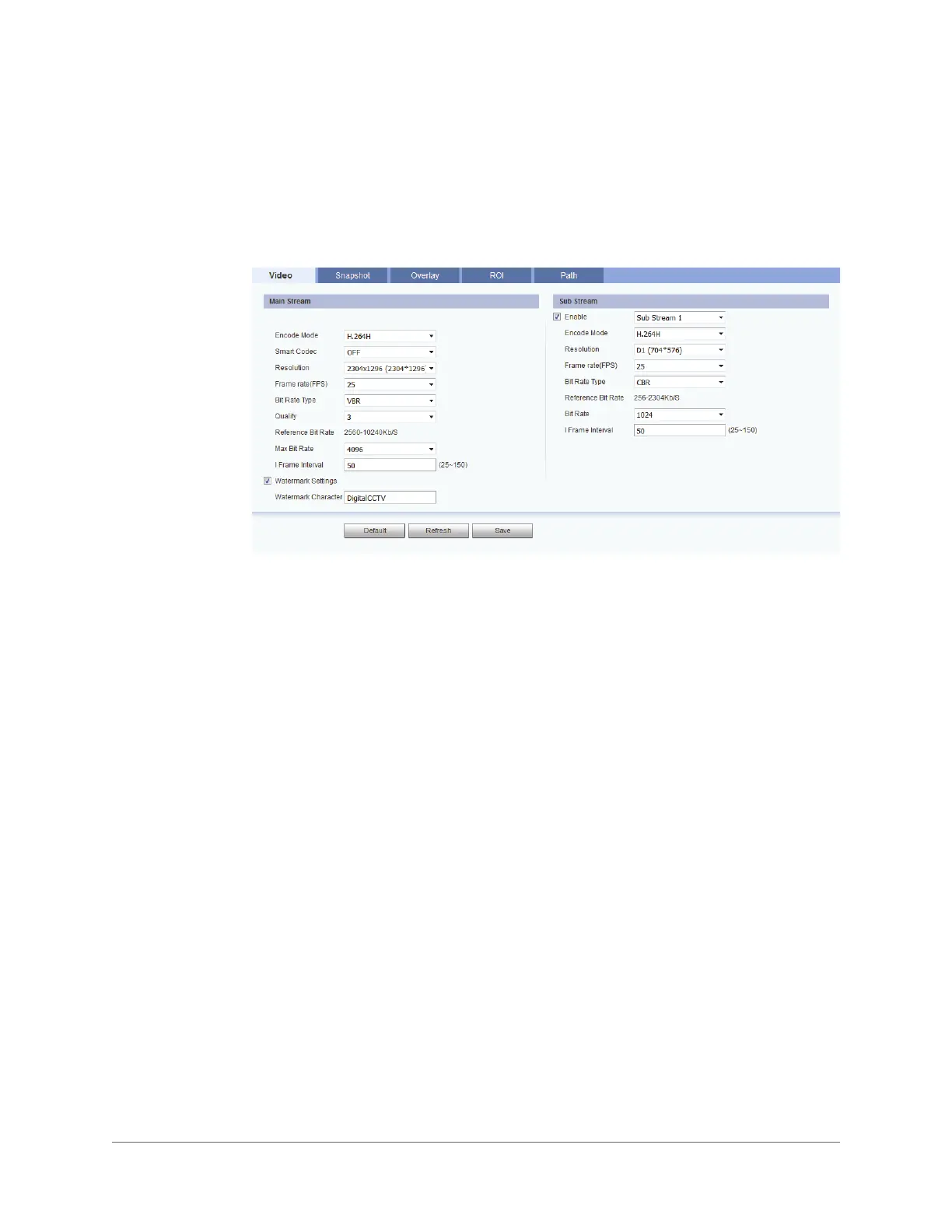
You can configure video streaming properties on the Setup > Camera > Video > Video page.
The page is divided into two sections: Main Stream and Sub Stream. In the Sub Stream
section, two sub streams are configurable: Sub Stream 1 and Sub Stream 2. To enable a sub
stream, select one of the sub streams, and then select the Enable check box.
Format
In the Encode Mode box, select H.264H, MJPEG, or H.265.
Smart Codec
Set Smart Codec to ON or OFF.
By taking reference frames and applying them to refreshed frames, Smart Codec eliminates
the need to transmit data for an unchanged image or parts of the image where there is no
movement.
Resolution
In the Resolution box, select a resolution from the list. The available options differ between
the main stream and sub streams.
Frame Rate
In the Frame Rate (FPS) box, select a frame rate within the available range (1–30 fps for
NTSC cameras; 1–25 fps for PAL cameras).
H.264H High Profile. Uses less bandwidth than Main Profile at the same quality. Lower
compression and higher quality than H.264.
MJPEG Uses the most bandwidth but produces excellent image quality with access to
every image in the stream.
H.265 High Efficiency Video Coding. Supports 4K resolution. Twice as efficient as H.264.



 To Next Page
 Loading...