Honeywell GmbH 14 MU5H-1419GE23 R0815
11. Push or to change between the reserve
types:
• AUTO (default): capacity and reserve are automatically
calculated.
• OFF: reserve calculator is not active.
8.5.9. Regeneration start time
1. Push to go to the next parameter.
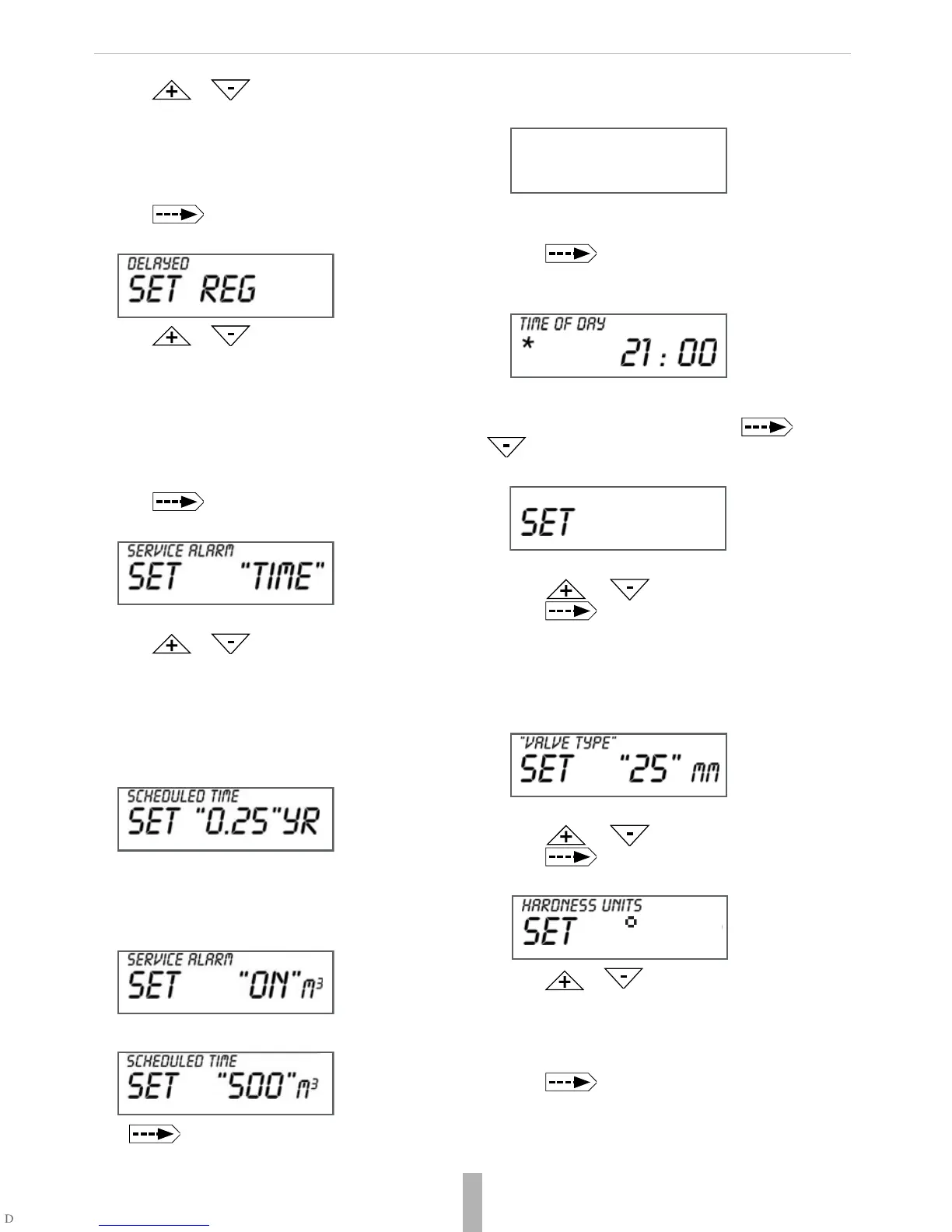
The display shows DELAYED.
2. Push or to select the regeneration start
time between:
• DELAYED: regeneration on a specific time
• IMMEDIATE:immediate regeneration when volume
is at 0
• DELAY+IMMEDIATE (default): delayed regeneration
with override on 0 volume
8.5.10.Service alarm
1. Push to go to the next parameter.
The display shows SERVICE ALARM.
You can set the service alarm basing on time, volume or both.
2. Push or to set the unit:
• TIME: based on time
• m³: based on volume
• BOTH: based on time and volume
• OFF: no service alarm defined
Example:
Service alarm every 3 months
If set up service alarm is based on time each push increases
or decreases the time by 3 months.
The display shows SERVICE ALARM if setting is based on
volume or both.
Example: Service alarm every 500 m³
Push to go to the next parameter.
8.5.11.Scheduled service
The display shows SCHEDULED SERVICE.
For more information on scheduled service go to paragraph
10. Maintenance.
3. Push to exit the settings.
The display shows TIME OF DAY or another general para-
meter (see 8.1. General parameters).
8.6. System parameters
Push and hold for 3 seconds both buttons and
and repeat this for further 3 seconds until the display
shows DISPLAY and the system language flashes.
8.6.1. Language settings
1. Push or to change the language.
2. Push to go to the next parameter.
8.6.2.
Valve parameters
The display shows VALVE TYPE and the type number
flashes.
Example:
25 mm is set as default.
8.6.3. Valve body and hardness unit
1. Push or to set up the size.
2. Push to go to the next parameter.
The display shows HARDNESS UNITS.
3. Push or to set the hardness unit:
• ppm: parts per million
• °dH: German degree
• °fH: French degree, default
• NA: no hardness setting
4. Push to go to the next parameter.


 To Next Page
 Loading...