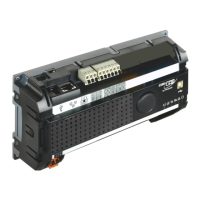
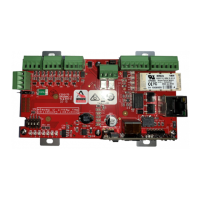
The PW7K1R1E is a network-connected, single-door reader interface designed for OEM integrators to connect TTL/Wiegand/RS-485 type readers to door hardware. It features an on-board twisted pair Ethernet jack with PoE (Power over Ethernet) support for easy installation.
Function Description:
The PW7K1R1E allows for the control of one physical barrier using single or paired readers. The first reader port supports Wiegand, magnetic stripe, or 2-wire RS-485 electrical signaling standards, along with one or two-wire LED controls and buzzer control (one-wire LED mode only). The second reader port accommodates Wiegand or magnetic stripe signaling, one or two-wire LED controls, and buzzer control (one-wire LED mode only).
It provides two form-C relay outputs for door strike control or alarm signaling, rated at 5A @ 30VAC/DC in a dry contact configuration. Four inputs are available for monitoring door contacts, exit push buttons, and alarm contacts.
The device can be powered via PoE or a local 12VDC supply. Reader power consumption should be considered based on peak reader usage.
Important Technical Specifications:
- PoE Power Input: 12.95W, compliant with IEEE 802.3af
- PoE+: 25W, compliant with IEEE 802.3at
- Local Power Input: 12VDC 10%, 900mA maximum
Power Output:
- PoE: VO (TB4-1) and RVO (TB7-4) combined: 12 Vdc @ 1A maximum (PoE+)
- 12 Vdc: VO (TB4-1) 12 Vdc @ 1A maximum, RVO (TB7-4) 12 Vdc @ 0.5A maximum
- Reader (TB3) 12 VDC: 10.3 to 12.6V @ 150mA maximum
- AUX (TB5) 12 VDC: 10.7 to 13.0V @ 700mA maximum
Output:
- Four relays: Form-C contacts rated at 2A @ 30 Vdc
- Six unsupervised/supervised inputs
- End of Line resistors: 1k/1k ohm, 1%, ¼ watt
- Standard
Reader Interface:
- Reader Power: 12VDC @ 5mA maximum (RVO, TB7-4)
- Communication: 2-Wire RS-485, OSDP protocol, four devices maximum
- Reader LED Output: TTL compatible (High > 3.0V, Low < 0.5V), 5mA source/sink maximum
- Buzzer Output: Open collector, 5VDC open circuit maximum, 10mA sink maximum
- Reader Data Inputs: TTL compatible inputs or 2-wire RS-485
RS-485 Mode:
- 9600 bps, Asynchronous, Half-duplex
- 1 start bit, 8 data bits, 1 stop bit
- Maximum cable length: 4000' (1,200m)
Cable Requirements:
- Communication (Ethernet): Category 5 minimum
- Power: 18 AWG, 1 twisted pair
- Ethernet: CAT-5 (minimum)
- RS-485: 24AWG, 120-ohm impedance, 4,000ft (1,220m) maximum, twisted pair(s) with an overall shield 18AWG
- Alarm Input: 1 twisted pair per input, 30-ohm maximum loop resistance
- Reader data (TTL): 18AWG, 6 conductors, 500-foot (150m) maximum
- Reader data (RS-485): 24AWG, 120-ohm impedance, twisted pair with shield, 4000-foot (1,219m) maximum
Environmental:
- Storage Temperature: -55°C to +85°C
- Operational Temperature: 0°C to +70°C
- Humidity: 5 to 95% RHNC
Mechanical:
- Dimensions (without bracket): 5.5" (140mm) W x 2.75" (70mm) L x 0.96" (24mm) H
- Dimensions (with bracket): 5.5" (140mm) W x 3.63" (92mm) L x 1.33" (34mm) H
- Weight (without bracket): 4 oz. (112g)
- Weight (with bracket): 5 oz. (142g)
- Stand by Power: I
- Endurance: IV
- Line Security: I
- Destructive Attack: I
Usage Features:
- Mounting: The PW7K1R1E can be mounted in a 3-gang switch box using the supplied mounting plate, which also matches the MR50 mounting footprint for enclosure installations.
- Network Integration: It must be installed on the same subnet as PW6101 (PW6K1ICE) or PW6000 controllers. Encryption between these devices is built-in and automatic.
- OSDP Reader Support: TB7 provides connections for a 2-wire RS-485 OSDP communication bus and 12 Vdc power for OSDP readers. Up to four OSDP readers are supported, with a 12 Vdc output limited to 0.5A maximum.
- RS-485 Termination: The J4 RS-485 termination jumper should only be installed if the MR62e is at an end of the communication bus. Termination should not be installed on more than two devices on the bus.
- Input Circuit Configuration: Inputs can be configured as unsupervised (reporting open or closed states) or supervised (reporting open, closed, open circuit, shorted, grounded, and foreign voltage). Supervised circuits require two 1K Ohm, 1% resistors located close to the sensor. Custom end-of-line (EOL) resistances can be configured via host software.
- Relay Circuit Usage: Form-C contact relays are used for door lock mechanisms or alarm signaling. Normally Open (NO) and Common (C) poles are used for controlling power delivery to a door strike. Normally Closed (NC) and Common (C) poles are used for momentarily removing power to unlock a door (e.g., with a mag lock).
- DIP Switch Configuration: Four switches on the S1 DIP switch configure the operating mode. These settings are read on power-up, except for enabling default user name/password.
- Factory Default Communication Parameters: Default static IP address: 192.168.0.251, Subnet Mask: 255.255.0.0, Default Gateway: 192.168.0.1.
- Bulk Erase Function: This function allows erasing all configuration to set the MR62e to OEM settings (sanitize board) or restoring to OEM default parameters. The process involves specific DIP switch settings and power cycling.
- Status LEDs: LEDs indicate various states, including on-line (encryption disabled/enabled), off-line, waiting for application firmware, host communication, data reception from readers, and input status (inactive, active, fault).
- IT Security: Upon installation, user accounts for the web configuration page should be created with secure passwords, and all DIP switches should be in the OFF position for normal operating mode. The default login account (enabled when DIP 1 is ON) is available for five minutes. It is recommended to define at least one user account and set DIP switches to OFF before commissioning. Configuring the MR62e with an IP address accessible from the public Internet is not recommended. Options to disable Zeroconf discovery and the web configuration module are available to enhance network security.
Maintenance Features:
- Warranty: Honeywell Security Access warrants the product to be free from defects in material and workmanship under normal use and service with proper maintenance for one year from the date of factory shipment.
- Repair/Replacement: The warranty is limited to the repair or replacement of the defective unit. Returned units are repaired or replaced from a stock of reconditioned units.
- Return Merchandise Authorization (RMA): All returns must be accompanied by an RMA number obtained from customer service, with prepaid postage and insurance.
- Relay Protection: Door lock mechanisms can generate feedback to the relay circuit. It is recommended to use either a diode or MOV (metal oxide varistor) to protect the relay and prevent damage or premature failure. Wire should be of sufficient gauge to avoid voltage loss.
- Battery Charge: The initial charge of the battery may take up to 24 hours to be fully charged.

 Need help?
 General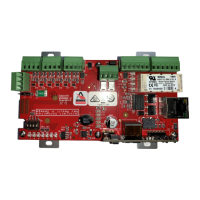


 To Next Page