16
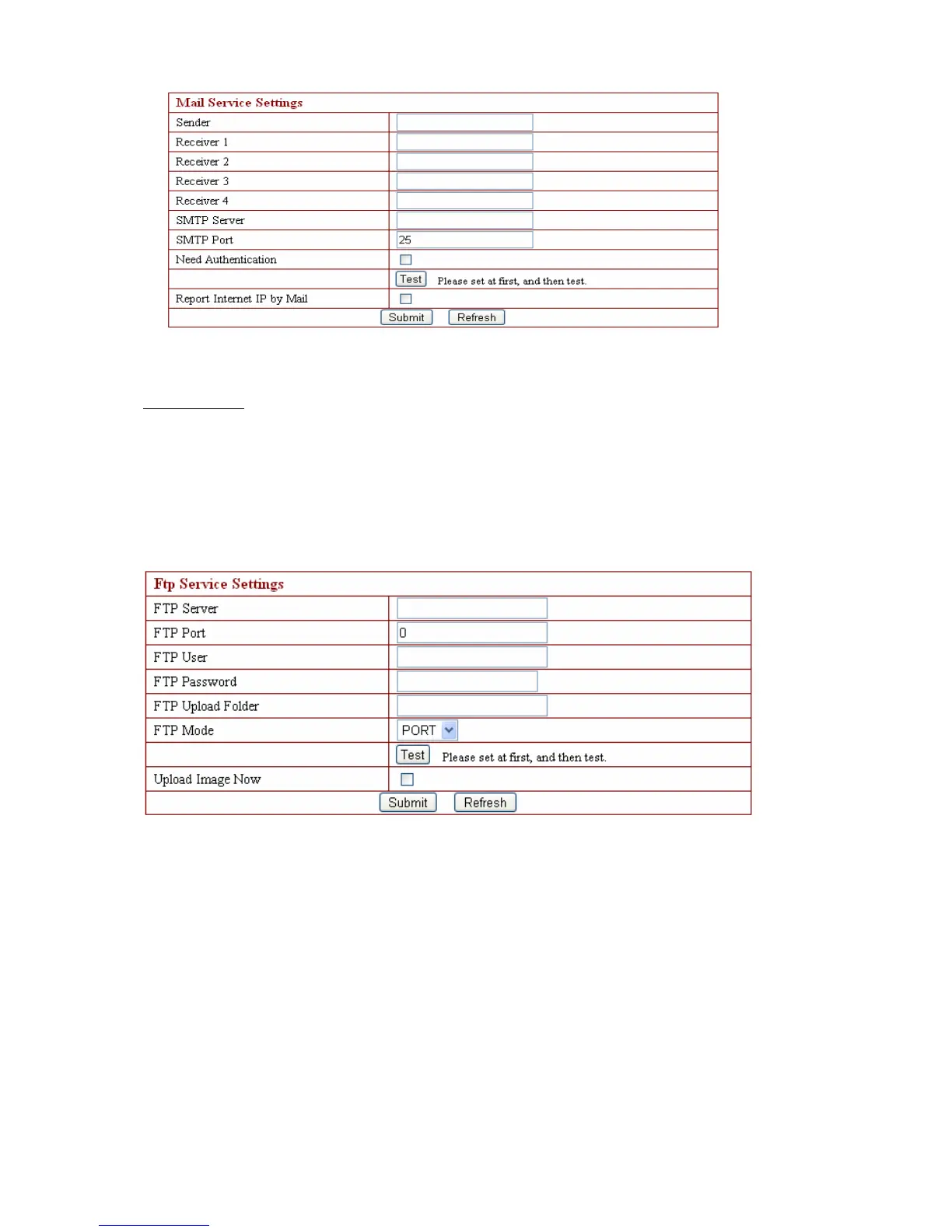
The above setting is a preparation for the alarm function, the sender should be entered the
sender’s email address,recipient 1、2、3、4 is filled with recipient E-mail address;SMTP server
should be filled with the sender email SMTP server , e.g. the sender email address is
abc@163.com,and enter mail.163.com. Generally SMTP port is 25,do no need to change;when
needs to check, just tick it, and enter SMTP user and SMTP password,both of them are provided
by Email provider,and test according to reference;when needs to send, please tick Email
notification Internet IP address;
The e-mail server and other information can be obtained from the mail
service provider the email notification is image captured when alarming if no email notification is
needed when alarming, and then no need to enter
3.4.11. FTP Service Settings
The above setting is equally similar to Mail Server Settings,when alarming is triggered it also
sends image,please enter FTP server、FTP port、FTP user、FTP password、FTP upload directory、
FTP mode,FTP mode has two options: PORT and
POSV . If needs a quick upload image, then select it, edit upload image interval
(second)。
3.4.12. Alarm Service Settings
As shown below, there are two modes of alarm trigger, first one is motion detection, pleas
refer to below interface,the sensitivity of motion detection can be adjusted according to the
users′ requirement, the higher the number is, the lower sensitivity is; Another mode is
input alarm, when connected, it triggers alarm through alarm input signal which connects to
linkage alarm GPIO;


 To Next Page