15
I. Settings
I1. Press the key on the main menu
FLASHTEST
to set up the device.
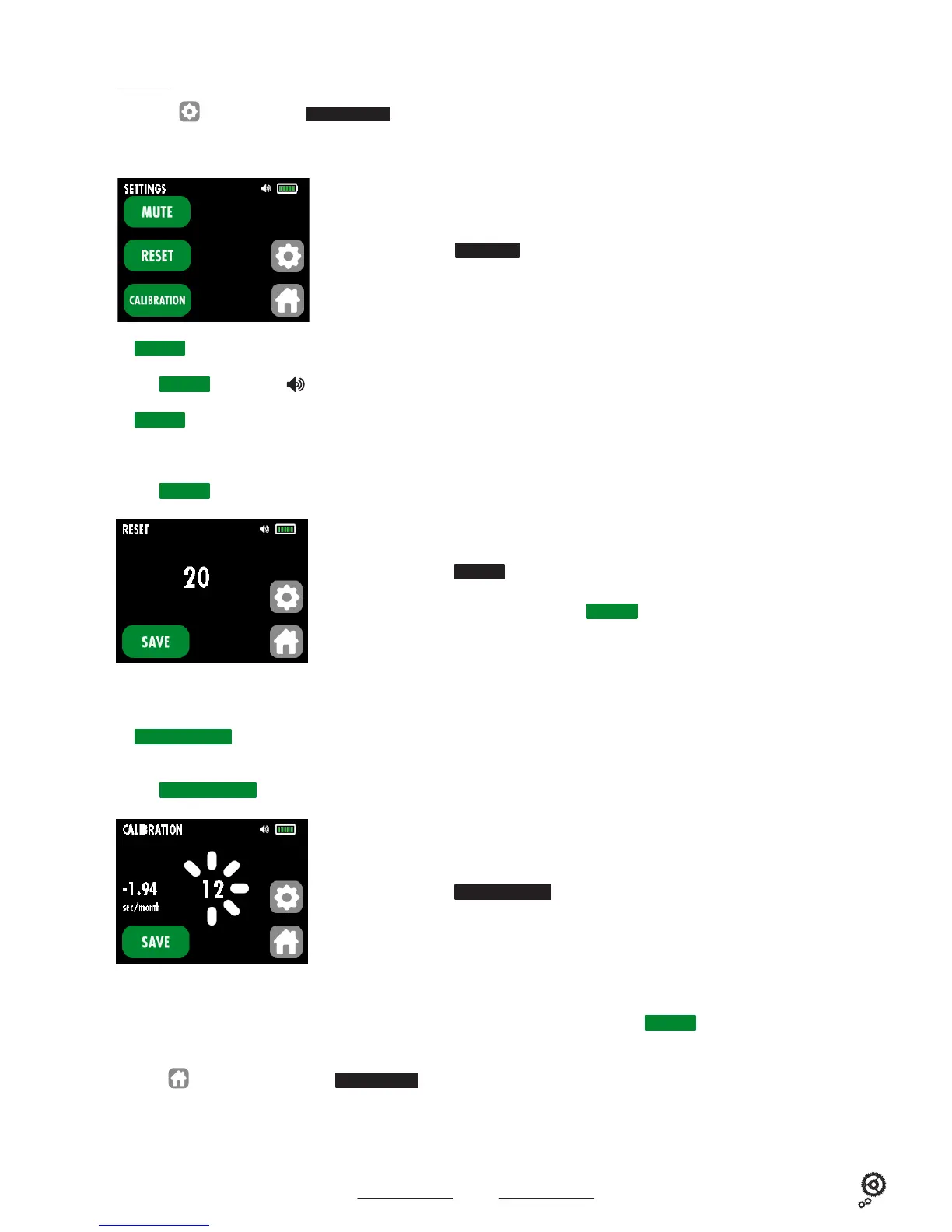
The following screen displays :
I2.
MUTE
mode
Press the
MUTE
key, the symbol disappears (silent mode) or appears (sound mode).
I3.
RESET
mode
Values reset : resets the real value of the corrupted zero by measurements of voltage and electricity.
Press the
RESET
key, the following screen displays :
Display of the sub-submenu
SETTINGS
Display of the sub-submenu
CALIBRATION
Display of the sub-submenu
RESET
Note : when restarting the device, the reset is done automatically.
I4.
CALIBRATION
mode
Using the GPS MSA19.108-E (item sold separately), it is possible to proceed regularly with the calibration of the device.
Press the
CALIBRATION
key, the following screen displays :
Connect the GPS MSA19.108-E to the rear panel of the device. see paragraph 3 on page 4
- The calibration value is displayed on the screen. As soon as the calibration value stabilizes (example -1.94), press the
SAVE
key. The calibration
is completed.
- Press the key to return to the main menu
FLASHTEST
.
The displayed value is the value to be corrected. Press the
SAVE
key to save the counter-value.



 To Next Page