9
Upkeep & Clean-up of the Liberator
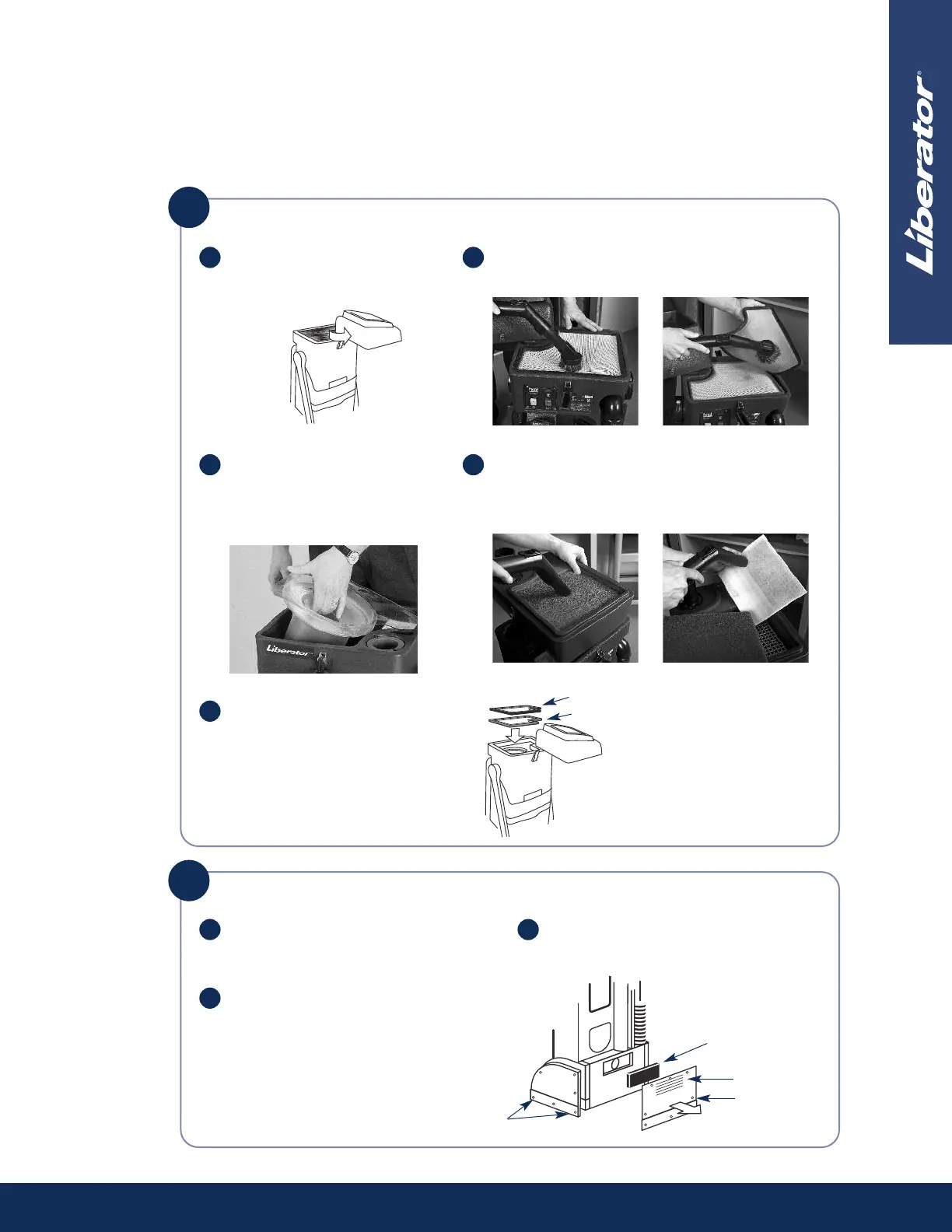
Cleaning the Filters & Vacuum Cone
Turn Liberator off. Unlatch filter
housing and swing to the side.
Use a tank vacuum to vacuum both sides of the
black and burnt orange primary filters.
Remove the separator assembly
and wipe the inside with a cloth.
Replace the separator assembly
and push down firmly for a tight
seal.
Flip the filter housing over and vacuum both sides
of the 3-piece filters and replace. Refer to separate
Safety & Maintenance Instructions for HEPA filter
care.
Replace the burnt orange filter,
then the black filter. Close the filter
housing and close the latches.
Black
Burnt orange
a b
e
c d
1
Screws
Screws
Vacuum vents
Remove and
clean foam filter
2
Note: If you are cleaning
where IAQ is a concern
(i.e. healthcare facility),
clean filters elsewhere.
Cleaning the Motor Vents & Filter
Vacuum motor vents with the Liberator
hose after each use.
Remove the Velcro
®
skirt and screws
from side and back cover plates.
a
b
Remove foam motor filter and
vacuum.
c


 To Next Page