Self-CleaningYourConventionalOven
If done properly, it will take only a few moments to
While you are becoming acquainted with your self-
start the self-cleaning cycle on your range. After
cleaning oven, we recommend 2 hoursfor the over-
setting your range to self-clean, a high heat tem-
age cleaning function, but in some cases a longer
perature removes the soil in the oven cavity. The
cleaning time, up to 3 hours may be necessary. In
dirt will then disappear byturning into an ash waste
order to judge the degree of soil, look at the oven
or evaporating into an odorless and colorless vapor.
floor and walls. Light spatter and thinner spills
When the cycle is complete, allow your range to
would generally need only 2 hours cleaning. Heavy
cool. greasy spills and spatter on the oven interior would
need up to3 hours.
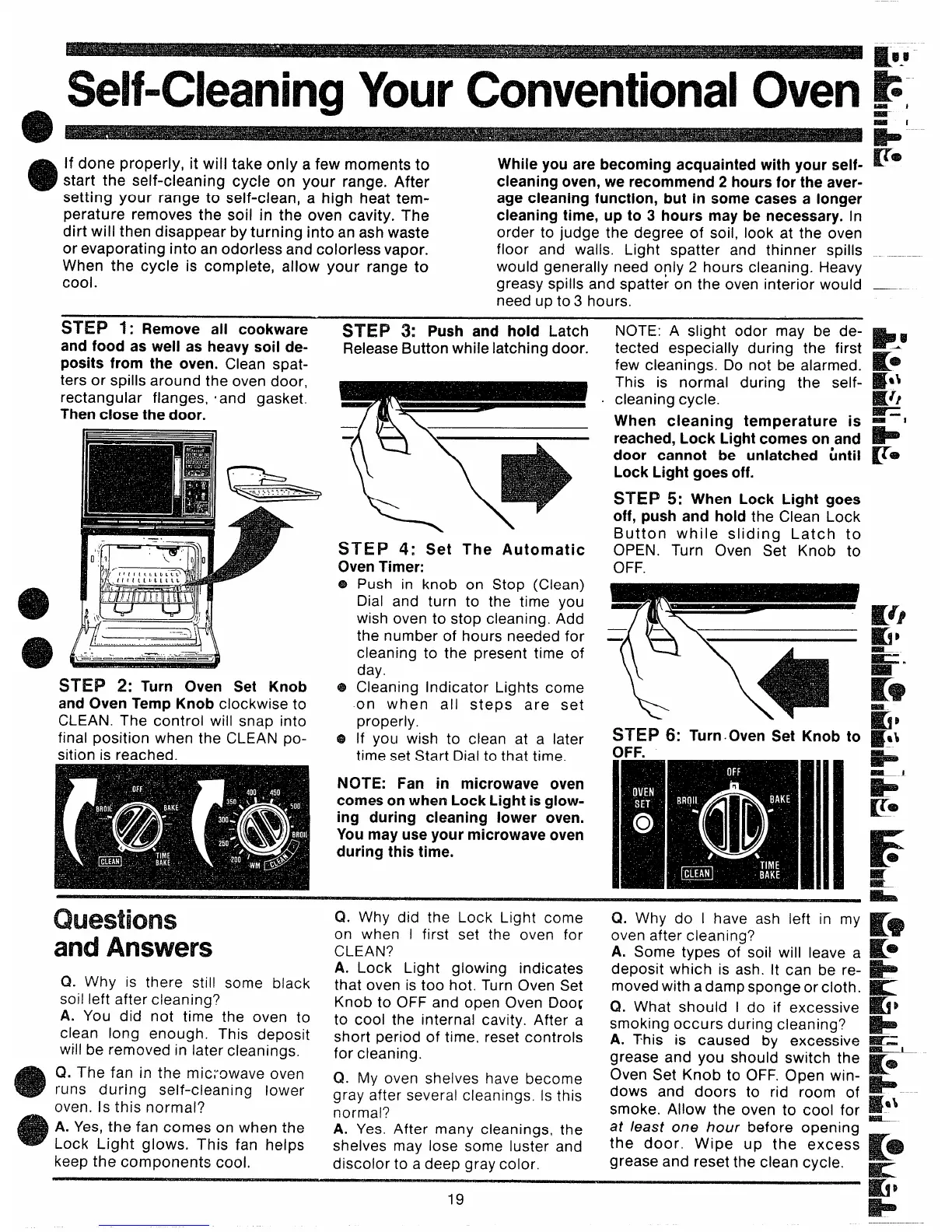
~~~~ ~: Remove all cookware -
and food as well as heavy soil de-
posits from the oven. Clean spat-
ters or spills around the oven door,
rectangular flanges, Iand gasket.
Then close the door.
~~~~ ~: Turn Oven Set Knob
and Oven Temp Knob clockwiseto
CLEAN. The control will snap into
final position when the CLEAN po-
sition is reached.
STEP 3: Push and hold Latch
ReleaseButton while latching door.
\\
—
‘a
k=
\
.
~~~p 4: Set The Automatic
OvenTimer:
Push in knob on Stop (Clean)
Dial and turn to the time you
wish oven to stop cleaning. Add
the number of hours needed for
cleaning to the present time of
day.
Cleaning Indicator Lights come
on when all steps are set
properly.
If you wish to clean at a later
time set Start Dial to that time.
NOTE: Fan in microwave oven
comeson when Lock Light isglow-
ing during cleaning lower oven.
Youmay useyour microwave oven
during this time.
NOTE: A slight odor may
be de-
tected especially during the first
few cleanings. Do not be alarmed.
This is normal during the self-
cleaning cycle.
When cleaning temperature is
reached, Lock Lightcomes on and
door cannot be unlatched ~ntil
Lock Light goes off.
~~~~ ~: When Lock Light goes
off, push and hold the Clean Lock
Button while sliding Latch to
OPEN. Turn Oven Set Knob to
OFF.
~~~~ 6: Turn.Oven Set Knob to
Questions
andAnswers
Q. Why is there still some black
soil left after cleaning?
A. You did not time the oven to
clean long enough. This deposit
will be removed in later cleanings.
Q. The fan in the mic;owave oven
runs during self-cleaning lower
oven. Is this normal?
A. Yes, the fan comes on when the
Lock Light glows, This fan helps
keep the components cool,
Q. Why did the Lock Light come
on when I first set the oven for
CLEAN?
A. Lock Light glowing indicates
that oven is too hot. Turn Oven Set
Knob to OFF and open Oven Doo[
to cool the internal cavity. After a
short period of time, reset controls
for cleaning.
Cl. My oven shelves have become
gray after several cleanings. Is this
normal?
A. Yes. After many cleanings, the
shelves may lose some luster and
discolor to a deep gray color.
Ct. Why do I have ash left in my
oven after cleaning?
A. Some types of soil will leave a
deposit which is ash. It can be re-
moved with a damp sponge or cloth.
Q. What should I do if excessive
smoking occurs during cleaning?
A. This is caused by excessive
grease and you should switch the
Oven Set Knob to OFF. Open win-
dows and doors to rid room of
smoke. Allow the oven to cool for
at /east one hour before opening
the door, Wipe up the excess
grease and reset the clean cycle.
F.
Ii!
19



 To Next Page