25
PL1200 Thermal Transfer Printer
Operations
Chapter 4: Operations
This chapter will cover docking and removing the PL1200 labeling unit from the host
machine, changing the label and thermal transfer print tapes, creating editing and printing
labels with the PL1200 labeling system.
4.1 Docking and Removing the PL1200 Labeling Unit
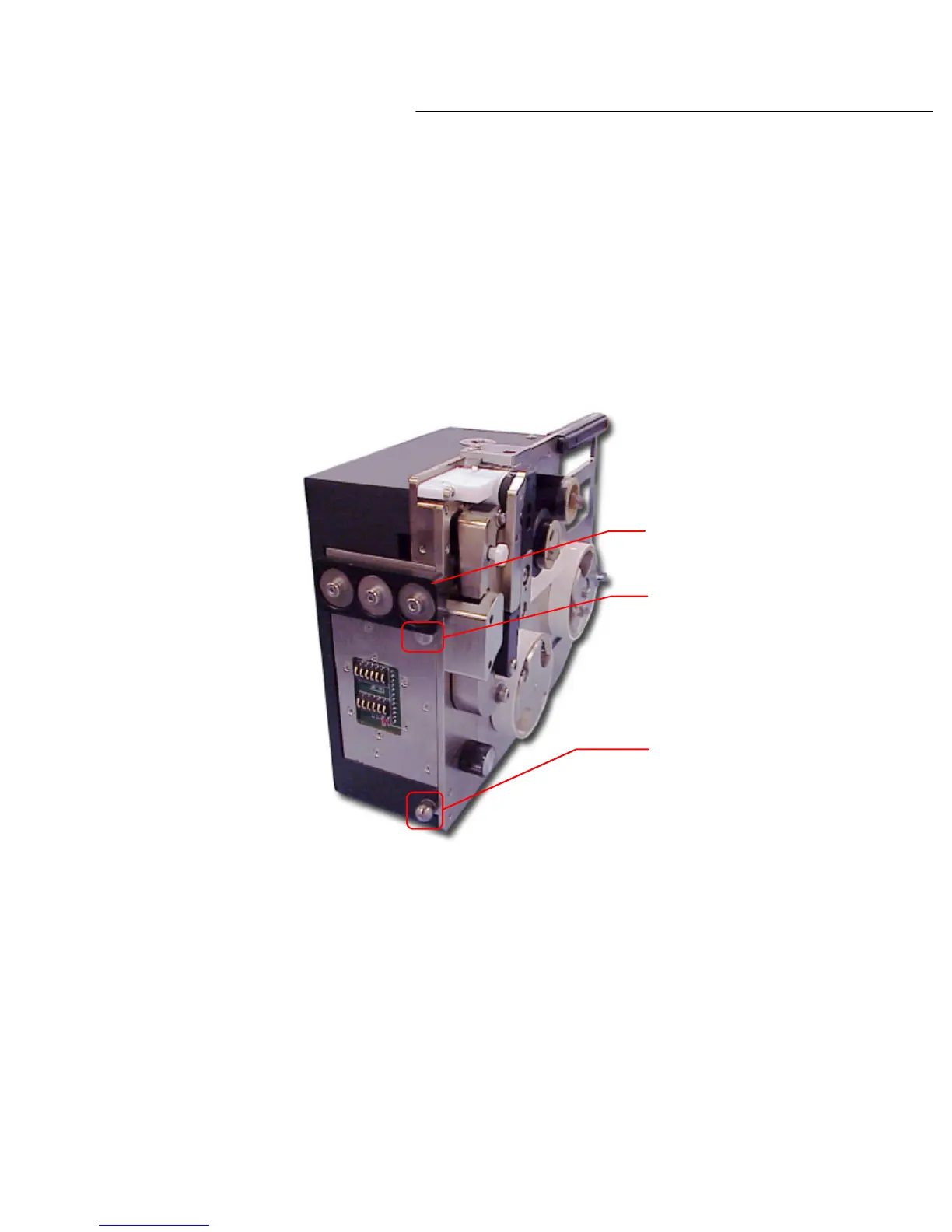
The mounting points on the PL1200 labeling unit consist of a dock clamp block, a guide plate
pin and a tooling ball. Please see diagram 4.1a below.
To dock the labeling unit to the docking station, align the guide pin within the top of the groove
on the dock plate and place the bottom edge of the dock clamp block onto the notched edge
along the top plate of the docking station.
Once the dock clamp block and guide pin are lined up correctly, the tooling ball will snap into
place and the PL1200 labeling unit will power up.
To remove the labeler from the docking station, firmly grasp the handle found on the top of the
labeling unit. Lift the labeling unit up and out to release the tooling ball from the alignment
bushing. The labeler can now be lifted out and away from the docking station.
Diagram 4.1a
Dock clamp block
Guide pin
Tooling ball



 To Next Page