44 Chapter 7 D82008753R 10/15
Chapter 7
Disassembling and Reassembling Your MPV5
®
Controller Removal/Replacement
Removal
1. Check that vehicle power is OFF.
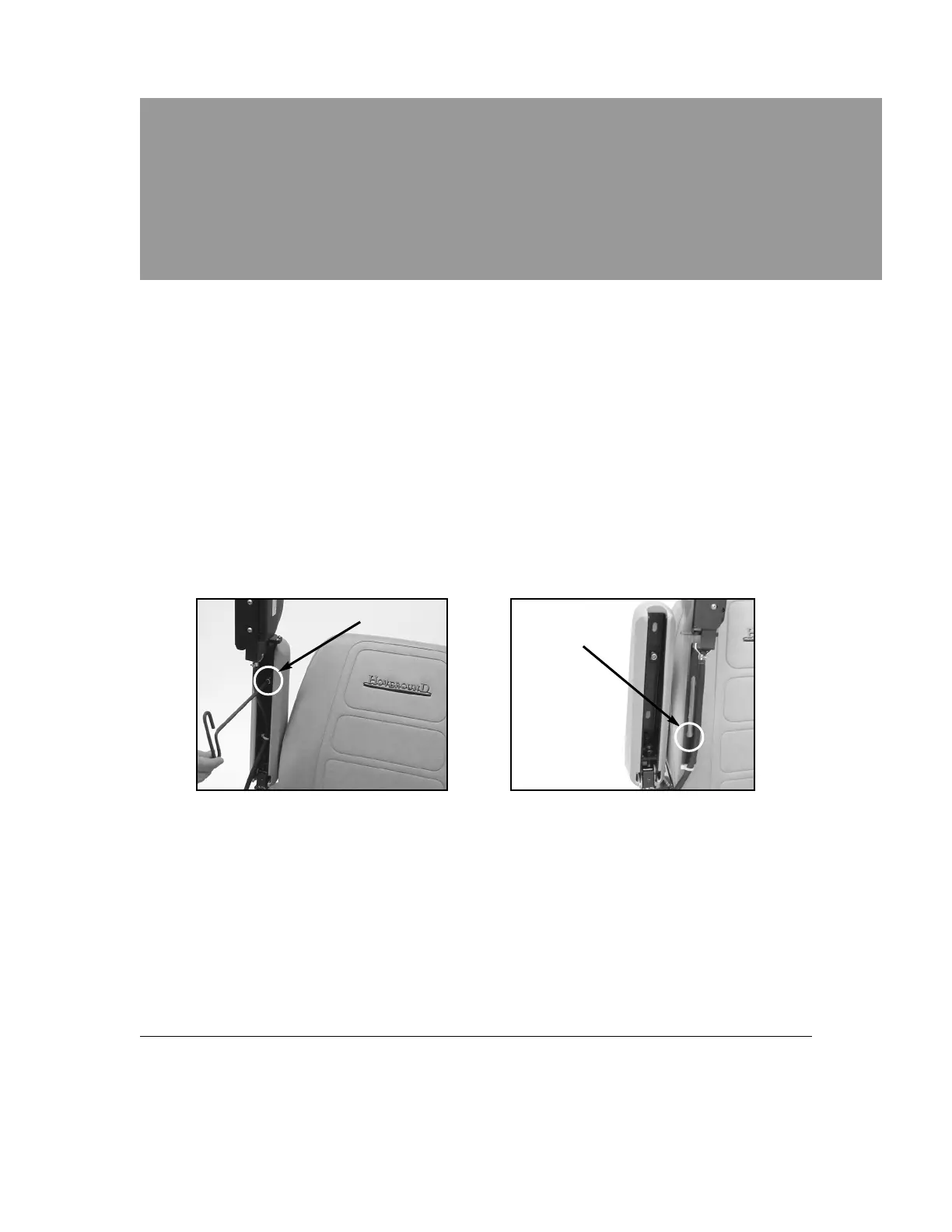
2. Lift the arm and loosen the socket head cap screw closest to the
controller. Use the 1/4 inch hex wrench supplied with your chair
(See Figure 7A, below).
3. Slide the controller bracket forward until it hits the key slot. (See Figure
7B, below). Remove bracket from arm and place on footrest or other
safe location. Unlock cable from seat. (See Figures 7C, Page 45).
Keyhole
Cap Screw
Figure 7A Figure 7B
Replacement
1. Loosen forward socket head cap screw.
2. Position key hole portion of bracket over screw and slide into place.
3. Position controller in a comfortable position and secure screw.
4. Fasten the controller cable on to the catch on the lower seat
(See Figure 7D, page 45).


 To Next Page