Operating the 1U Integrated Keyboard Drawer
HP 1U Integrated Keyboard Drawer User Guide 3-5
CONFIDENTIAL
Writer: John Turner - Amy Laffitte File Name: d-ch3 Operating the 1U Integrated Keyboard Drawer
Codename: Dachshund Part Number: 269450-001 Last Saved On: 7/29/02 1:26 PM
Cable Locking Mechanism
The cables on the 1U Integrated Keyboard Drawer have a locking mechanism to
provide a secure cable connection. You must follow proper procedures when
disconnecting these cables.
CAUTION: Failure to follow proper disconnect procedures could result in damage to
the cables or to your unit.
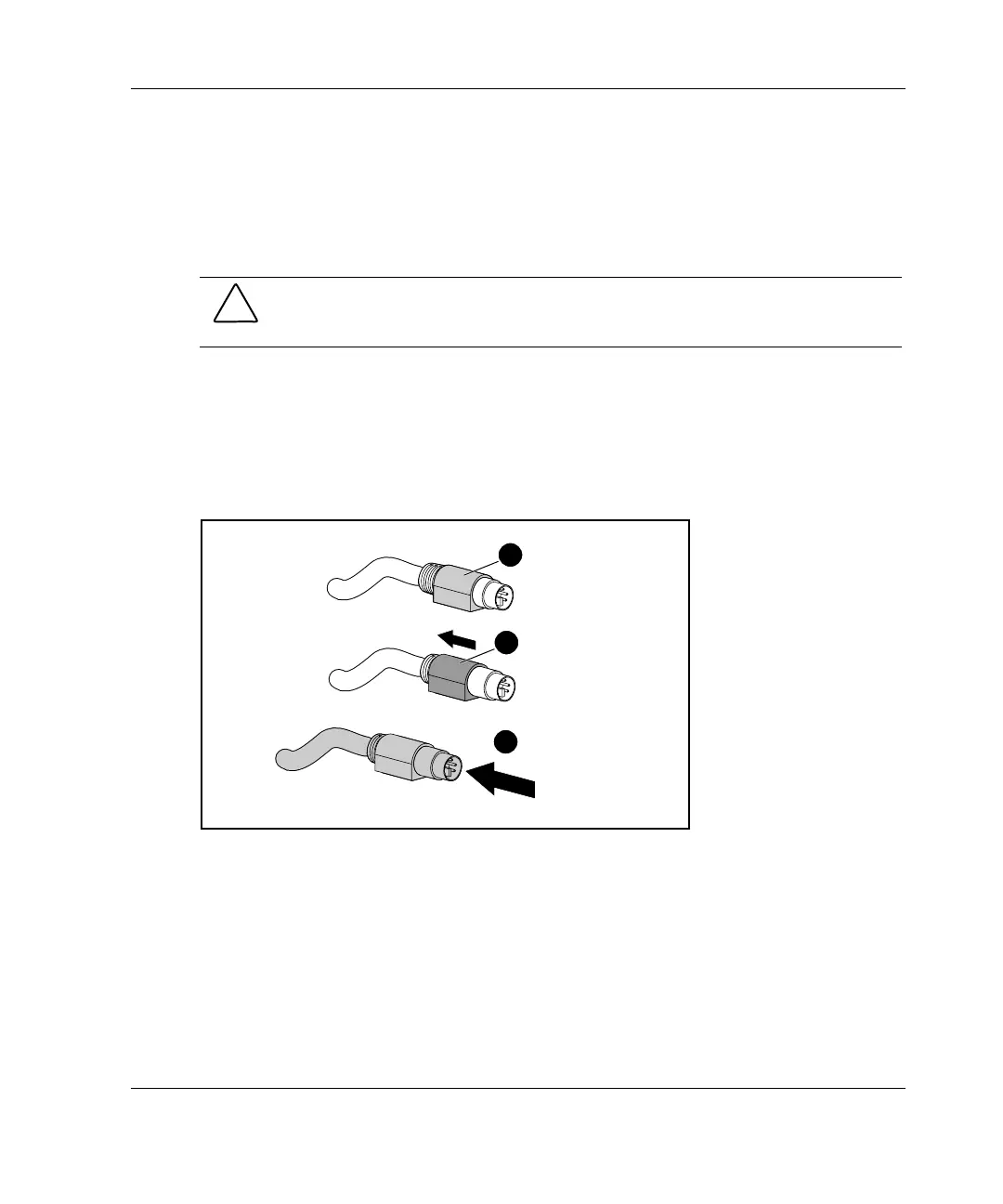
To properly disconnect the keyboard and mouse cables:
1. Grasp the housing (1).
2. Slide the housing back to release the locking mechanism (2).
3. Remove the cable (3).
1
2
3
Figure 3-4: Disconnecting the keyboard and mouse
cables
To insert the cables, simply plug the cables into the appropriate connector. The
locking mechanism automatically locks the cable into place.



 To Next Page