Installing the 1U Integrated Keyboard Drawer
2-8 HP 1U Integrated Keyboard Drawer User Guide
HP CONFIDENTIAL
Writer: John Turner - Amy Laffitte File Name: c-ch2 Installing the 1U Integrated Keyboard Drawer
Codename: Dachshund Part Number: 269450-001 Last Saved On: 8/2/02 9:30 AM
Removing the 1U Integrated Keyboard Drawer
To remove the 1U Integrated Keyboard Drawer from a rack, reverse the order of the
steps listed in the “Installation Instructions” section.
Removing the Multipurpose Cover
Removing the multipurpose cover is an optional procedure that allows the user more
flexibility when using the 1U Integrated Keyboard Drawer.
To remove the multipurpose cover:
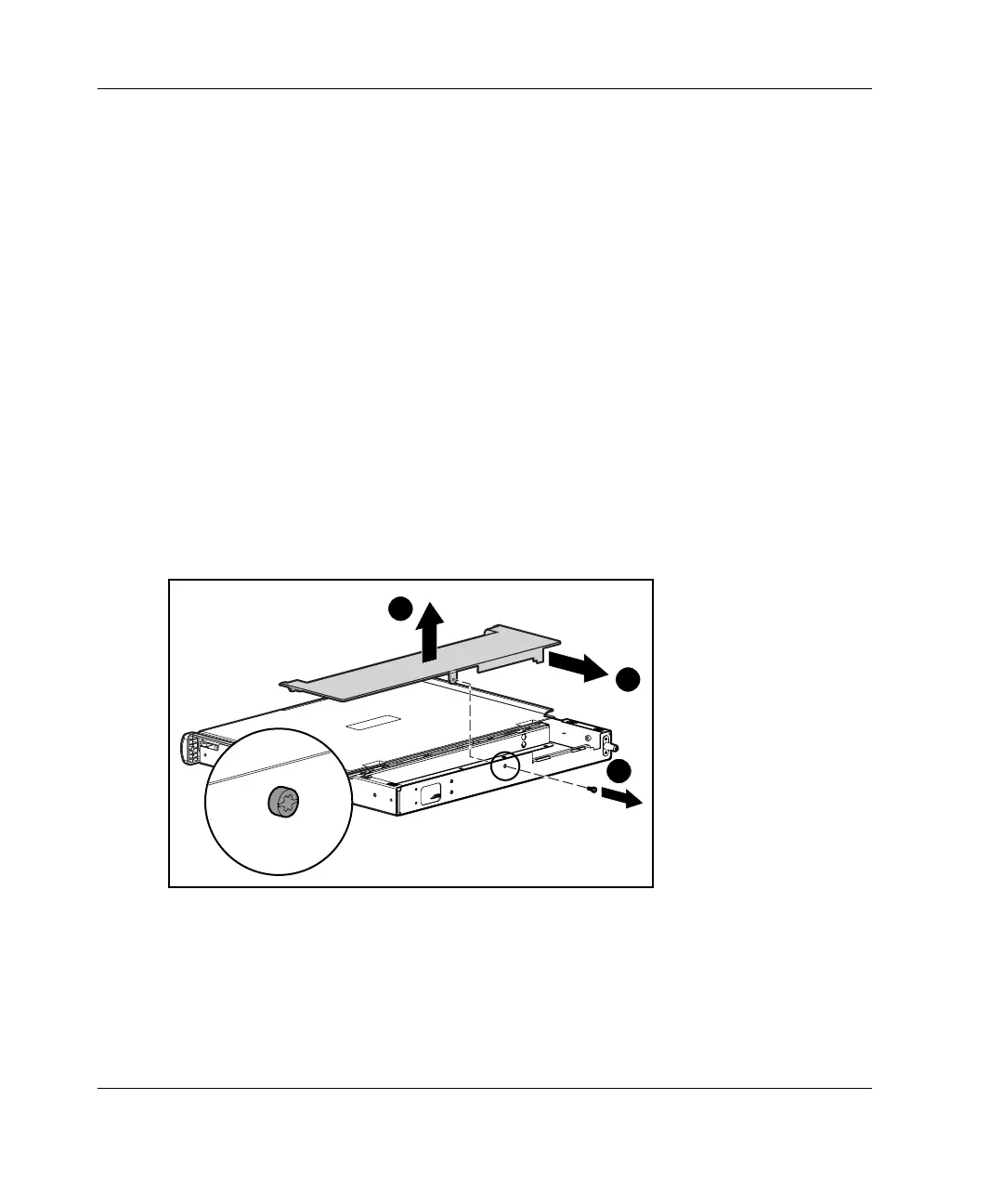
1. Remove the rear cover.
a. Remove the screw securing the rear cover to the metal tray (1).
b. Slide the rear cover back (2).
c. Rotate the rear cover and remove it out of position (3).
1
2
3
Figure 2-8: Removing the rear cover



 To Next Page