EasyManua.ls Logo

HP 48G - Page 19

HP 48G
84 pages
Print Icon
To Next Page IconTo Next Page
To Previous Page IconTo Previous Page
Loading...
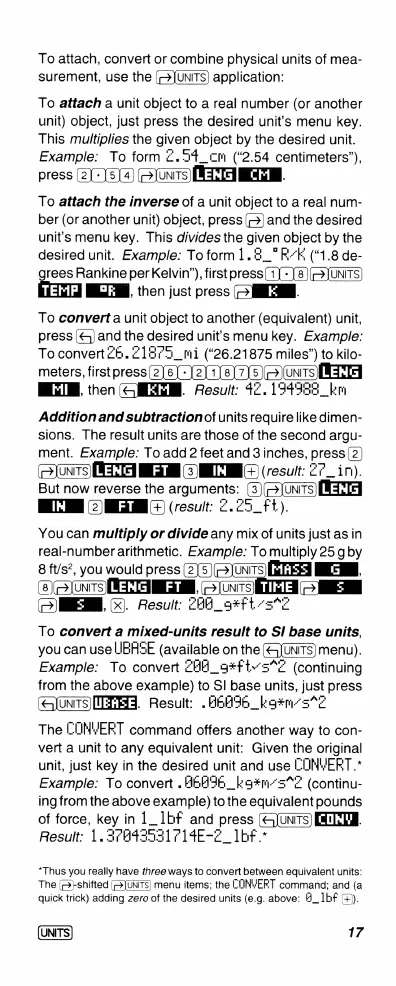
To
attach,
convert
or
combine
physical
units
of
mea-
surement,
use
the
application:
To
attach
a
unit
object
to
a
real
number
(or
another
unit)
object,
just
press
the
desired
unit's
menu
key.
This
multiplies
the
given
object
by
the
desired
unit.
Example:
To
form
£.5%_cm
(“2.54
centimeters”),
press
(2]
[5]4)
(]
WIEIEI
To
attach
the
inverse
of
a
unit
object
to
a
real
num-
ber
(or
another
unit)
object,
press
(=)
and
the
desired
unit’s
menu
key.
This
divides
the
given
object
by
the
desired
unit.
Example:
To
form
1.2_"F-E
(“1.8
de-
rees
Rankine
per
Kelvin”),
firstpress
(1]
-
8)(=UNITS)
B,
then
just
press
(>
.
To
convert
a
unit
object
to
another
(equivalent)
unit,
press
(&)
and
the
desired
unit's
menu
key.
Example:
To
convert
26.
21875
_mi
(“26.21875
miles”)
to
kilo-
meters,
firstpress(2)
6]~
|2
1]8)]7)5)[>)uns
[EH
BTN,
then
(QIEEM.
Result:
42.134338_km
Addition
and
subtraction
of
units
require
like
dimen-
sions.
The
result
units
are
those
of
the
second
argu-
ment.
Example:
To
add
2
feetand
3inches,
press
(2)
(oJonims)
(KT
MG
)M
)
(result:
27_in).
But
now
reverse
the
arguments:
(3)(=Junms)
[T
1IN
(result:
Z.29_f1).
You
can
multiply
or
divide
any
mix
of
units
just
as
in
real-number
arithmetic.
Examp/e
To
multiply
25
g
by
8
ft/s2,
you
would
press
(2
G
|
(&)
onTs
METHNEE
-m
TIHE
o/HEM.
X.
Result:
THA_g#ft
To
convert
a
mixed-units
result
to
Sl
base
units,
you can
use
IBASE
(available
on
the
(<3[UNITS)
menu).
Example:
To
convert
ZHH_g#f1+3*Z
(continuing
from
the
above
example)
to
Sl
base
units,
just
press
(qIuNTS)IEEHET.
Result:
.
HBEIE_|g#m-s7E
The
COMVYERET
command
offers
another
way
to
con-
vert
a
unit
to
any
equivalent
unit:
Given
the
original
unit,
just
key
in
the
desired
unit
and
use
CONYERT
.
Example:
To
convert
.
HEHIE
_lg#m-5*F
(continu-
ing
fromthe
above
example)
to
the
equivalent
pounds
of
force,
key
in
1_1bf
and
press
(&unTs)
T
Result:
1.37A43531714E-2_1bF
*
*Thus you
really
have
three
ways
to
convert
between
equivalent
units:
The
()-shifted
(>JUNTS)
menu
items;
the
CONYERT
command;
and
(a
quick
trick)
adding
zero
of
the
desired
units
(e.g.
above:
H_1bf
().
UNITS
17

Related product manuals