EasyManua.ls Logo

HP 48G - Andthe MES

HP 48G
84 pages
Print Icon
To Next Page IconTo Next Page
To Previous Page IconTo Previous Page
Loading...
Of
course,
you
can
also
use
the
MES
on
your
own
groups
of
equations—just
put
your
desired
equations
into
a
list.
And
you
can
use
the
built-in
group
of
pro-
jectile
motion
equations
as
the
starting
point.
Example:
Suppose
you
want
to
know
the
trajectory
angle(s),
6,,
needed
for
a
target
at
range
6000
m,
ele-
vation
1200
m,
with
a
300
m/s
muzzle
velocity.
You
can’t
do
this
easily
with
just
the
built-in
equations
list,
but
you can
add
the
necessary
equation
to
a
copy
of
that
list,
then
store
this
as,
say,
PR:
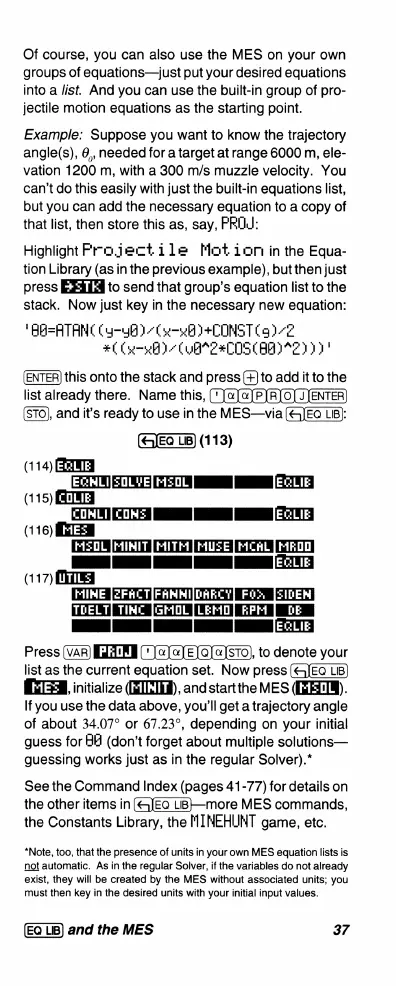
Highlight
Frojectile
Mot
ion
in
the
Equa-
tion
Library
(as
in
the
previous
example),
but
then
just
press
to
send
that
group’s
equation
list
to
the
stack.
Now
just
key
in
the
necessary
new
equation:
"BA=ATANC
(y—gB
)
Cu—wB)+C0ONST
(9)
2
#(
(=l
)
(UB
2=C0SCAAIMEY
D)
this
onto
the
stack
and
press
(+]to
add
it
to
the
list
already
there.
Name
this,
('
Ja]«]PJR]0]
JJENTER]
(STO),
and
it's
ready
to
use
in
the
MES—via
(G]EQ
LB):
(113)
GRENECLIE
EcHLIzOLVE[MsOL]
|
[EGLIE]
(115)
({3
coWLifcoNs]
|
[
[EGLIE]
QRY
HE:
II
I
N
T
(117)
(S
MINE
[ZFACT|FRNNI[DARCY]
Fik
[SIDEN
T
T
(T
T
I
T
]
JEGLEE
Press
I
E)Q)@]STO),
to
denote
your
list
as
the
current
equation
set.
Now
press
=3
initialize
(EILTH),
and
startthe
MES
(IEEIM).
If
you
use
the
data
above,
you'll
get
a
trajectory
angle
of
about
34.07°
or
67.23°,
depending
on
your
initial
guess
for
B8
(don’t
forget
about
multiple
solutions—
guessing
works
just
as
in
the
regular
Solver).*
See
the
Command
Index
(pages
41-77)
for
details
on
the
other
items
in
LB—more
MES
commands,
the Constants
Library,
the
MMINEHUNT
game,
etc.
*Note,
too,
that
the
presence
of
units
in
your
own
MES
equation
lists
is
not
automatic.
As
in
the
regular
Solver,
if
the
variables
do
not
already
exist,
they
will
be
created
by
the
MES
without
associated
units;
you
must
then
key
in
the
desired
units
with
your
initial
input
values.
and
the
MES
37

Related product manuals