EasyManua.ls Logo

HP 48G - LIBRARY), Ports and Backups

HP 48G
84 pages
Print Icon
To Next Page IconTo Next Page
To Previous Page IconTo Previous Page
Loading...
LIBRARY),
PorTs
AND
BAckups
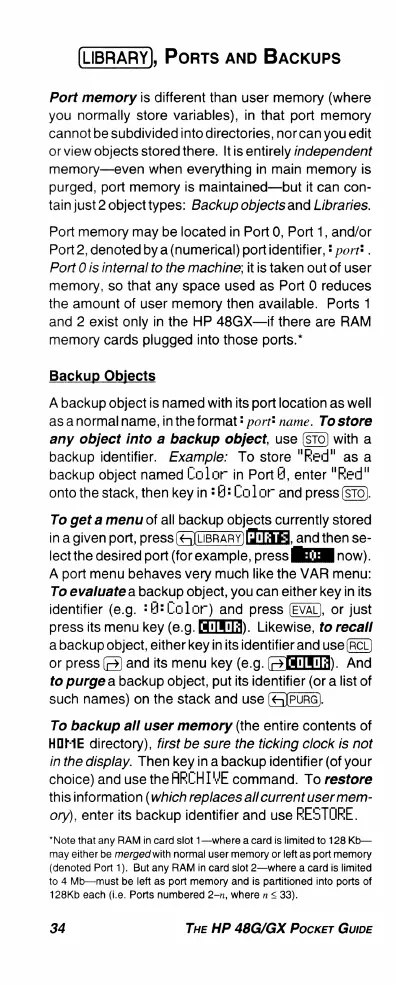
Port
memory
is
different
than
user
memory
(where
you
normally
store
variables),
in
that port
memory
cannotbe
subdivided
into
directories,
nor
can
you
edit
orview
objects
stored
there.
Itis
entirely
independent
memory—even
when
everything
in
main
memory
is
purged,
port
memory
is
maintained—but
it
can
con-
tain just
2
object
types:
Backup
objectsand
Libraries.
Port
memory
may
be
located
in
Port
0,
Port
1,
and/or
Port2,
denoted
by a
(humerical)
portidentifier,
&
port*
.
Port
0
is
internal
to
the
machine;
it
is
taken
out
of
user
memory,
so
that
any
space
used
as
Port
0
reduces
the
amount
of
user
memory
then
available.
Ports
1
and
2
exist
only
in
the
HP
48GX—if
there
are
RAM
memory
cards
plugged
into
those
ports.*
Backup
Objects
A
backup
object
is
named
with
its
port location
as
well
asanormalname,
inthe
format
!
port*
name.
To
store
any
object
into
a
backup
object,
use
with
a
backup
identifier.
Example:
To
store
"Fed"
as
a
backup
object
named
LColar
in
PortH,
enter
"Fed"
onto
the
stack,
then
key
in
:
B2
Color
and
press
(STo).
To
get
a
menu
of
all
backup
objects
currently
stored
in
a
given
port,
press
(&LBRARY)
FH,
and
then
se-
lect
the
desired
port
(for
example,
press
IETEE
now).
A
port
menu
behaves
very
much
like
the
VAR
menu:
To
evaluate
a
backup
object,
you can
eitherkey
inits
identifier
(e.g.
*H:Color)
and
press
(EVAL),
or
just
press
its
menu
key
(e.g.
[M).
Likewise,
to recall
abackup
object,
either
key
inits
identifier
and
use
(RCL)
or
press
()
and
its
menu
key
(e.g.
[H).
And
to
purge
a
backup
object,
put
its
identifier
(or
a
list
of
such
names)
on
the
stack
and
use
(&JPURG).
To
backup
all
user
memory
(the
entire
contents
of
HOME
directory),
first
be
sure
the
ticking
clock
is
not
in
the
display.
Then
key
in
a
backup
identifier
(of
your
choice)
and
use
the
ARCHIVE
command.
To
restore
thisinformation
(which
replaces
all
current
user
mem-
ory),
enter
its
backup
identifier
and
use
RESTORE.
*Note
that
any
RAM
in
card
slot
1—where
a
card
is
limited
to
128
Kb—
may
either
be
merged
with
normal
user
memory
or
left
as
port
memory
(denoted
Port
1).
But
any
RAM
in
card
slot
2—where
a
card
is
limited
to
4
Mb—must
be
left
as
port
memory
and
is
partitioned
into
ports
of
128Kb
each
(i.e.
Ports
numbered
2-n,
where
n
<
33).
34
THe
HP
48G/GX
Pocker
GuIDE

Related product manuals