EasyManua.ls Logo

HP 48G - Chars

HP 48G
84 pages
Print Icon
To Next Page IconTo Next Page
To Previous Page IconTo Previous Page
Loading...
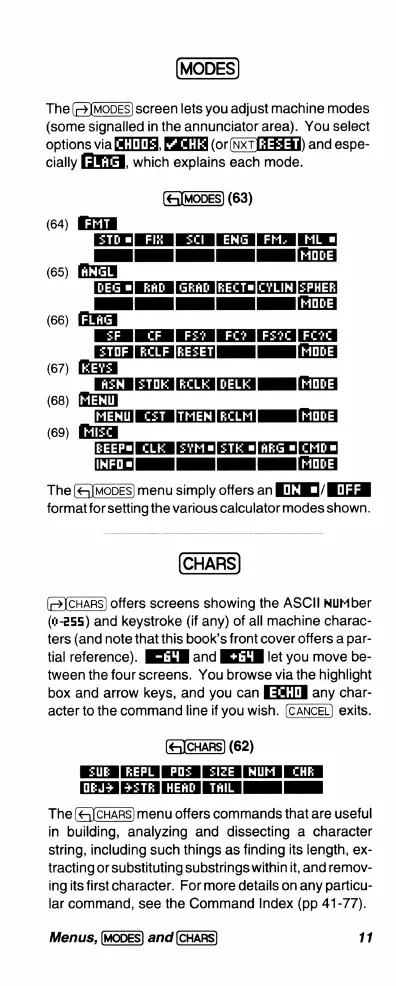
The
screen
lets
you
adjust
machine
modes
(some
signalled
in
the
annunciator
area).
You
select
options
via
[,
(or(NxT[AFE3)
and
espe-
cially
[IXTE,
which
explains
each
mode.
(&xJMODES)
(63)
(64)
DGTT
T
D
IIAB
77T
(65)
[NTEM
[DEG
=]
RAD
|GRAD
[KECTE|CYLIM
[SPHER]
T
T
[
[woDE]
(66)
G
T
N
REZET]
|
|MODE
(67)
I8
KCLE
[DELK
[MODE]
(68)
[widall]
MEMU]
C£T
|JTMEM|RCLM
-
MODE
FEO
NB
BrE0
A0
R
iwFoel
[|
|
|MODE]
The
menu
simply
offers
an
GG/
I3
format
for
setting
the
various
calculator
modes
shown.
(69)
CHARS
offers
screens
showing
the
ASCII
NUurber
(n-255)
and
keystroke
(if
any)
of
all
machine
charac-
ters
(and note
that
this
book’s
front
cover
offers
a
par-
tial
reference).
IR
and
IEZM
let
you
move
be-
tween
the
four
screens.
You
browse
via
the
highlight
box
and
arrow
keys,
and
you
can
any
char-
acter
to
the
command
line
if
you
wish.
exits.
(62)
REPL
PO:
SIZE
WUF
CHE
[TNEN
EXT
ICTTN
AT
I
The
menu
offers
commands
that
are
useful
in
building,
analyzing
and
dissecting
a
character
string,
including
such
things
as
finding
its
length,
ex-
tracting
or
substituting
substrings
within
it,
and
remov-
ing
its
first
character.
For
more
details
on
any
particu-
lar
command,
see
the
Command
Index
(pp
41-77).
Menus,
and
11

Related product manuals