EasyManua.ls Logo

HP 48G - (VAR), Variables and Names

HP 48G
84 pages
Print Icon
To Next Page IconTo Next Page
To Previous Page IconTo Previous Page
Loading...
(VAR),
VARIABLES
AND
NAMES
Storing
Objects
in
Names
If
an
objectis
on
the
stack,
you can
nameit
(i.e.,
store
itin
a
name):
Position
the
object
at
stack
level
2
and
the
desired
name
at
level
1,
using
algebraic
apostro-
phes
aroundthe
name
(e.g.
'
name').
Then
justpress
(sTol.
Name
and
object
(the
arguments)
disappear
from
the
stack,
but the
name
appears
as
the
newest
(left-most)
item
in
the
VARiable
menu,
which
you
see
via
(VAR].
This
menu
(which
is
menu
#2)
shows
the
names
of
all
objects
stored
in
the
current
directory.
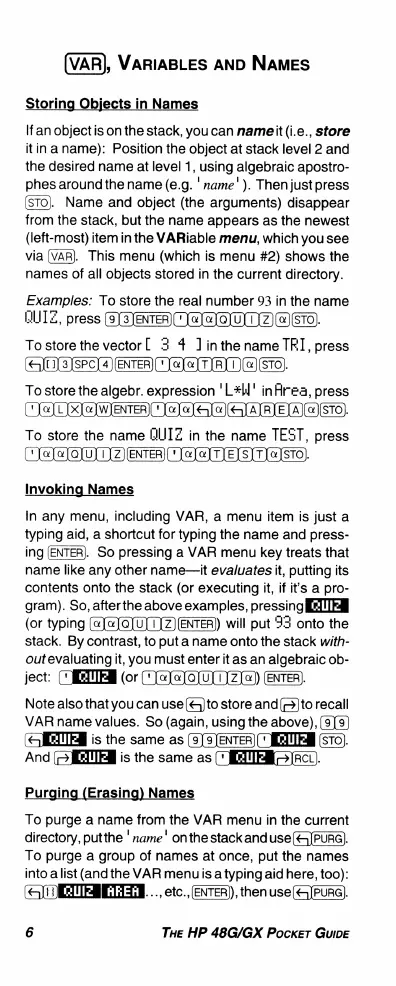
Examples:
To
store
the
real
number
93
in
the
name
UUIZ,
press
(e]3)ENTER)
(e[
Q
W
Z)()ETO)
Tostorethevector[
3 4
1inthe
name
TRI,
press
(eJtals]sPc]4]
(LeJeJTIRI1(](sTO)
To
store
the
algebr.
expression
'L*l'
inArea,
press
("
TelLIX]
e
]WIENTER)(
o]
[
e
<)
ALRIELA)(«(STO)
To
store
the
name
BIIIZ
in
the
name
TEST,
press
('
JeJoJo[ulZ)
[
TeJoJTIE[SITI]STO)
Invoking
Names
In
any
menu,
including
VAR,
a
menu
item
is
just
a
typing
aid,
a
shortcut
for
typing
the
name
and
press-
ing
(ENTER).
So
pressing
a
VAR
menu
key
treats
that
name
like
any
other
name—it
evaluates
it,
putting
its
contents
onto
the
stack
(or
executing
it,
if
it's
a
pro-
gram).
So,
afterthe
above
examples,
pressing
IETTER
(or
typing
(@)a]QJU]1)Z)ENTER)
will
put
93
onto
the
stack.
By
contrast,
to
put
a
name
onto
the
stack
with-
outevaluating
it,
you
must
enter
it
as
an
algebraic
ob-
ject:
("IEITER
(or
()
@lQ)u)1)Z))
ENTER.
Note
also
that
you
can
use
(&)
to
store
and
()
to
recall
VAR
name
values.
So
(again,
using
the
above),
(SIETTEH
is
the
same
as
(9)9)EnTER)(
IETTEN
(STO).
And
JIETTEH
is
the
same
as
([
JIETTFE=)RCL).
Purging
(Erasing)
Names
To
purge
a
name
from
the
VAR
menu
in
the
current
directory,
putthe
'
name'
onthe
stack
and
use(<5]PURG).
To
purge
a
group
of
names
at
once,
put the
names
into
alist
(and
the
VAR
menuis
a
typing
aid
here,
too):
(QOETERETN.
..,
etc.,
[ENTER),
then
use(<4]PURG).
6
THE
HP
48G/GX
Pocker
GuIDE

Related product manuals